
Income Tax Login: Step-by-Step Guide to the e-Filing Portal
- by kapil
- Updated October 2, 2026
- 15 mins read
With the growing digitalisation of tax services in India, managing income tax-related activities has become increasingly dependent on online access. Taxpayers now regularly need to access their tax records, returns, notices, refunds, and other important information through digital channels. This has made income tax login an important first step for accessing the services available on the e-Filing Portal.
Whether you are a salaried individual, business owner, professional, or NRI, understanding the registration process, available login options, post-login services, and solutions to common login issues can help ensure a smoother experience when managing income tax matters online.
Income Tax Login Portal: Overview
The Income Tax Login portal provides taxpayers with online access to a range of income tax-related services through the official e-Filing platform. After signing in, users can file and verify income tax returns, check refund and ITR status, view tax-related information, respond to notices, download documents, and manage their profile details.
The portal can be accessed by individuals, businesses, professionals, and other registered taxpayers using their login credentials. Depending on the user type, login may require a PAN, Aadhaar, or other permitted credentials along with authentication. With most tax services available online, the portal enables taxpayers to manage their income tax requirements from a single platform.
An Introduction to the e-filing Portal
The Income Tax e-Filing Portal is the online platform of the Income Tax Department that enables taxpayers to manage various tax-related activities digitally. It brings several services together, including Income Tax Return filing, tax payments, refund tracking, notice responses, verification of returns, and access to tax records.
The portal can be used by individual taxpayers, businesses, professionals, and other registered users. Through its online interface, taxpayers can submit information, receive communications from the department, and monitor the progress of their tax-related requests.
The platform has made many income tax services more accessible by reducing the need for physical paperwork and office visits.
What are the Prerequisites for Income Tax Login?
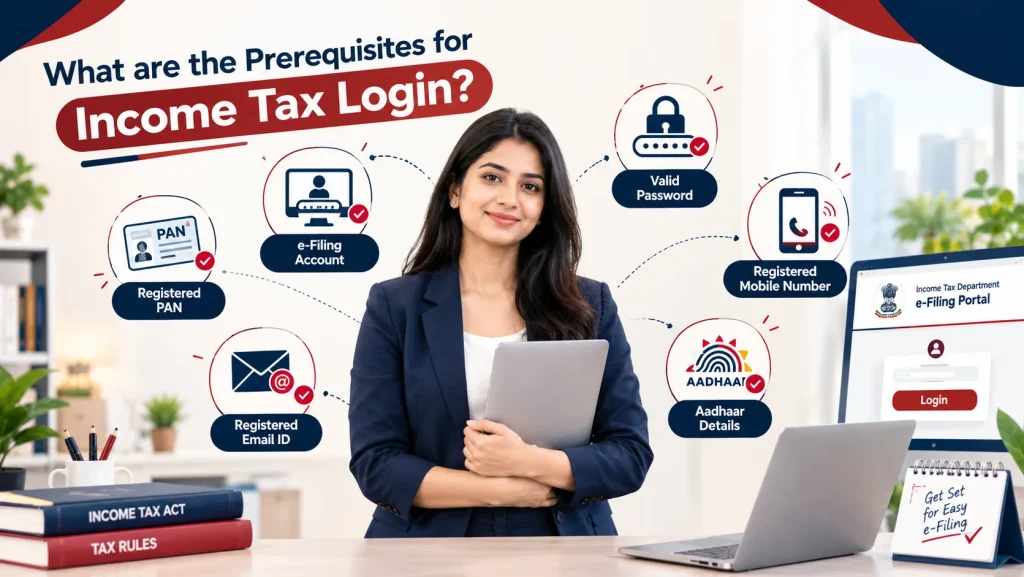
Before accessing the Income Tax e-Filing Portal, taxpayers should keep certain details and resources ready. The requirements may vary depending on whether the user is an individual, business, tax professional, or another type of taxpayer. The key requirements include:
- Registered PAN
- e-Filing Account
- Valid Password
- Registered Mobile Number
- Registered Email ID
- Aadhaar Details
Why do you need to log in to the Income Tax Portal?
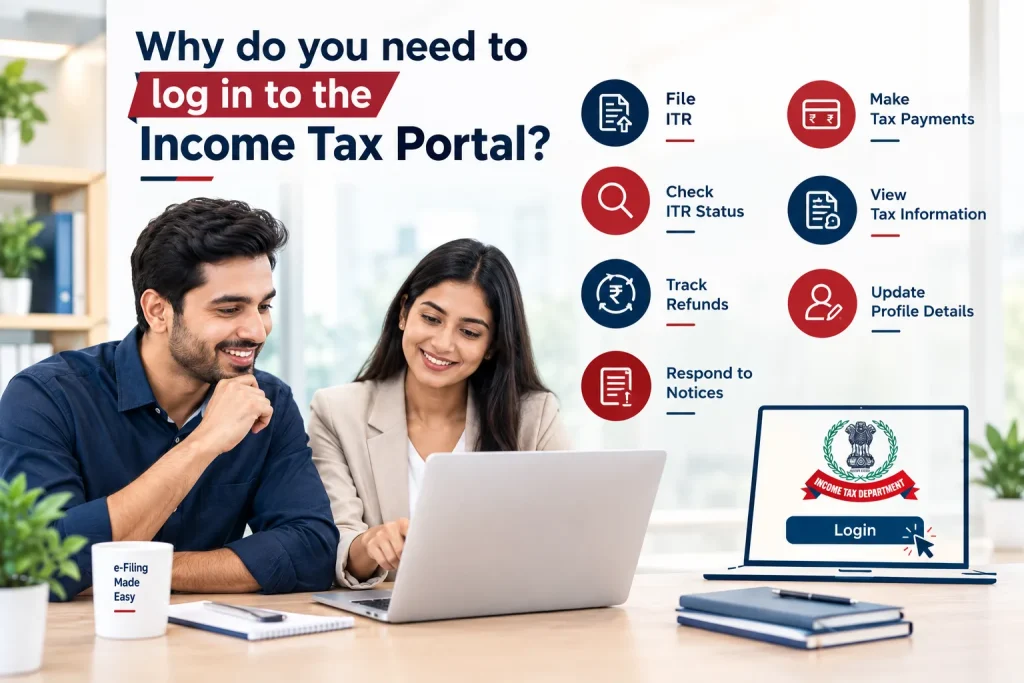
Logging in to the Income Tax Portal gives taxpayers access to professional tax services and their account information. From filing returns to checking refunds and responding to notices, several important activities can be completed online after successful login. Here’s why a taxpayer needs to log in to the income tax portal:
- File Income Tax Returns: Logging in allows taxpayers to access the relevant ITR forms, enter income and deduction details, submit their returns, and complete the required verification process through the e-Filing portal.
- Check ITR Status: Taxpayers can track the status of their filed Income Tax Returns, including whether the return has been verified, processed, or requires any further action.
- Track Income Tax Refunds: After logging in, users can view information related to their tax refund and monitor its status when an excess amount of tax has been paid.
- Respond to Income Tax Notices: The portal allows taxpayers to view certain notices, communications, and compliance-related requests issued by the Income Tax Department and submit responses or required information online.
- Make Tax Payments: Taxpayers can access applicable tax payment services through the portal and complete their tax-related payment requirements using the available online payment options.
- View Tax Information: Login provides access to relevant tax records and information available in the taxpayer’s account, helping users review their reported income, tax-related details, and other available records.
- Update Profile Details: Registered users can access their profile and update permitted personal or contact information, helping ensure that important communications from the Income Tax Department reach the correct details.
Who is required to log in to the Income Tax Portal?
Different categories of taxpayers and authorised users may need to access the Income Tax e-Filing Portal to complete tax-related activities, submit information, or use online services. Some of them are:
- Individual taxpayers
- Salaried individuals
- Self-employed professionals
- Business owners
- Companies and LLPs
- Partnership firms
- HUF taxpayers
- Trusts and entities
- Tax professionals
- Authorised representatives
What is the Step-by-Step Process for Registration on the ITR e-Filing Portal?
New users must first register on the Income Tax e-Filing Portal before accessing its online tax services. The registration process requires basic taxpayer details and verification through registered contact information. Here’s the step-by-step process:
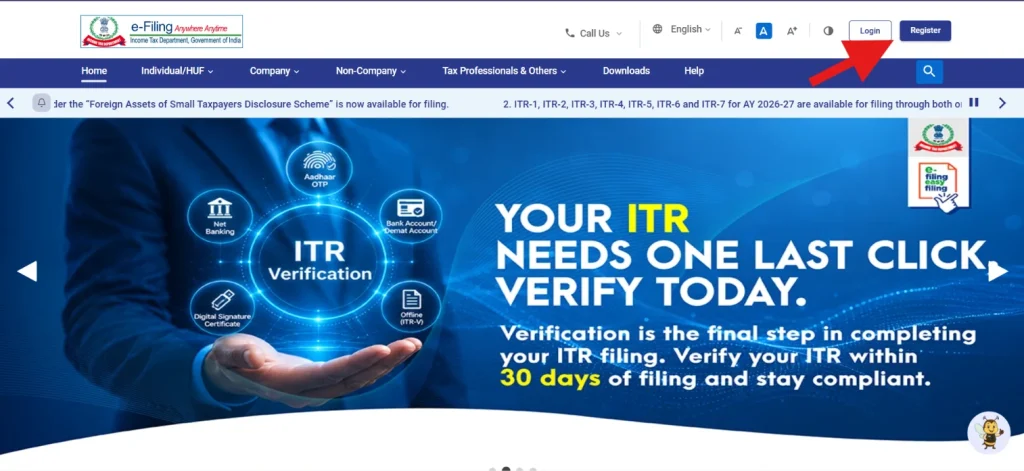
STEP 1. Visit the e-Filing Portal: Open the official Income Tax e-Filing Portal and select “Register” on the homepage.
STEP 2: Register as a Taxpayer and Enter PAN Details: Choose to register as a taxpayer and provide your PAN details. The portal verifies whether the PAN is already registered.
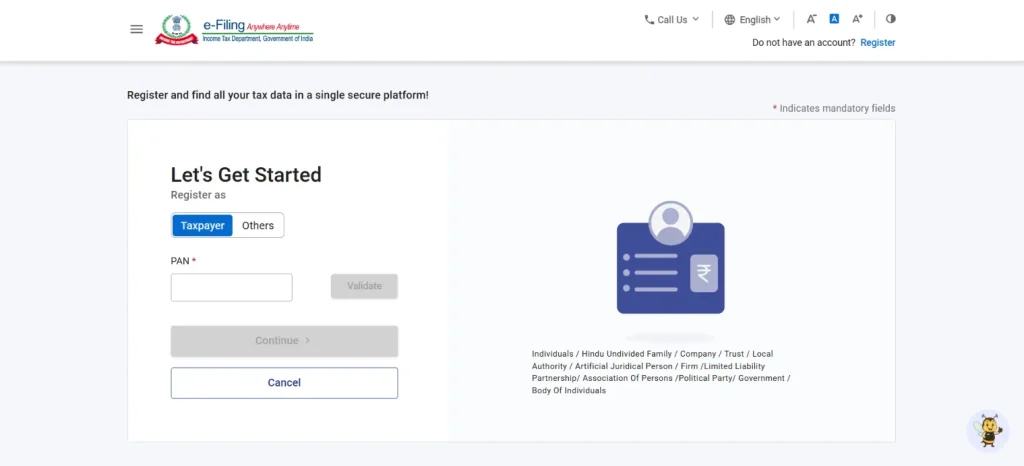
STEP 3: OTP Verification and Confirmation: When you click “Continue” after submitting PAN details, a confirmation message will be shown; click on it to register. Afterwards, you will receive an OTP on the mobile number linked to the PAN, enter it and submit.
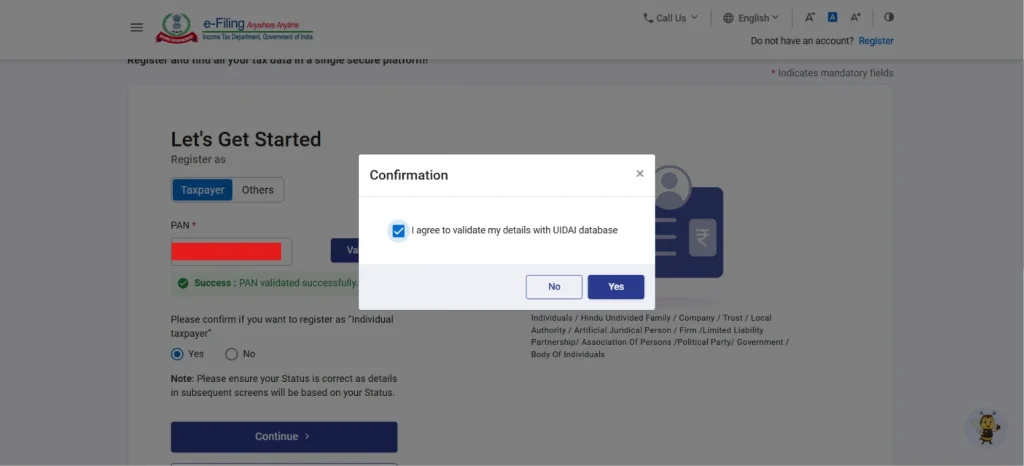
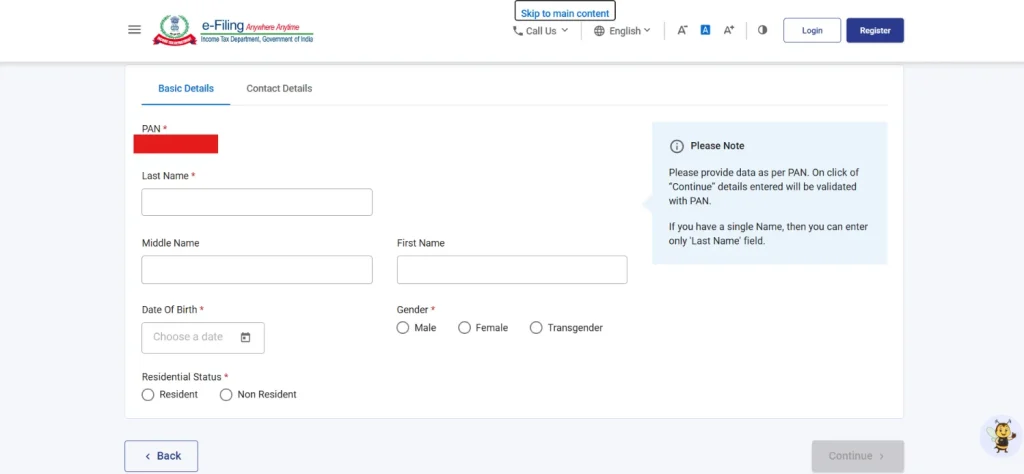
STEP 4: Provide Basic Information: Enter the required personal or entity details, including your name, date of birth or incorporation, and contact information, as applicable.
STEP 5:Verify Mobile Number and Email ID: Enter your registered mobile number and email address. Complete the verification using the OTPs sent to your contact details.
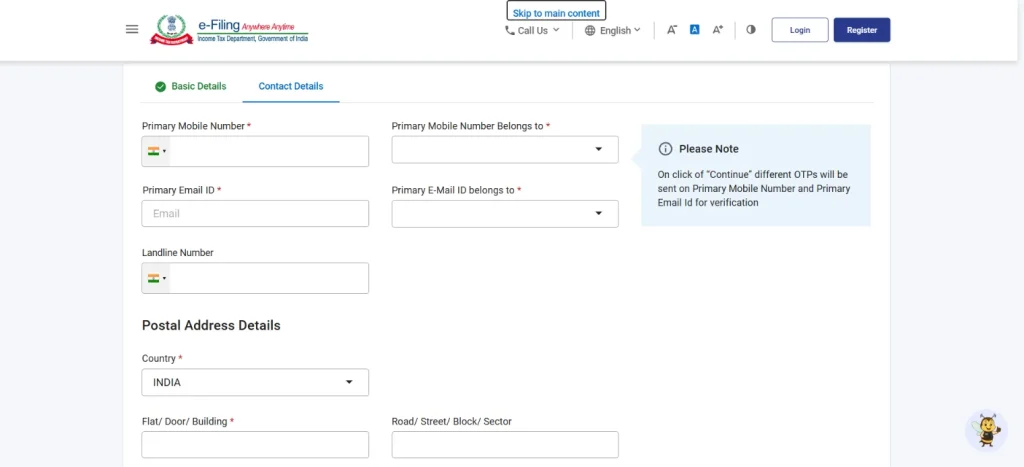
STEP 6: Set Login Credentials: Create a secure password for your e-Filing account according to the portal’s prescribed requirements.
STEP 7: Complete Registration: Review the information entered and submit the registration request. Once successfully registered, you can use your credentials to log in to the Income Tax e-Filing Portal.
What are the Different Income Tax Login Methods?
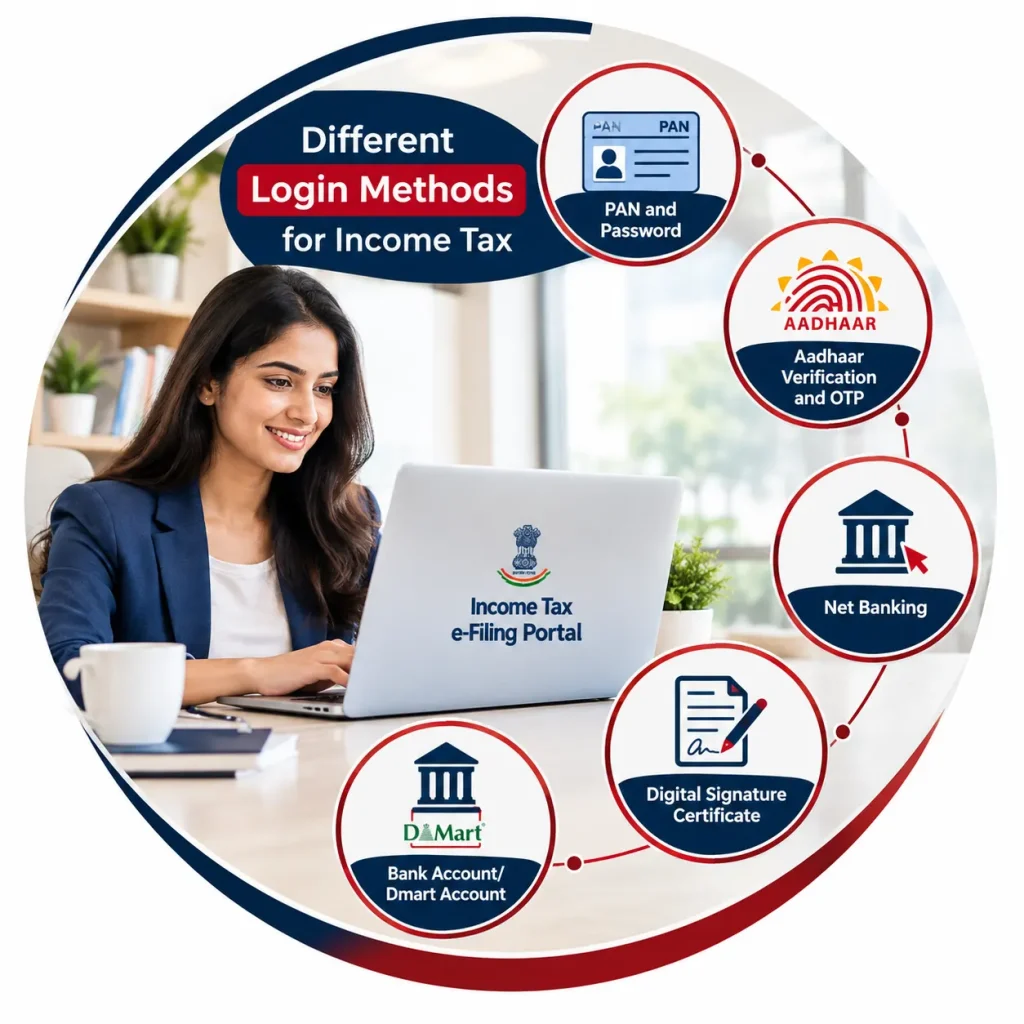
The Income Tax e-Filing Portal provides different authentication options depending on the user’s account type, available credentials, and services being accessed. Common login methods include:
- PAN and Password
- Aadhaar Verification and OTP
- Net Banking
- Digital Signature Certificate
- Bank Account/ Dmart Account
How can you log in to the e-Filing Portal using PAN or Aadhaar details?
Taxpayers can access their Income Tax e-Filing account using their PAN and registered password. Follow these steps to complete the login process:
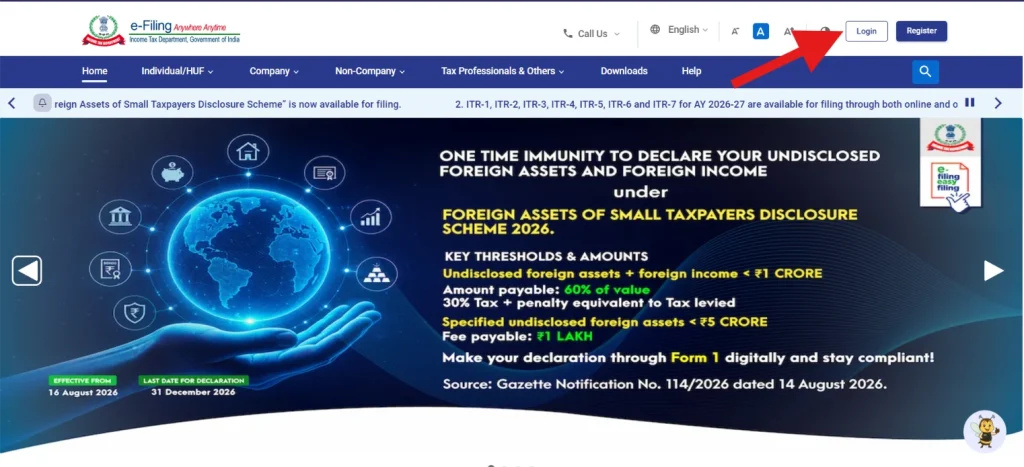
1. Open the official Income Tax e-Filing Portal and click “Login” on the homepage.
2. Enter your PAN or Aadhaar details in the User ID field and click “Continue.”
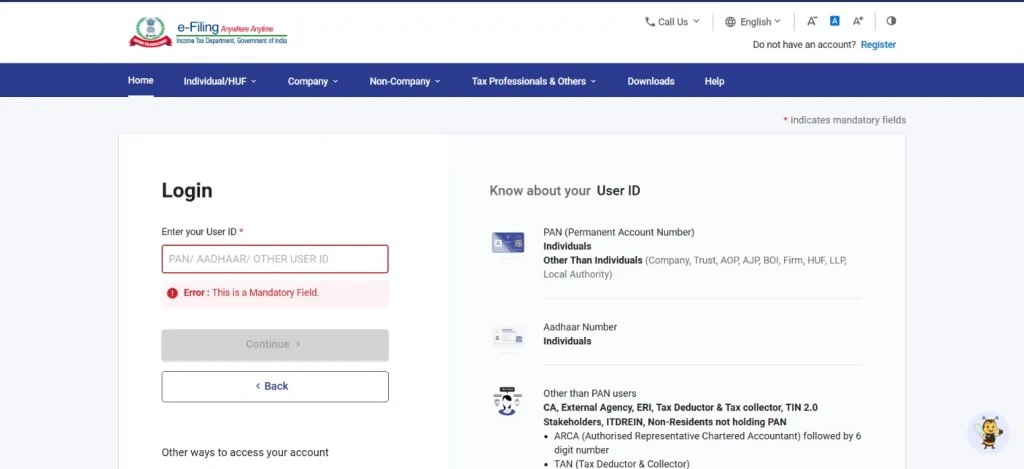
3. Verify the displayed details and confirm that the entered PAN belongs to you.
4. Enter your registered e-Filing account password and click “Continue.”
5. Complete the required security verification or authentication step, if prompted.
6. After successful authentication, access your Income Tax e-Filing account dashboard and use the available tax services.
How can you log in to the e-Filing Portal via Net Banking?
The Income Tax e-Filing Portal allows eligible taxpayers to access their accounts through the net banking facility of participating banks. This method enables users to authenticate themselves through their bank’s online banking platform and access income tax services without directly entering their e-Filing password.
Here is the step-by-step process:
1. Open the official Income Tax e-Filing Portal and click “Login” on the homepage. Select the “Login Through Net Banking” option available on the login page.
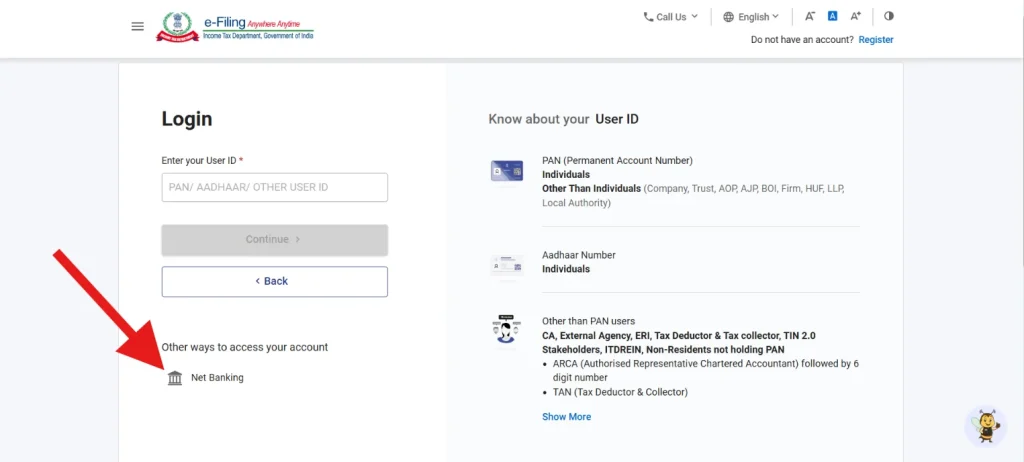
2. Select your bank from the list of participating banks displayed on the portal.
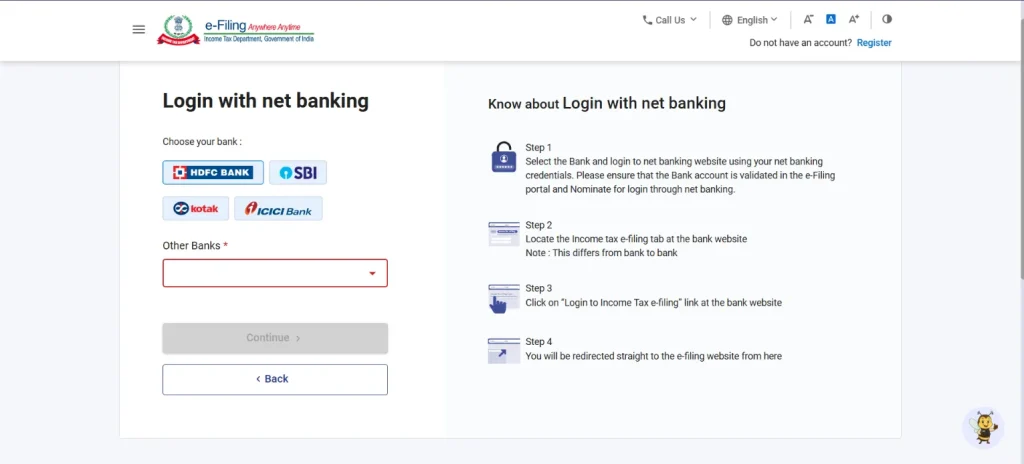
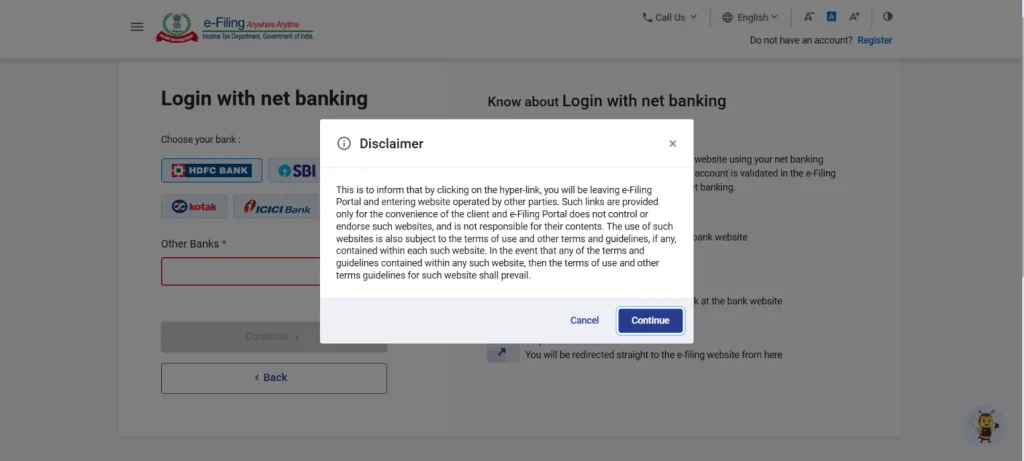
3. A disclaimer will be shown specifying that hereafter, you will be directed to the specific bank website you have selected. Click on “Continue” to proceed further.
4. Log in to your Net Banking account using the credentials provided by your bank.
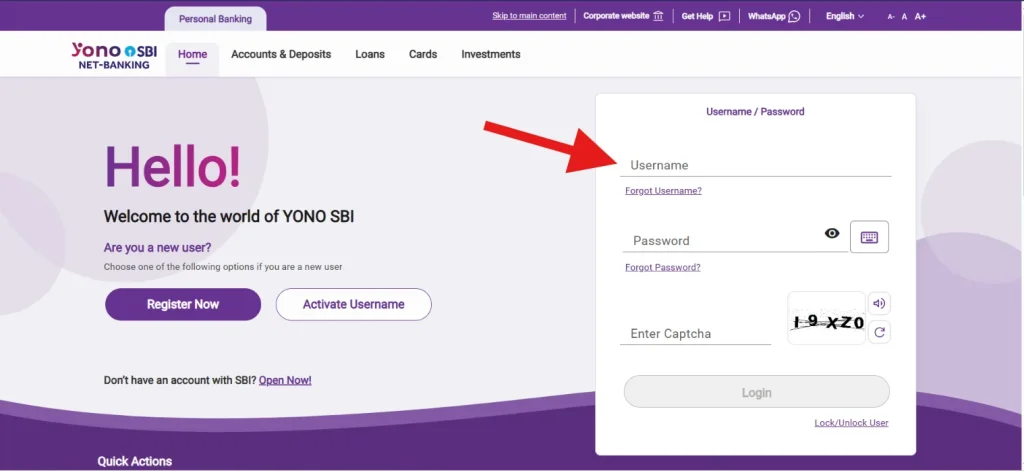
5. Select the option to access the Income Tax e-Filing Portal from your Net Banking interface.
6. Complete the required authentication or verification process, if prompted.
7. After successful authentication, you will be redirected to your Income Tax e-Filing account.
How can you log in to the e-Filing Portal through a Digital Signature Certificate?
A Digital Signature Certificate (DSC) can be used by eligible taxpayers and authorised users to authenticate their identity on the Income Tax e-Filing Portal. The DSC must be registered on the portal before it can be used for authentication.
Here is how you can access the e-filing portal via DSC:
1. Open the official Income Tax e-Filing Portal and click “Login” on the homepage.
2. Enter your PAN details and click Continue.
3. Confirm your Secure Access Message. Enter your password and click Continue.
4. Select the DSC Option – New DSC or Registered DSC (as required) and click Continue.
5. Select I have downloaded and installed the eSigner utility.
6. On the Data Sign page, choose the Provider and Certificate. Enter the Provider Password and click Sign.
7. After successful verification, access your Income Tax e-Filing account dashboard and use the available services.
How can you log in to the e-Filing Portal using a Bank Account/Dmart Account?
The Income Tax e-Filing Portal allows users who have enabled e-Filing Vault Higher Security to authenticate their login using an EVC generated through their linked bank account or demat account. The following are the steps to access e-filing dashboard via bank account/dmart account:
1. Open the official Income Tax e-Filing Portal and click “Login” on the homepage.
2. Enter your PAN in the User ID field and click “Continue.”
3. Confirm your Secure Access Message, enter your password, and click “Continue.”
4. Select “Bank Account EVC / Demat Account EVC”
5. If you do not have an EVC, click “Generate EVC.” The EVC will be sent to the mobile number registered with your bank account or demat account.
6. If you already have an EVC, select “I already have an EVC.”
7. Enter the EVC received and click “Login.”
8. After successful validation, you will be taken to your e-Filing Dashboard.
How CA, TAN User, ERI, External Agency, and ITDREIN user can Login to e-filing Portal?
The Income Tax e-Filing Portal provides a separate login process for users other than individual taxpayers, including Chartered Accountants (CAs), Tax Deductors and Collectors, ERIs, External Agencies, and ITDREIN users. These users can access the portal using their registered User ID and password via these steps:
1. Open the official Income Tax e-Filing Portal and click “Login” on the homepage.
2. Enter your User ID and click “Continue.”
3. Use the appropriate User ID based on your user category: CA, Tax Deductor/Collector, ERI, External Agency, ITDREIN User
4. Confirm your Secure Access Message, enter your registered password, and click “Continue.”
5. After successful authentication, access the e-Filing Dashboard and use the services available for your registered user category.
What Services can You Access after Income Tax Login?
Once you log in to the Income Tax e-Filing Portal, you can access various personalised services related to return filing, tax payments, compliance, refunds, and tax records. The key services include:
- File and submit Income Tax Returns
- E-verify filed Income Tax Returns
- Check ITR filing and processing status
- Track Income Tax refund status
- Pay applicable income tax
- View Form 26AS
- Access Annual Information Statement (AIS)
- View and respond to tax notices
- Download tax-related documents
- Update profile and contact details
- Raise and track grievances
- Access compliance-related services
How to File Your Income Tax Return after Logging in to the e-Filing Portal?
After logging in to the Income Tax e-Filing Portal, taxpayers can file their Income Tax Return online by selecting the appropriate ITR form and providing the required income and tax details. Follow these steps:
1. After successful login, click “e-File” and select “Income Tax Returns” followed by “File Income Tax Return.”
2. Select the relevant Assessment Year and choose “Online” as the mode of filing.
3. Select the applicable status, such as Individual, HUF, or other relevant taxpayer category, and click “Continue.”
4. Select the appropriate ITR form based on your income sources and other applicable conditions.
5. Review the pre-filled information and provide the required details relating to income, deductions, exemptions, and taxes paid.
6. Review the tax computation and check whether any additional tax is payable or a refund is due.
7. Preview the completed return and carefully verify the information entered before submission.
8. Submit the ITR and complete the required e-Verification using an available verification method.
9. After successful verification, save the acknowledgement for your records and future reference.
What Should You do If You forgot Your Income Tax Login Password?
If you forget your Income Tax e-Filing login password, you can reset it through the “Forgot Password” option on the portal. The process allows you to create a new password after verifying your identity through an available authentication method.
Here’s how you can do it:
1. Open the official Income Tax e-Filing Portal and click “Login” on the homepage.
2. Enter your User ID and click “Continue.”
3. Click “Forgot Password?” on the password entry screen.
4. Enter your PAN or User ID and click “Continue.”
5. Select an available password reset option, such as Aadhaar OTP, e-Filing OTP, or another authentication method available for your account.
6. Enter the required verification details and the OTP received on your registered mobile number or other registered contact details.
7. After successful verification, enter and confirm your new password according to the portal’s password requirements.
8. Click “Submit” to complete the password reset process.
9. Return to the login page and sign in using your User ID and newly created password.
How Can You Change Your Registered Mobile Number on the e-Filing Portal?
You can update your registered mobile number through the My Profile section of the Income Tax e-Filing Portal. The new number must be verified through an OTP before it becomes the registered contact number. Here’s the step-by-step procedure for changing your registered mobile number:
1. Open the official Income Tax e-Filing Portal and click “Login” on the homepage.
2. Enter your User ID and password and complete the required authentication.
3. From your dashboard, click “My Profile.”
4. Select “My Profile” or the relevant Contact Details option to access your registered contact information.
5. Click “Edit” and enter your new mobile number in the mobile number field.
6. Click “Continue” or “Save” to proceed with verification.
7. Enter the OTP received on your new mobile number and complete the verification.
8. After successful verification, save the updated details. Your new mobile number will be registered on the e-Filing Portal.
Can an NRI Register for the e-Filing Portal?
Yes, a Non-Resident Indian (NRI) can register on the Income Tax e-Filing Portal to manage their Indian income tax obligations online. An NRI may need to register if they are required to file an Income Tax Return or need to access other tax-related services in India. Registration generally requires a valid PAN and other details requested by the portal. NRIs can use the registered mobile number and email ID for account verification and communication. Once registered, they can log in to access services such as ITR filing, tax payments, refund tracking, return verification, and viewing available tax information.
What are the common Issues you may face while Income Tax Login and How to Resolve them?
Here are the common issues you may face while income tax login and how to resolve them:
| Issues | What Happens | How to Solve It |
| Incorrect User ID | The portal does not recognise the entered PAN or other User ID. | Check the User ID carefully and enter the credentials associated with your registered account. |
| Incorrect Password | Login fails because the entered password does not match your account credentials. | Re-enter the password carefully or use “Forgot Password” to create a new one. |
| PAN Not Registered | You cannot log in because your PAN is not registered on the e-Filing Portal. | Complete the e-Filing account registration process using your PAN and required details. |
| Mobile Number Not Updated | OTPs and important account communications may be sent to an old mobile number. | Log in and update your mobile number through My Profile, then verify the new number. |
| Account Locked | Multiple unsuccessful login attempts may temporarily prevent you from accessing the account. | Wait for the applicable lock period or use the available password-reset process to regain access. |
| Aadhaar OTP Issue | Aadhaar-based authentication cannot be completed because the OTP is unavailable or verification fails. | Ensure your Aadhaar-linked mobile number is active and retry the OTP verification. |
| Browser or Technical Error | The portal may not load correctly, or a login page may stop responding. | Clear browser cache and cookies, update the browser, or try another supported browser. |
Frequently Asked Questions
1. Is it mandatory to register your PAN on the e-Filing portal?
Yes, taxpayers generally need to register their PAN on the Income Tax e-Filing Portal to access services such as filing returns, checking tax records, responding to notices, and viewing refunds. PAN serves as the primary user ID.
2. Do you need to register your mobile number for income tax portal login?
Yes, a valid mobile number is required for registration and authentication on the e-Filing Portal. It is used to receive OTPs and important communications. Keeping your mobile number updated helps ensure secure and uninterrupted portal access.
3. What are the key features available on the income tax e-filing portal?
The Income Tax e-Filing Portal provides services for filing income tax returns, checking refund status, viewing tax records, responding to notices, making tax payments, accessing Form 26AS and AIS, and managing taxpayer profile details.
4. What are the security features of the income tax login portal?
The Income Tax e-Filing Portal uses security measures such as OTP-based authentication, password protection, secure login processes, and registered contact details for verification. These measures help protect taxpayer accounts and sensitive financial information from unauthorised access.
5. What are the Benefits of using the income tax login portal?
The portal allows taxpayers to complete tax-related activities online without visiting an income tax office. Users can file returns, make tax payments, track refunds, access tax information, respond to notices, and manage their profiles conveniently.
6. How can you change the language in the income tax login portal?
You can change the portal language using the language option available on the Income Tax e-Filing Portal. Select your preferred language from the available choices, and the portal interface will display the selected language where supported.
7. Can you register on e-filing portal on behalf of your family member?
Yes, registration can be completed on behalf of a family member where permitted, but the concerned taxpayer’s PAN, registered mobile number, email address, and required verification details must be provided. The taxpayer remains responsible for the account information.
You may also like


What GLA Membership Can Mean for Logistics Businesses
GLA Membership can help a logistics business find overseas partners, but the de