Digital Signature Certificate (DSC): Process & Requirements
- by kapil
- Updated September 28, 2026
- 18 mins read
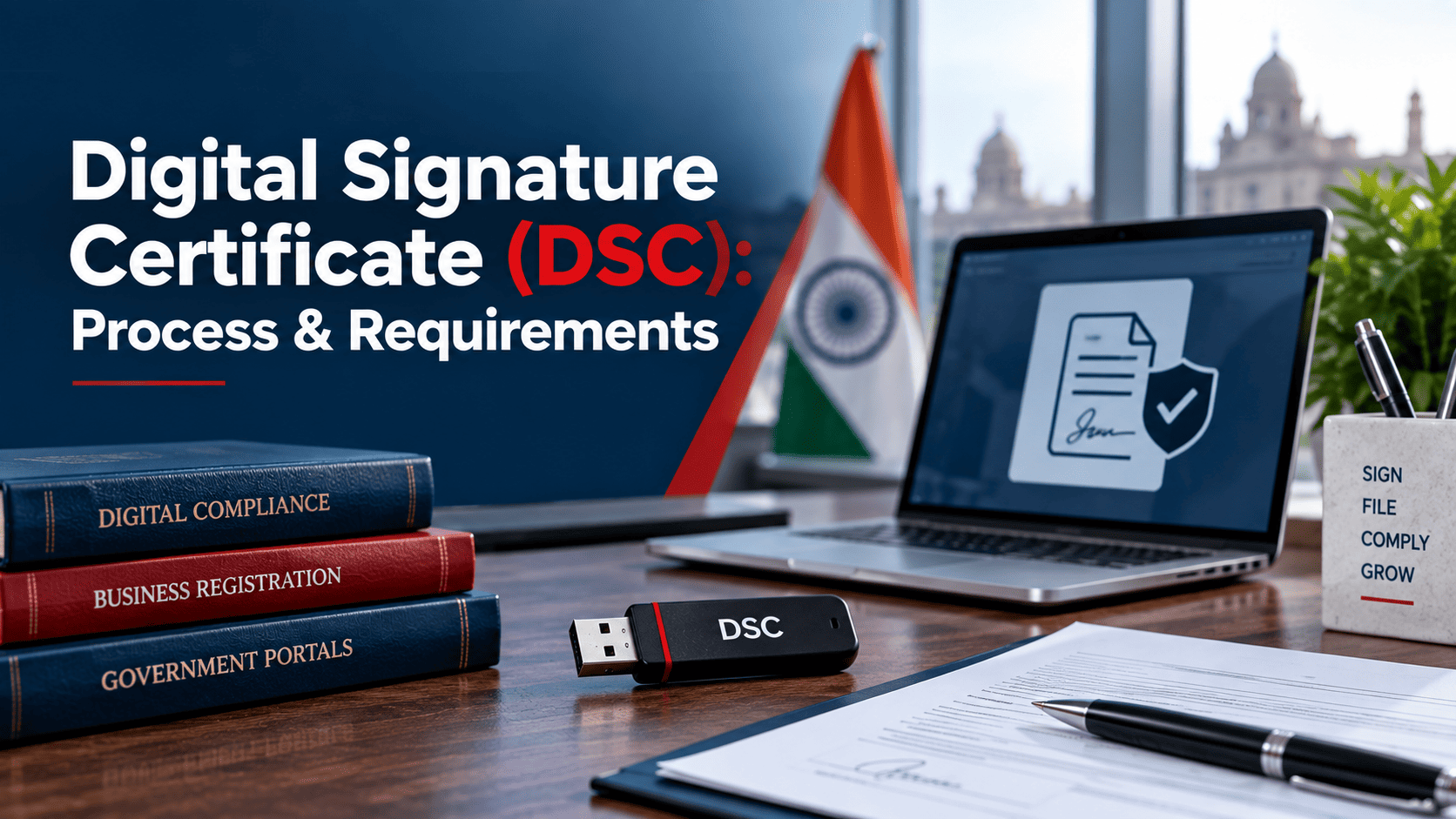
A Digital Signature Certificate (DSC) is an encrypted digital key issued by a licensed Certifying Authority that lets you sign documents and file returns online with full legal validity under India’s IT Act, 2000. You need a Class 3 DSC on a USB token for MCA, GST, Income Tax, DGFT, and e-tender filings, valid for one, two, or three years.
Most people run into a DSC requirement the first time they try to incorporate a company, file a GST return as a director, or bid on a government tender. The form simply will not go through without one, and the CA’s website is full of terms like Class 3, token, and eKYC that nobody explained beforehand.
This guide walks through what a DSC actually is, which type you need, the exact documents and steps involved, what it costs, and a genuinely important change to DSC tokens that took effect this month.
What Is a Digital Signature Certificate (DSC)?
A Digital Signature Certificate is the electronic version of your physical signature or company seal. It proves who signed a document and confirms nobody altered it after signing.
Technically, a DSC is built on Public Key Infrastructure. It pairs a private key, which only you hold, with a public key embedded in the certificate. When you sign a PDF or an online form with your DSC, the system uses this key pair to verify your identity and lock the content against tampering.
A licensed Certifying Authority (CA) issues the certificate after verifying your identity. These CAs work under the Controller of Certifying Authorities (CCA), which functions under the Ministry of Electronics and Information Technology (MeitY) and was set up under Section 17 of the Information Technology Act, 2000. The CCA itself does not issue certificates to individuals or businesses. It only licenses and audits the CAs, under Section 24 of the same Act, who then issue DSCs to the public.
A Digital Signature Certificate in India typically holds your name, email address, country, the certificate’s issue and expiry dates, and the name of the issuing CA. Once issued, it carries the same legal weight as a handwritten signature on paper.
Why Do You Need a Digital Signature Certificate in India?
Section 3A of the Information Technology Act gives digitally signed documents the same legal standing as physically signed ones. A GST return, an MCA form, or an income tax audit report signed with a valid DSC holds up in the same way a wet-ink signature would.
Beyond the legal recognition, a DSC solves a practical problem. Government portals need proof that the person submitting a form is actually authorised to do so, and that the data was not changed between submission and receipt. A DSC does both jobs in one step, without needing you to print, sign, scan, and re-upload anything.
There is also a straightforward business reason. Several government portals, including MCA, GST, and the income tax e-filing site, simply refuse certain filings without a valid DSC attached. Skipping it is not an option once your business crosses into that category, which the sections below explain in detail.
What Are the Types of Digital Signature Certificates?
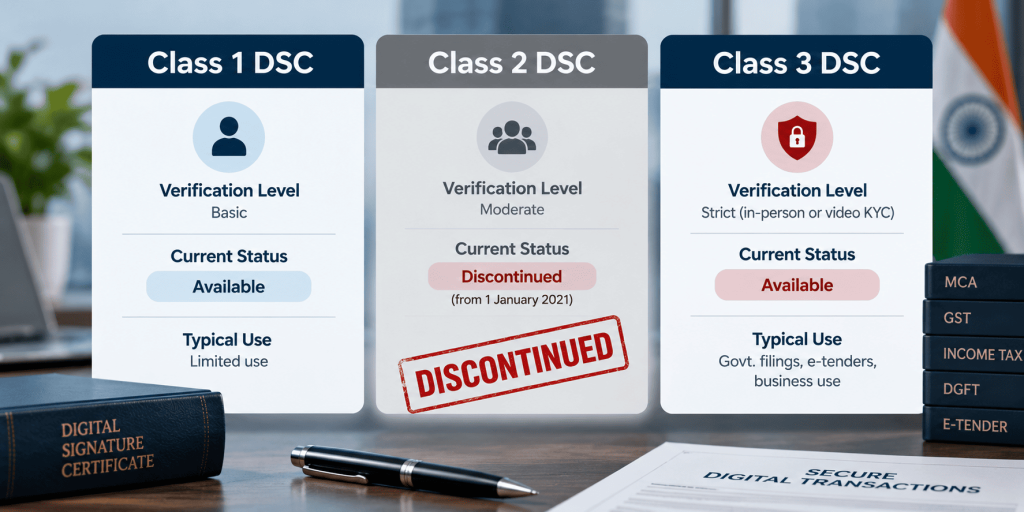
DSCs used to come in three classes, but only one is relevant today. The CCA discontinued Class 2 issuance from 1 January 2021, following a directive dated 26 November 2020, after concerns about weaker identity checks under that class. Every CA in India now issues Class 3 DSCs for all individual and business purposes, and Class 3 covers everything Class 2 used to handle.
Class 1 technically still exists, but it only confirms a name and email address with minimal verification. No government portal accepts a Class 1 certificate for statutory filings, so it is not a practical option if you are reading this to solve a compliance need.
| DSC Class | Current status | Verification level | Typical use today |
| Class 1 | Still exists, rarely issued | Low, name and email only | Not accepted for statutory filings |
| Class 2 | Discontinued since 1 January 2021 | Was medium, document based | Old certificates ran out their validity; cannot be renewed |
| Class 3 | The only class in active use | High, Aadhaar eKYC plus mandatory video verification | MCA, GST, Income Tax, DGFT, EPFO, e-tenders, trademark and patent filing |
If a vendor still tries to sell you a Class 2 certificate, that is a sign their information is outdated. Class 3 is the only certificate worth buying in 2026.
Signature, Encryption, or Both: Which DSC Type Do You Need?
Within Class 3, a CA sells three variants, and picking the wrong one is a common, avoidable mistake.
- Signature certificate. Authenticates you as the signer and locks the document against changes. This covers the vast majority of use cases, including ITR filing, GST returns, and MCA forms.
- Encryption certificate. Encrypts the content of a document so only the intended recipient can read it. On its own, this is used far less often by individuals and small businesses.
- Combo (Sign and Encrypt). Bundles both on a single token. E-tendering and e-procurement portals usually insist on this combination, since bidders need to both sign their bid and keep pricing details confidential until the tender opens.
If you are unsure which one to pick, check the specific portal’s requirement first. A director filing MCA forms only needs a signing certificate. A contractor bidding on a government tender almost always needs the combo.
Who Needs a Digital Signature Certificate?
Three broad groups apply for a DSC in India.
Individuals apply when they are company directors, LLP partners, authorised signatories, or professionals like chartered accountants and company secretaries who certify filings on a client’s behalf. Some individual taxpayers choose to get one too, even when it is not compulsory, simply because it speeds up return verification.
Organisations, including private limited companies, LLPs, partnership firms, trusts, and societies, apply for a DSC in the entity’s name, used by whichever director or partner is the authorised signatory.
Foreign nationals and foreign companies operating in India can also apply, though they submit a passport and visa details in place of an Aadhaar or PAN based identity proof.
Not everyone actually needs one, though. Plenty of individual taxpayers with only salary or interest income never touch a DSC in their life, since Aadhaar OTP or net banking based verification covers their filing needs. The mandatory categories are covered later in this guide.
What Documents Do You Need for DSC Registration?
The documents required for DSC depend on whether you are applying as an individual, on behalf of an organisation, or specifically for DGFT related work.
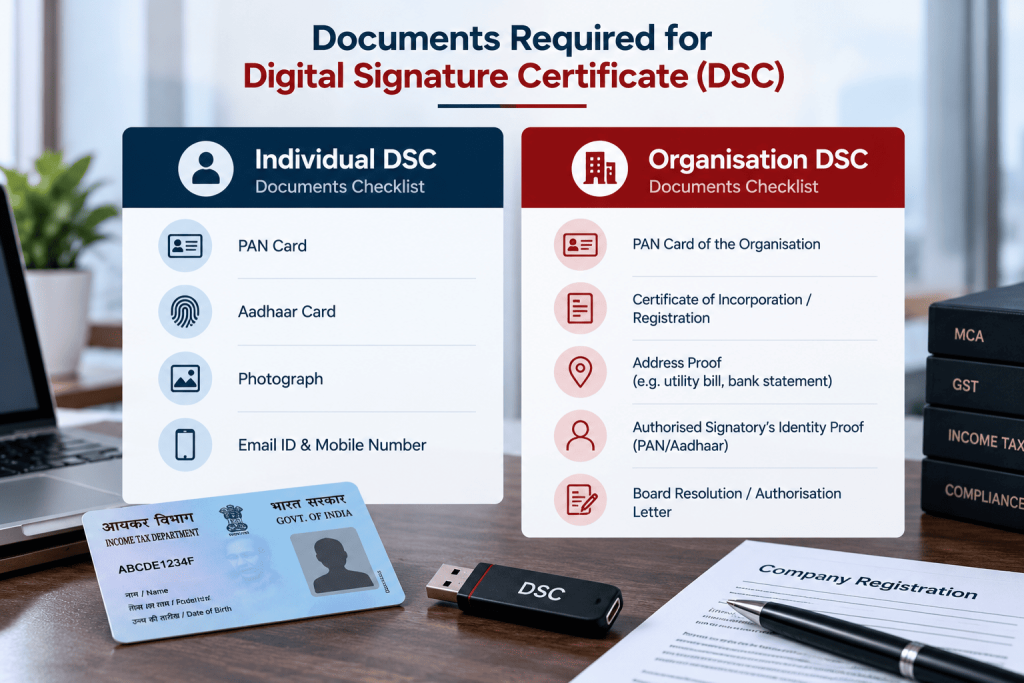
For an individual DSC, you typically need:
- PAN card
- Aadhaar card, or alternatively a passport, voter ID, or driving licence as identity and address proof
- A recent passport-size photograph
- A working mobile number and email address, since both get verified during the process
For an organisation DSC, along with the authorised signatory’s individual documents above, you also need:
- Certificate of Incorporation, or the Partnership Deed or LLP Agreement, depending on entity type
- GST registration certificate, where applicable
- An authorisation letter or board resolution naming the signatory
- The organisation’s PAN card
For a DGFT DSC used with IEC Code Registration and DGFT filings, add a copy of the IEC certificate to the individual or organisation document list above.
One detail that trips people up: the name, PAN, and email on the DSC application must match your other official records exactly. A mismatched middle name or an old email address is one of the most common reasons a DSC application gets sent back for correction.
How Do You Apply for a Digital Signature Certificate Online?
The DSC application process is almost entirely online now, and most first-time applicants finish it without ever printing a form.
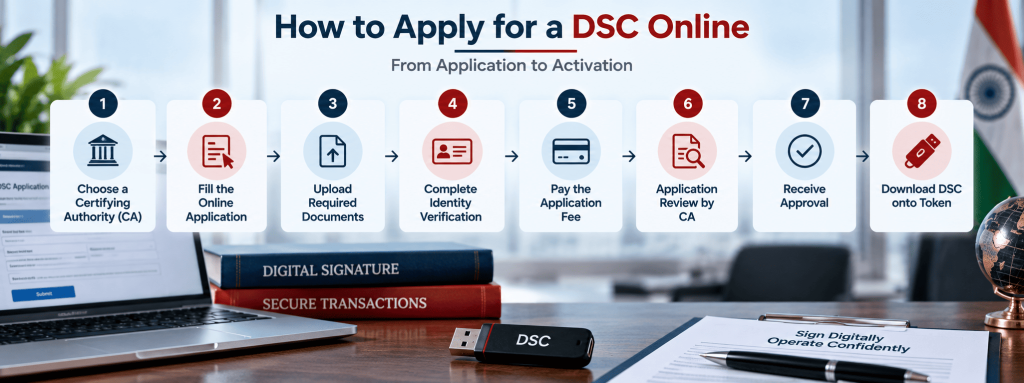
Step 1: Pick a licensed Certifying Authority. Choose one from the CCA’s official list, such as eMudhra, Capricorn, Sify, Protean (formerly NSDL e-Governance), or (n)Code Solutions. LegalBabu can also handle this coordination for you if you would rather not deal with the CA’s website directly.
Step 2: Choose applicant type and certificate details. Select individual, organisation, or DGFT, then pick Class 3, choose Sign only or the Sign and Encrypt combo, and select a validity of one, two, or three years.
Step 3: Verify your mobile number. An OTP confirms the number instantly.
Step 4: Fill the eKYC form. Enter your personal or business details exactly as they appear on your identity documents, then verify your email address through a confirmation link.
Step 5: Upload your documents. Clear, legible scans of your ID proof, address proof, and any organisation documents go here.
Step 6: Complete video verification. This step became mandatory for Class 3 DSC registration online under CCA guidelines. It usually takes a couple of minutes, and you will be asked to show your face and your original ID document on camera.
Step 7: Make payment and submit. Review every field carefully before this step, since some CAs will not let you edit details after the DSC is issued.
Step 8: Download your DSC certificate. Once the CA verifies everything, your certificate is either downloaded onto a USB crypto token or, with some providers, made available through a cloud based signing option that skips the physical token altogether.
If you go the paperless Aadhaar eKYC route, the entire process can finish in under an hour. The document and video verification route, used mainly by applicants without Aadhaar, usually takes one to three working days, plus courier time if a physical token needs to reach you.
What Does a Digital Signature Certificate Cost?
The government does not fix DSC pricing. Each licensed CA, and the resellers who work with them, sets its own rates, so prices genuinely vary depending on where you buy.
| Certificate type | 1 year | 2 years | 3 years |
| Class 3, Sign only | Rs 700 to Rs 1,500 | Rs 1,000 to Rs 2,200 | Rs 1,500 to Rs 2,800 |
| Class 3, Sign and Encrypt (combo) | Rs 1,200 to Rs 2,500 | Rs 1,800 to Rs 3,500 | Rs 2,500 to Rs 4,500 |
Treat these as indicative ranges, not fixed prices. A few things affect the final bill:
- GST usually applies on top of the base price
- A new USB token, where one is not already included, typically adds Rs 300 to Rs 500
- Renewing on your existing token often costs less than a fresh purchase, though this depends on whether your current token still meets the security standard covered in the next section
How Long Is a DSC Valid, and How Do You Renew It?
A Class 3 DSC is valid for one, two, or three years, whichever you choose at the time of purchase. Longer validity costs more upfront but saves you from repeating the KYC process every year.
There is no grace period once a DSC expires. An expired certificate simply will not sign anything, and government portals reject the attempt outright. It is worth renewing at least a couple of weeks before expiry rather than waiting until you actually need to file something urgently.
Renewal repeats most of the original application steps, including identity verification, though the process tends to move faster for someone the CA has already verified before. Whether you can keep using your existing USB token at renewal now depends partly on the token upgrade covered below.
What Is Changing in DSC USB Tokens From September 2026?
This is a genuinely current development worth knowing if you are buying or renewing a DSC around now. The CCA has directed Certifying Authorities to migrate DSC USB tokens from the older FIPS 140-2 security standard to the newer FIPS 140-3 standard, with 21 September 2026 set as the cutover date.
In plain terms, FIPS 140 is the international security standard that governs how well a cryptographic hardware token protects your private key. FIPS 140-3 replaces FIPS 140-2 with stricter testing and stronger tamper resistance.
From 21 September 2026 onward, CAs are expected to stop issuing fresh DSCs on FIPS 140-2 tokens. If your existing DSC was already downloaded onto a FIPS 140-2 token on or before that date, nothing changes for you immediately. It continues working until it naturally expires. The requirement mainly affects fresh issuances and renewals from this point forward, which will generally need a FIPS 140-3 compliant token, subject to a few exceptions the CCA has specified.
The GST Network moved quickly on this. Its Advisory No. 672, dated 19 September 2026, introduced version 3.3 of the emSigner utility on the GST portal specifically to support the newer token type, while confirming that taxpayers whose existing DSC and token are working normally do not need to upgrade anything right away.
If you are due for a DSC renewal soon, it is worth asking your CA directly whether your next certificate will come on a FIPS 140-3 token and budgeting for a slightly higher token cost, since the newer hardware tends to cost more to manufacture.
Where Is a Digital Signature Certificate Used in India?
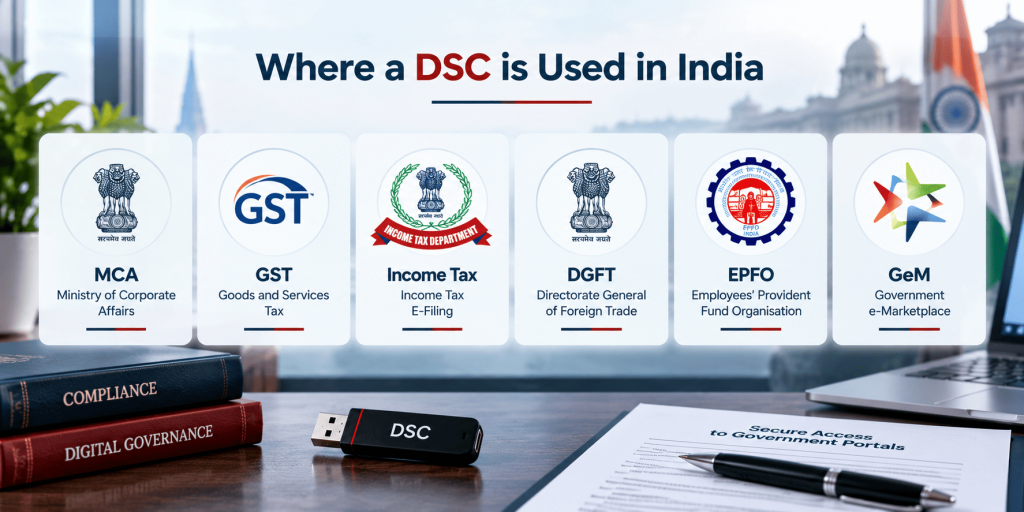
A DSC shows up across nearly every government portal that involves signing or authenticating a document online.
| Portal or purpose | What the DSC does there |
| MCA and ROC filings | Signs incorporation forms, annual returns, and changes to company details, relevant to company registration, LLP registration, and ROC annual return filings |
| Income Tax e-filing | Signs ITRs and audit reports for companies, LLPs, and tax audit cases, part of income tax filing and TDS filing |
| GST portal | Signs GST registration applications and periodic GST filing returns |
| DGFT and ICEGATE | Signs IEC applications and customs related filings, tied to IEC Code Registration |
| EPFO | Signs employer registration and periodic PF return filings |
| Trademark and patent filing | Signs applications with the IP office, relevant to trademark registration and patent application filings |
| GeM portal | Authenticates seller registration, covered under GeM Portal Registration |
| E-tendering and e-procurement | Signs and encrypts bids so pricing stays confidential until the tender opens |
| Udyam and Startup India | Some related filings and updates accept DSC based authentication alongside other verification modes, relevant to Udyam Registration and Startup India Registration |
A newly appointed or resigning director also needs a valid DSC to sign the relevant MCA forms, which is worth remembering alongside any director appointment or resignation filing.
Is a Digital Signature Certificate Mandatory for Income Tax Filing?
Not for everyone, but it is compulsory for specific categories.
Every company, whether private or public, must file its income tax return using a DSC. There is no turnover or income threshold that exempts a company from this. LLPs face the same requirement.
Individuals, partnership firms, and Hindu Undivided Families also need a DSC if their accounts fall under mandatory tax audit provisions, specifically Section 44AB of the Income Tax Act. Forms like the tax audit report itself, filed by a chartered accountant, also require DSC based signing.
Everyone outside these categories, which covers most salaried individuals and small taxpayers, can verify their return through Aadhaar OTP, net banking, or a bank account or demat account based EVC instead. A salaried professional filing a straightforward ITR with only salary and interest income almost never needs to buy a DSC for this purpose alone.
Is DSC Mandatory for GST Registration and Filing?
Yes, but again only for certain entity types. Companies, LLPs, and foreign companies registered in India must use a DSC to sign their GST registration application and every return filed afterward. The GST portal does not offer them the OTP based E-Sign or EVC alternative.
Proprietorships, partnership firms, and HUFs registered under GST have more flexibility. They can choose between DSC and E-Sign or EVC, based on whichever is more convenient for the authorised signatory.
A small trading proprietorship in a city like Indore, for instance, can complete its monthly GST filing with just an Aadhaar linked OTP, while a private limited company doing the same filing needs its director’s DSC every single time.
What Is the Difference Between a DSC and Aadhaar eSign?
Both are legally valid ways to sign a document electronically in India, but they work very differently.
A DSC relies on a cryptographic key pair issued by a Certifying Authority after identity verification. The private key usually lives on a physical USB token, so you need that token plugged in whenever you sign something.
Aadhaar eSign authenticates you through your Aadhaar linked mobile number using OTP, or through biometric verification, with no physical token involved at all. It is quicker and cheaper for one-off signing needs.
The catch is availability. Companies and LLPs are generally required to use DSC specifically on portals like GST and MCA, where Aadhaar eSign is not offered as an alternative for them. Individual taxpayers and smaller entities, on the other hand, often find Aadhaar eSign more convenient for occasional filings, since there is no certificate to buy or token to carry around.
What Common DSC Problems Should You Watch For?
A handful of issues account for most DSC related support requests.
- Expired certificates. Filing deadlines have a way of exposing an expired DSC at the worst possible moment. Track your expiry date and renew ahead of time.
- Mismatched details. If the name, PAN, or email on your DSC does not exactly match your profile on the GST, MCA, or income tax portal, registration or signing fails. Fixing this usually means updating your portal profile or getting a corrected certificate.
- Token or driver issues. A USB token that is not detected usually points to a missing driver, an outdated signing utility like emSigner, or simply a different USB port worth trying.
- Lost or damaged tokens. A DSC cannot be recovered from a lost token. You need a fresh certificate, since the private key was never meant to leave the original hardware.
- Browser and utility compatibility. Signing utilities on government portals are updated periodically, as seen with the GST portal’s emSigner update in September 2026, so keeping that software current avoids a lot of unnecessary troubleshooting.
FAQs
Can I use the same DSC for GST, Income Tax, and MCA filings, or do I need a different certificate for each?
One Class 3 DSC works across all of these portals, as long as it is registered on each one separately. You register the same certificate on the GST portal, the MCA portal, and the income tax e-filing site individually, but you do not need to buy a separate DSC for each.
My new laptop does not detect my DSC token. Is the certificate itself faulty?
Almost always, this is a driver issue rather than a problem with the certificate. Install the token manufacturer’s driver software on the new machine, plug the token into a different USB port if the first one does not respond, and make sure your browser and the relevant signing utility, such as emSigner, are up to date. The certificate itself is rarely the cause.
Can my spouse or business partner use my Digital Signature Certificate for their own filings?
No. A DSC is legally tied to one individual’s verified identity, and using someone else’s certificate to sign a document defeats the entire purpose of the certificate, since it is meant to prove that specific person authorised the filing. Each authorised signatory needs their own DSC.
What should I do if I lose my DSC USB token?
Report the loss to your Certifying Authority so they can revoke the certificate tied to that token, then apply for a fresh DSC. Since the private key is generated inside the token and never leaves it, there is no way to recover or reissue the same certificate onto a new device.
I do not have an Aadhaar card. Can I still get a Digital Signature Certificate?
Yes. Aadhaar eKYC is simply the fastest route. Applicants without Aadhaar, including many foreign nationals, can still apply using PAN, passport, or other accepted identity and address proof, combined with document verification and mandatory video verification. It takes a bit longer than the paperless Aadhaar route, but it is a standard, supported path.
Does a Digital Signature Certificate work on a MacBook, or is it only for Windows computers?
Most licensed CAs provide token drivers for macOS alongside Windows, so a DSC can generally work on a Mac. That said, Windows remains the smoother experience on most government portals, and driver installation on macOS can involve a few extra steps. If you are a regular Mac user, it is worth confirming Mac driver support with your chosen CA before buying, and checking that the specific portal’s signing utility supports macOS too.
If a company director resigns, does the new director get the outgoing director’s DSC, or a fresh one?
A fresh one. A DSC is issued to a specific individual, not to a company role or position, so it cannot be handed over or reassigned. The incoming director applies for their own Class 3 DSC before signing any MCA forms on the company’s behalf.
How urgently can I get a DSC if I have a tender deadline tomorrow?
The paperless Aadhaar eKYC route can realistically get you a signed, downloaded DSC within a few hours on a good day, assuming your documents are in order and video verification goes smoothly. It is tight, though, and not something to plan around routinely. For anything with a same-day deadline, it genuinely helps to call the CA or a service provider directly instead of relying only on the self-service portal.
I run a proprietorship. Should I apply for an Individual DSC or an Organisation DSC?
An Individual DSC in the proprietor’s own name is generally the right choice, since a proprietorship has no separate legal identity from its owner. Most portals, including GST, treat the proprietor’s individual DSC as sufficient for signing the business’s filings.
Can I renew my DSC on the same USB token, or do I always need to buy a new one?
It depends on your token’s age and specification. Many renewals reuse the existing token if it is still functional and meets the current security standard. With the shift toward FIPS 140-3 tokens now underway, some renewals issued from around September 2026 onward may need a new, compliant token even if your old one still physically works. Ask your CA at renewal time which applies to your specific token.
You may also like

What GLA Membership Can Mean for Logistics Businesses
GLA Membership can help a logistics business find overseas partners, but the de