
TNREGINET: Login, EC, Guideline Value, Registration & Online Services
- by kapil
- Updated October 5, 2026
- 16 mins read
Buying or registering property in Tamil Nadu once meant keeping track of paperwork, visiting government offices, checking property records, and making repeated trips to complete different formalities. As these processes moved online, property owners and buyers gained easier access to registration-related information and services through TNREGINET.
It is the Tamil Nadu Government’s official portal to check property details, verify registration records, look up guideline values, apply for an Encumbrance Certificate, and manage other registration-related requirements easily.
Let’s explore more about this portal in detail and see how to register, submit documents, and apply for or view an EC!
What is TNREGINET?
TNREGINET (Tamil Nadu Registration Department Internet Network) is the official e-governance portal managed by the Inspector General of Registration (IGR) under the Government of Tamil Nadu. It provides online access to property, land, and registration-related services through a centralised digital platform.
The portal enables citizens to access services such as document registration, Encumbrance Certificate (EC) searches, guideline value verification, and other registration-related information. It also allows users to access relevant records and complete various registration procedures online, reducing the need for repeated visits to Sub-Registrar Offices. It aims to improve transparency, accessibility, and efficiency in the state’s registration processes.
TNREGINET: Overview and Details
| Full Form | Tamil Nadu Registration Department Internet Network |
| Portal Name | TNREGINET Portal |
| Department | Registration Department, Government of Tamil Nadu |
| State Covered | Tamil Nadu |
| Authority | Inspector General of Registration (IGR), Tamil Nadu |
| Purpose | Online access to property, land and registration-related services |
| Key Services | Document registration, Encumbrance Certificate (EC), Guideline Value, document search and registration-related services |
Why TNREGINET Matters for Property Buyers?
TNREGINET matters to property buyers because it provides access to important registration and property-related information that can help them make informed decisions before completing a transaction. It is important because:
- Buyers can check the Encumbrance Certificate (EC) to review registered transactions associated with a property.
- They can verify the guideline value applicable to a particular property or location.
- The portal provides access to registration-related information and services online.
- Buyers can use available records to support property due diligence before purchase.
- Online access can help reduce the need for repeated visits to government offices.
- Access to official registration information can improve transparency in property transactions.
Who can use TNREGINET?
TNREGINET can be used by individuals and stakeholders who need to access property, land, document registration, and other services provided through the Tamil Nadu Registration Department. Key users include:
What are the Key Services on the TNREGINET Portal?
| Key Services | Details |
| Encumbrance Certificate (EC) | Apply for and access Encumbrance Certificate-related services and property transaction records. |
| Guideline Value | Check the applicable guideline value of land and properties in Tamil Nadu. |
| Document Registration | Access online facilities related to registration of property and other documents. |
| Document Search | Search for registered documents and obtain relevant registration details. |
| Registration Status | Track the status of registration-related applications and transactions. |
| Appointment Booking | Book appointments for applicable registration services at Sub-Registrar Offices. |
| User Registration | Create and manage a user account to access TNREGINET’s online services. |
| Marriage Registration | Access online facilities and information related to marriage registration. |
How to Register on the Tamil Nadu Property Services Portal?
To access services available on TNREGINET, users can create an account through the portal’s online registration facility. The registration process generally involves providing basic personal details, contact information and creating login credentials.
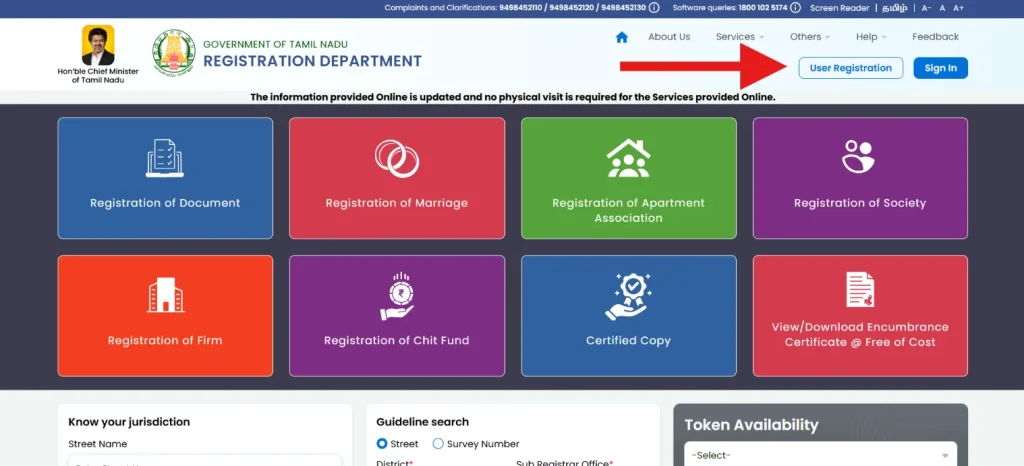
1. Open the official TNREGINET website and select the Registration or User Registration option available on the portal.
2. Choose the appropriate user type.
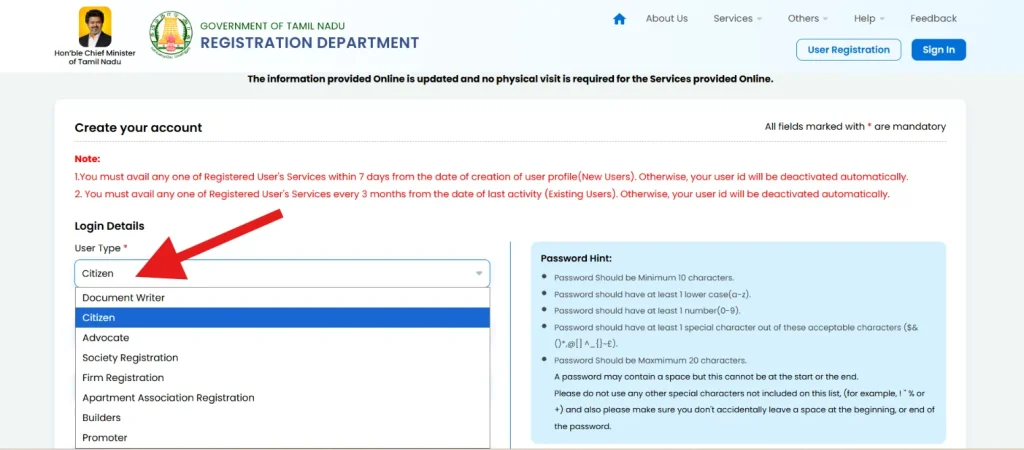
3. Create a username and password. The password should follow the guidelines provided in the password hint box.
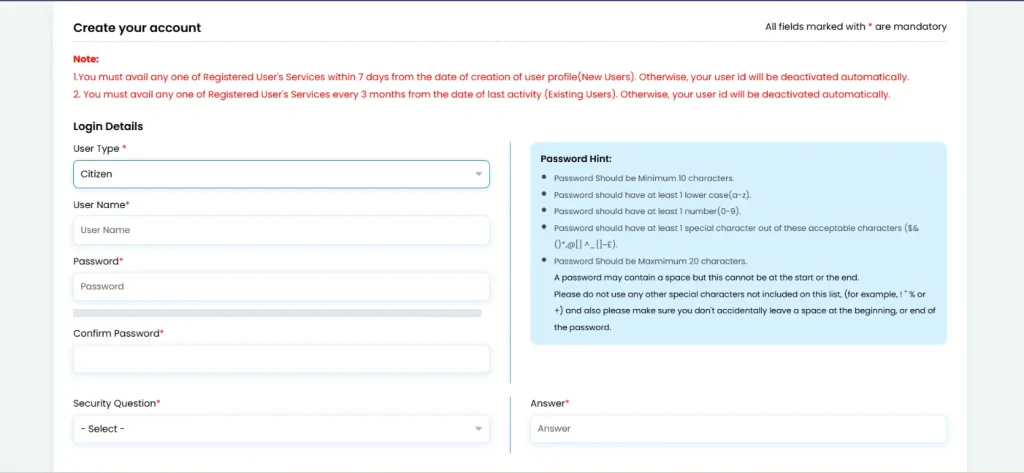
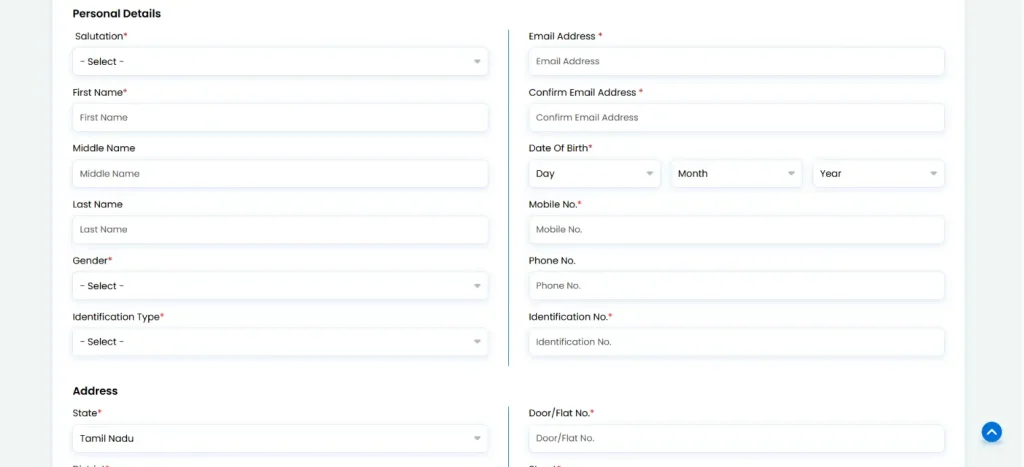
4. Enter your personal details like name, address, email, and mobile number accurately.
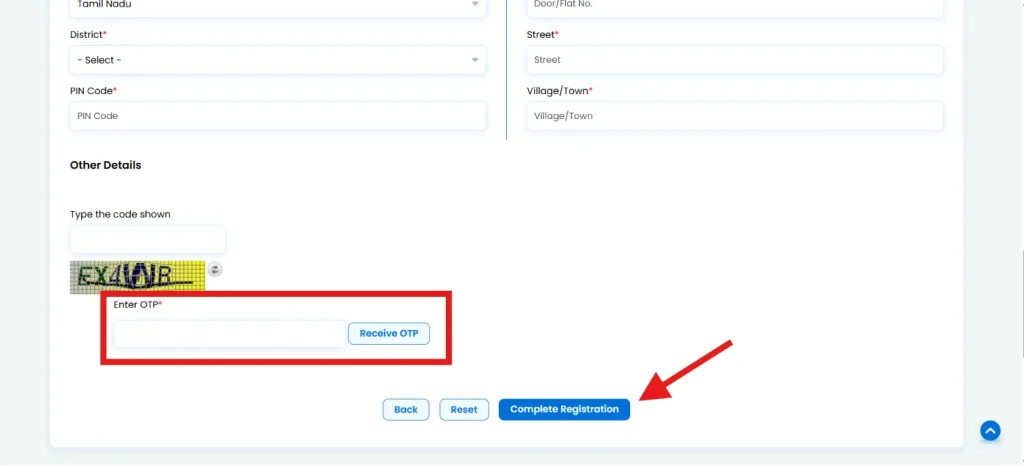
5. After filling in all the information, enter the Captch and the OTP you received on your registered phone number and click on “Complete Registration.”
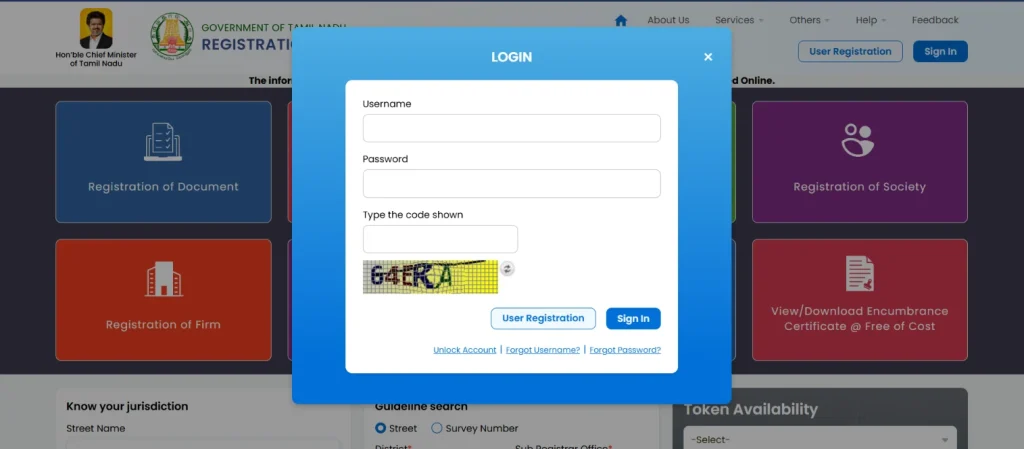
6. Once registration is completed successfully, use your registered username and password to log in and access the available TNREGINET services.
What is an Encumbrance Certificate (EC) and Why it is Important?
An Encumbrance Certificate (EC) is an important property-related document that provides information about registered transactions and encumbrances associated with a property for a specified period. It is commonly used during property transactions to help verify the property’s registration history and identify whether registered claims, mortgages, sales, or other transactions are recorded against it.
In Tamil Nadu, applicants can access EC-related services through TNREGINET. The certificate can help property buyers, owners, lenders, and other stakeholders conduct property due diligence before a transaction.
Importance of an EC:
- It helps verify the registered transaction history of a property.
- It assists buyers in checking for registered encumbrances.
- It supports property due diligence before purchase.
- It can be required by banks and financial institutions for property-related loans.
- It provides documented information about registered dealings concerning the property.
- It helps property owners maintain official records related to their property.
How to Search for an Encumbrance Certificate (EC) on the TNREGINET Portal?
Citizens can search and apply for an Encumbrance Certificate online by entering the required property details, including village and survey number on the TNREGINET portal. Here is the step-by-step process:
1. Visit the official TNREGINET portal and log in to your registered account.
2. Go to the E-Services section available on the portal.
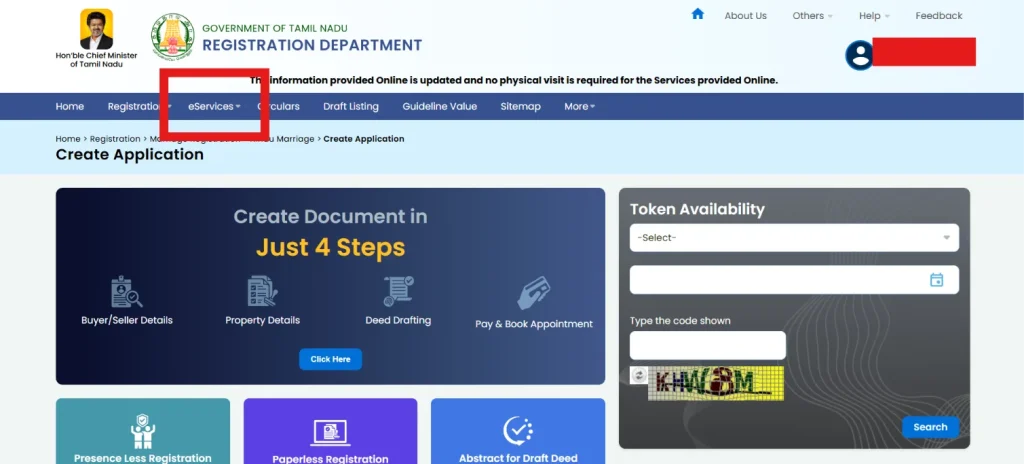
3. Select Encumbrance Certificate from the available services and click on “Search and Apply EC option.”
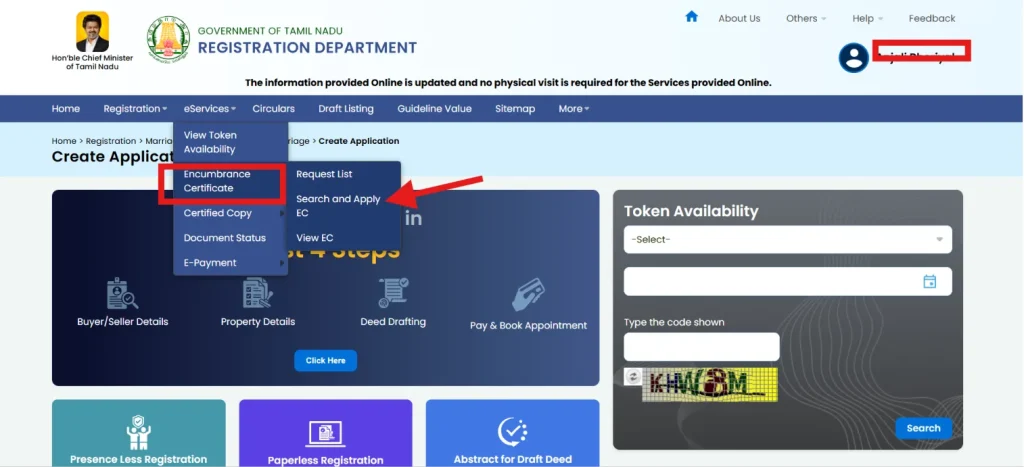
4. Enter the required EC search details, including the relevant village and survey number.
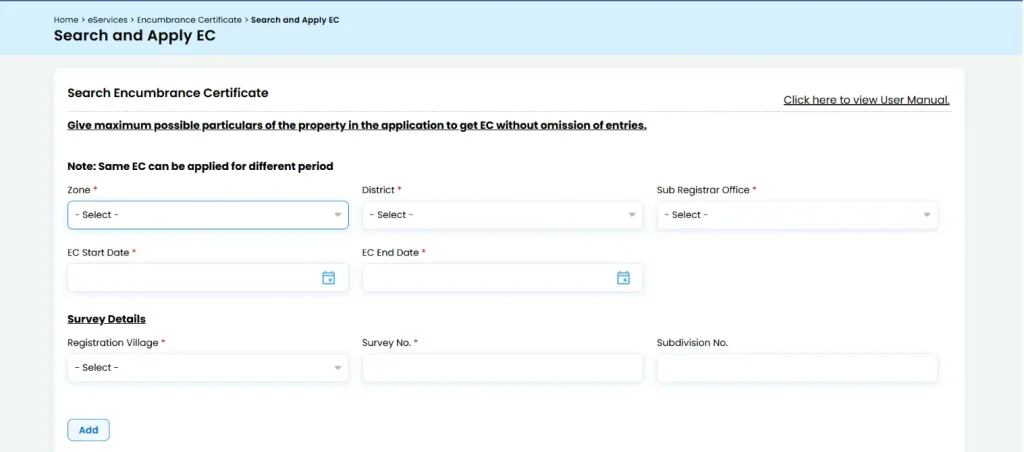
5. Provide the other property details requested by the portal, as applicable.
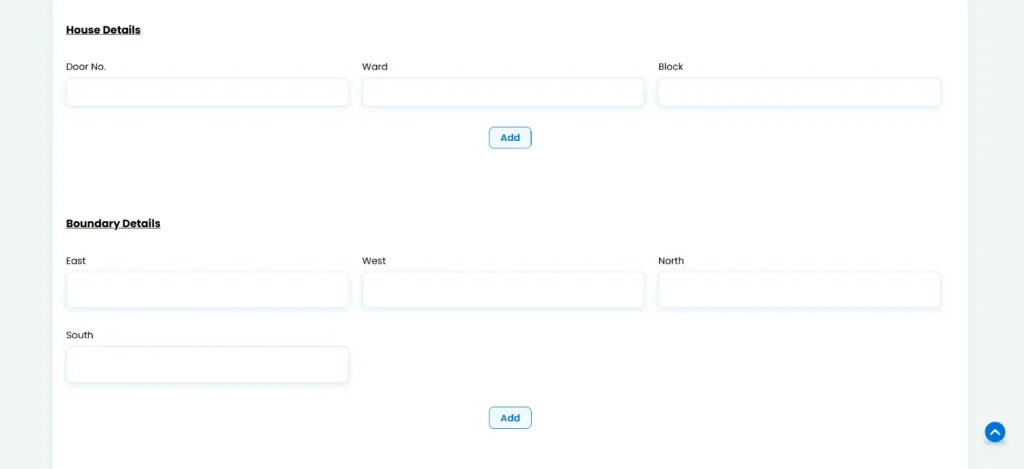
6. Check the information entered carefully to ensure that the property details are correct.
7. Submit the search/application to view the available Encumbrance Certificate information for the specified property.
What are the documents required to Apply for an Encumbrance Certificate on TNREGINET?
For an online EC application, TNREGINET primarily requires accurate property and registration details rather than a long list of document uploads. Here are the key documents required:
- Property details such as village, survey number and subdivision number.
- Location details, including district, zone and Sub-Registrar Office (SRO).
- EC search period, including the required start and end dates.
- Street, house or property details, wherever applicable.
- Property extent and boundaries, as required in the application.
- Document details, such as document number and registration year, where a document-wise search is being made.
- Applicant details, including name and address.
- Sale deed or other property documents may be useful for accurately entering and cross-checking the property details, particularly when applying for older records.
How to Track Encumbrance Certificate in Tamil Nadu Application Status?
After submitting an Encumbrance Certificate application through TNREGINET, applicants can check its progress online using the application number. Here’s how:
1. Log in to the TNREGINET portal using your registered username and password. Select “e-Services.”
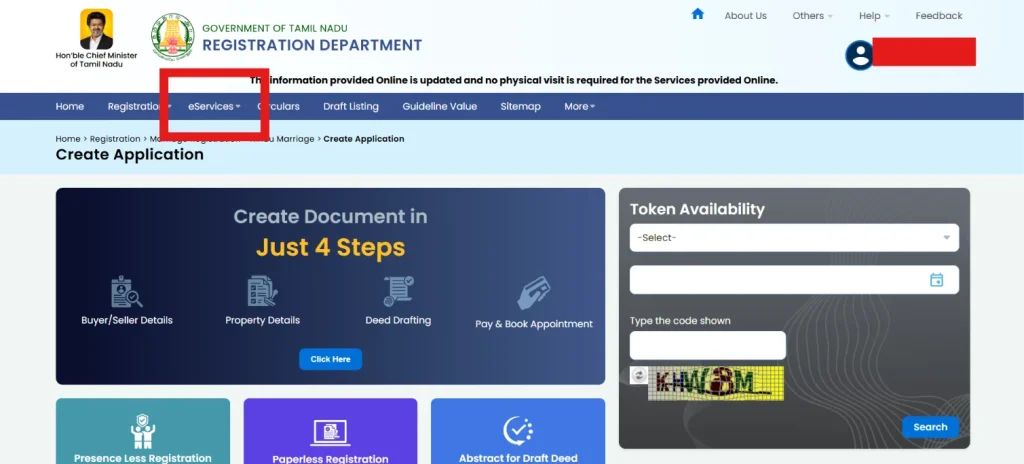
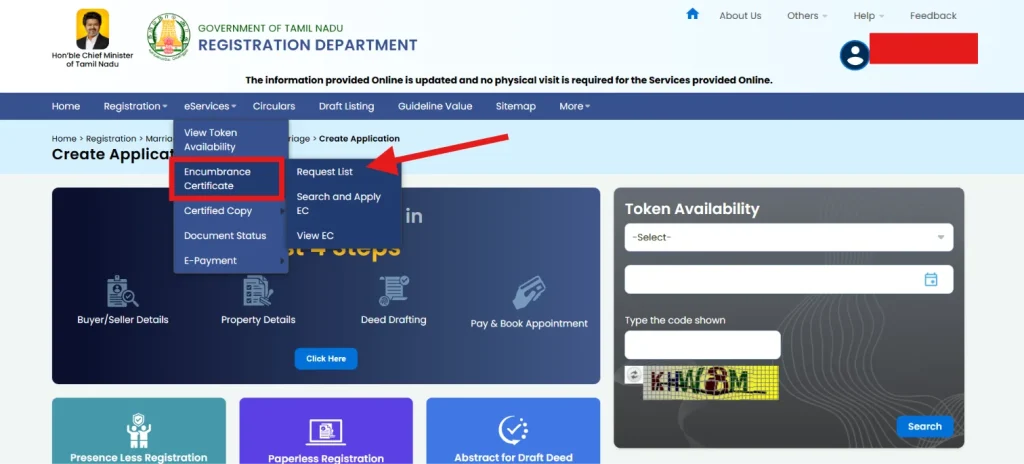
2. Select Encumbrance Certificate (EC) and click on “Request List.”
3. Fill in the required details, such as the application number, date, and status and click “Search.”
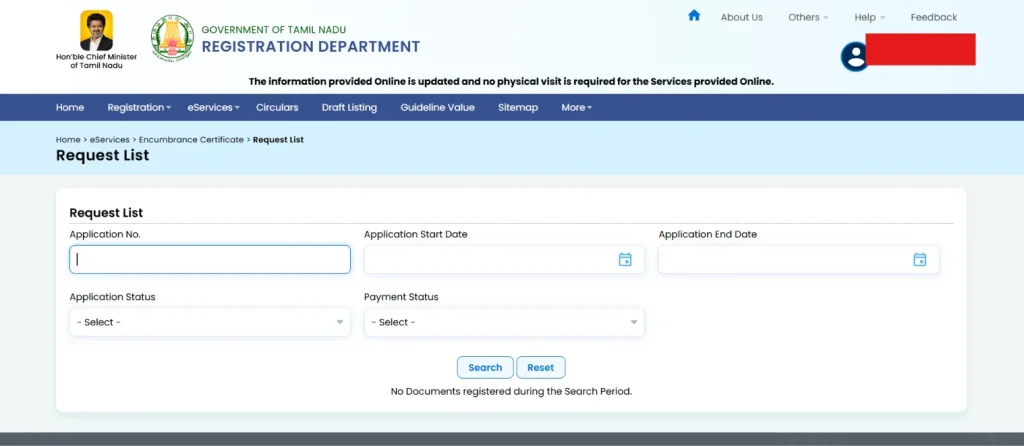
4. The portal will show you the application status of your EC.
What are the Charges for Obtaining an Encumbrance Certificate in TNREGINET?
| Particular | Charges |
| Application Fees | INR 1 |
| Computerised Fees | INR 100 |
| General Search Fee for 1st Year | INR 15 |
| General Search over Subsequent Year | INR 5 added for each year |
What is the validity period of an Encumbrance Certificate (EC)?
An Encumbrance Certificate (EC) does not have a fixed validity period. It reflects the registered transactions and encumbrances recorded against a property for the specific period mentioned in the certificate. Therefore, an EC remains relevant only for the period it covers and does not automatically confirm the property’s status after its end date. For a property transaction, buyers or lenders may require a recent EC covering an appropriate period, depending on their requirements.
How to Apply for Property Registration on TNREGINET Portal?
Property registration through TNREGINET involves entering the required documents and property details online, paying the applicable fees, and completing the registration process through the concerned Sub-Registrar Office (SRO). Here is the step-by-step process:
1. Log in to the TNREGINET portal using your registered user credentials.
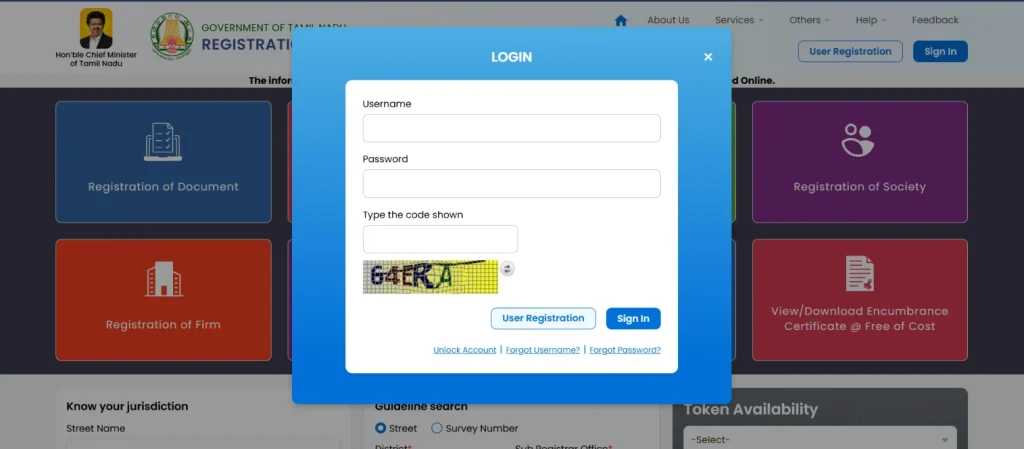
2. Under Registration, select Document Registration and choose Create Document Online.
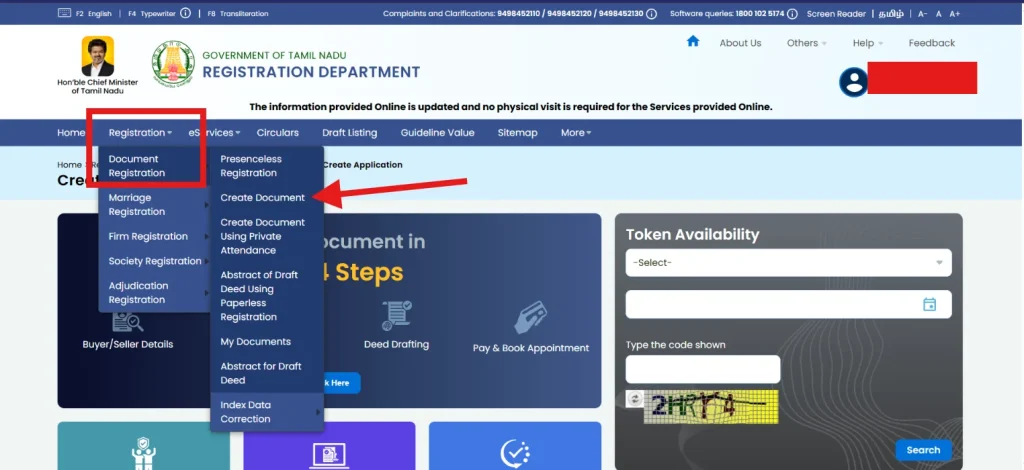
3. Select the type of document you want to register, such as a sale deed, gift deed, mortgage or other applicable document.
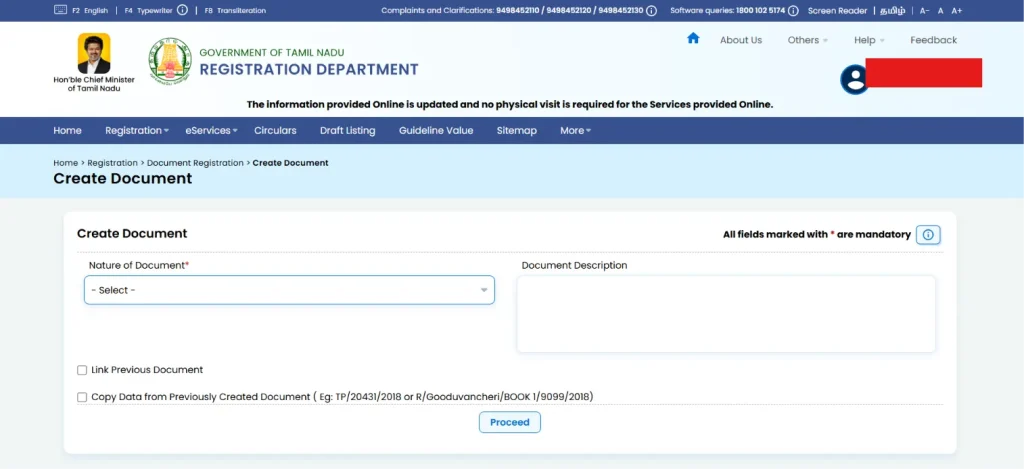
4. Enter the required party details, including the buyer, seller, representatives and witnesses, along with the applicable identification details.
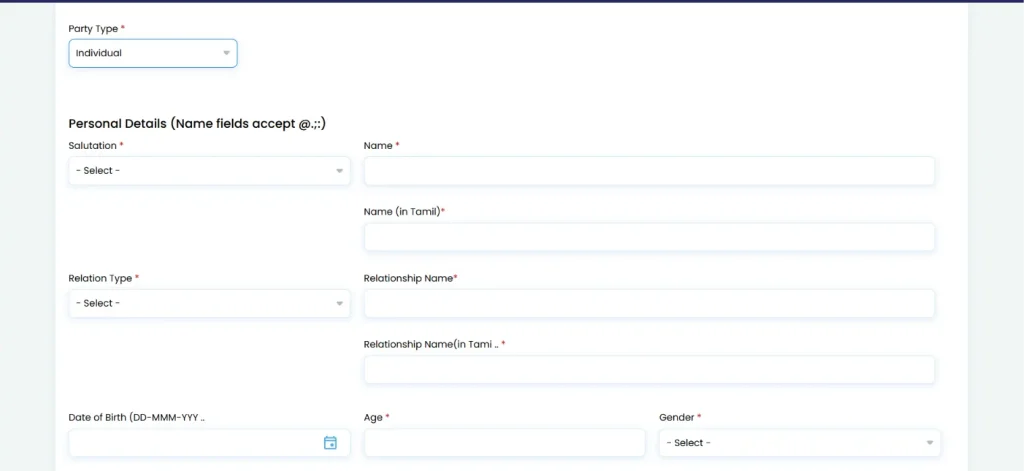
5. Enter the property details, including the district, Sub-Registrar Office, village, survey number, subdivision and other details required for the selected document. Enter the required supporting and transaction details, including the place of execution and other particulars applicable to the document.
6. Once your document draft is approved, schedule a visit to the sub-registrar’s office.
7. Pay the applicable stamp duty, registration fee and other charges through the available payment facility after the document and valuation details are completed.
8. Follow the instructions provided by the portal and visit the concerned Sub-Registrar Office with the original documents for document verification.
How to Check Document Status on TNREGINET?
To check your document status in TNREGINET online, you need to follow these steps:
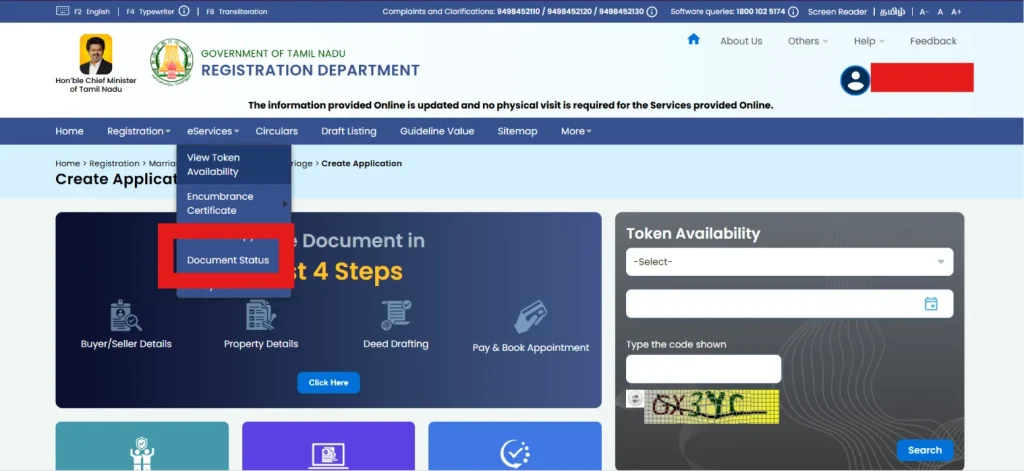
1. Open the TNREGINET Official Website. Go to the E-Services section from the homepage.
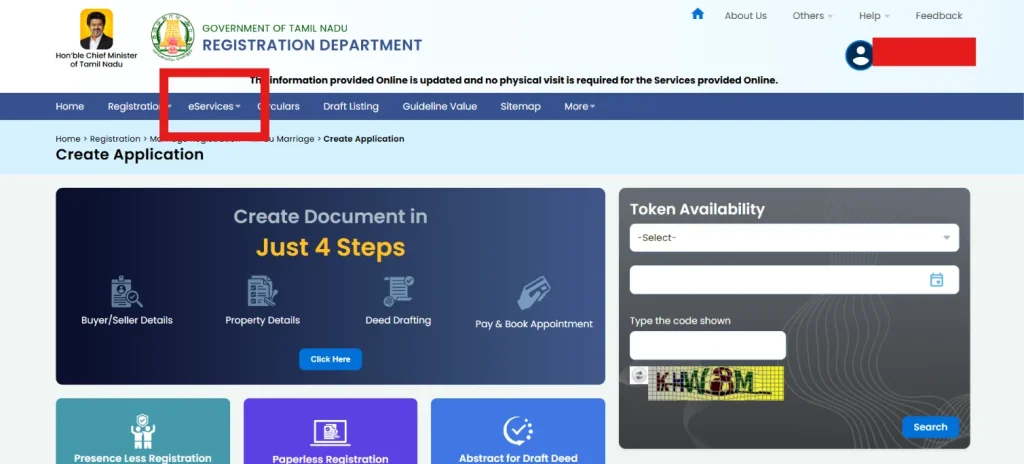
2. Locate the Document Status or search tracker option.
3. Provide the required inputs, such as your Temporary Deed Number, Pending Number, or Registration Number.
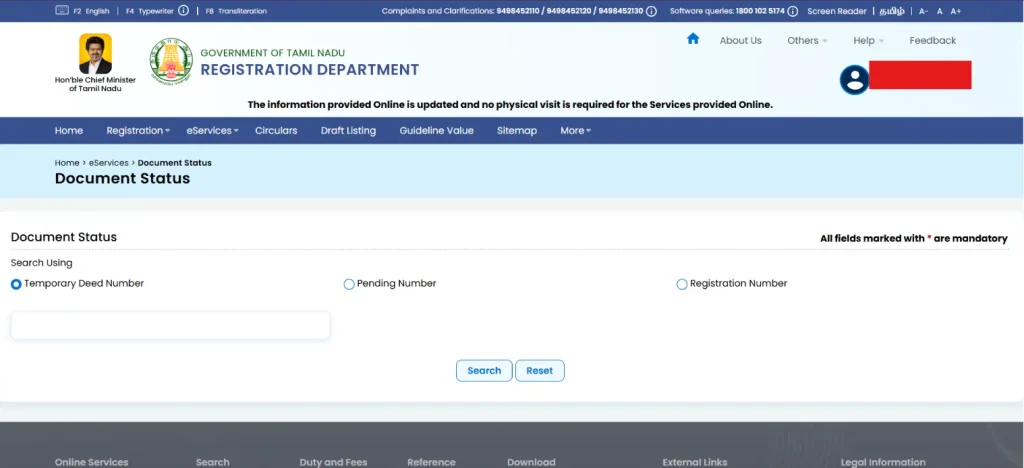
4. Enter the verification captcha code displayed on the screen and click Search or Fetch to view real-time updates.
What is the Stamp Duty and Registration Fees in Tamil Nadu?
| Document Type | Stamp Duty | Registration Fee |
| Sale Deed | 7% on the market value of the property | 4% on the market value of the property |
| Mortgage Deed | 1% on the loan amount, subject to a maximum of Rs 40000/- | 1% on loan amount subject to a maximum of Rs 10000/- |
| Mortgage with possession | 4% on loan amount | 1% subject to the maximum of INR 200000/- |
| Deposit of title deeds | 0.5 % on loan amount subject to a maximum of Rs 30000/- | 1% on loan amount subject to maximum of Rs 6000/- |
| Sale Agreement | INR 20 | 1% on the money advanced (1% on total consideration if possession is given) |
| Lease Deed | 1%-7% depending on lease period | 1% on lease amount subject to maximum Rs 20000/- |
How to Calculate Building Value on Tamil Nadu Property Services Portal?
The Tamil Nadu Property Services Portal (TNREGINET) provides an online Building Value Calculator to estimate the value of a building based on its construction details. The calculation is separate from the land value and is useful when estimating the overall property value for registration-related purposes.
Here’s how you can calculate building value on TNREGINET:
Step 1: Visit the TNREGINET Portal: Go to the official TNREGINET portal, Login to your account using your username and password, and look for the Building Value Calculator under the available online services.
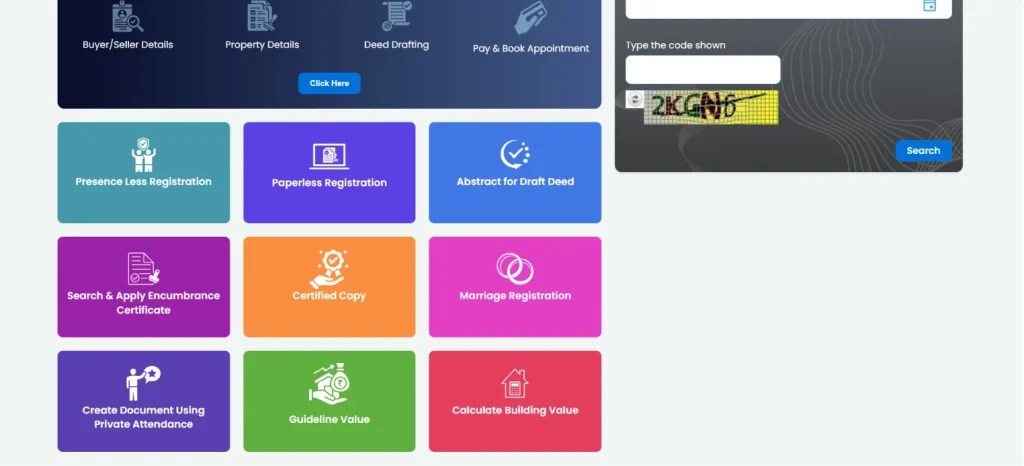
Step 2: Select the Building Details: Enter the required details in the PWD Calculator to determine the building value.
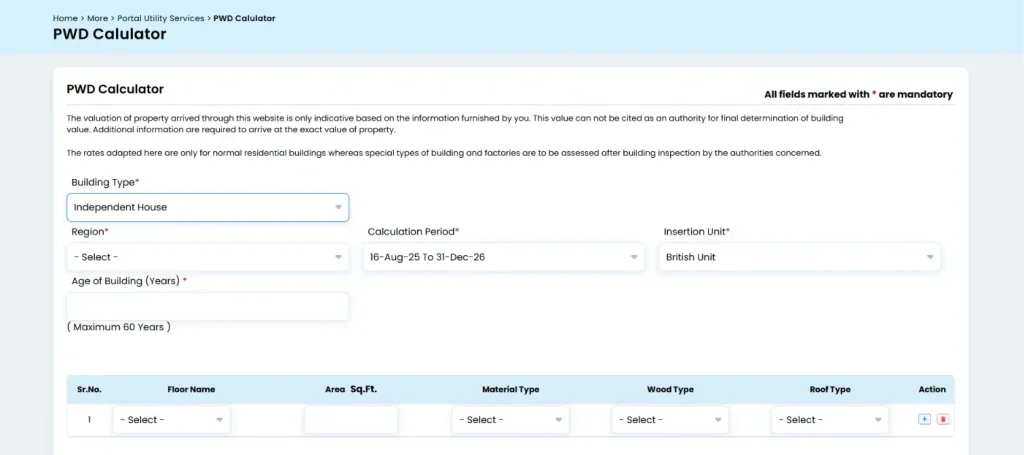
Step 3: Enter Other Required Details: Enter other required details like floor type, building amenities, compound type, garage, etc. and submit.
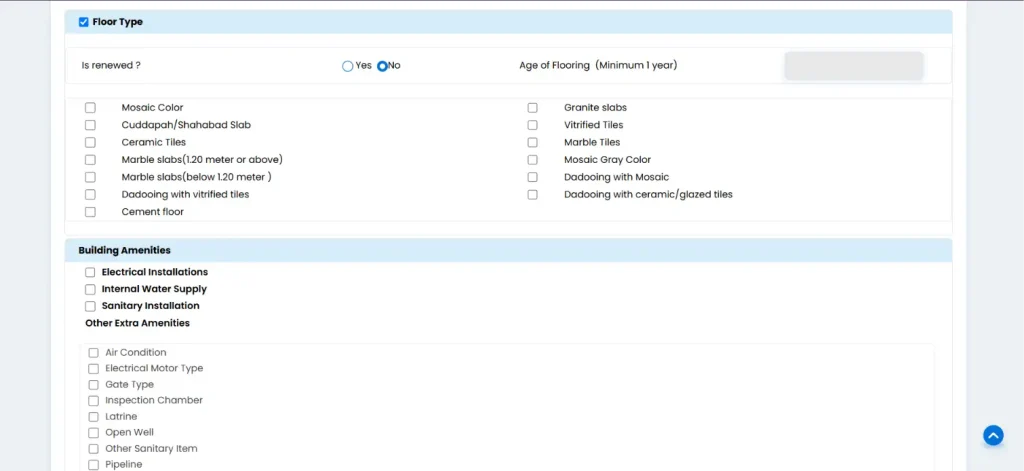
Step 4: Submit the Details: Submit the form to view the final estimated building value, along with estimated stamp duty and registration fees.
How to Check Land Registration Document on TNREGINET?
The TNREGINET portal allows citizens to access various property-registration services online, including searching for registration-related information and applying for an Encumbrance Certificate (EC). If you want to check the registration history of a piece of land, the EC service is one of the key options available on the portal.
Here’s how you can access land registration documents:
1. Visit the official TNREGINET portal. Select the Encumbrance Certificate option under the E-Services section and click on “View EC.”
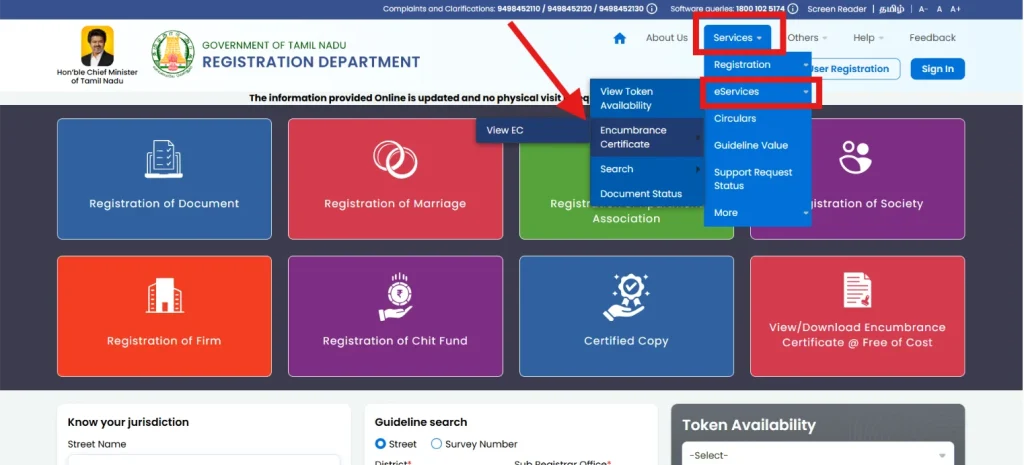
2. Enter the district, Sub-Registrar Office, village, and relevant survey number.
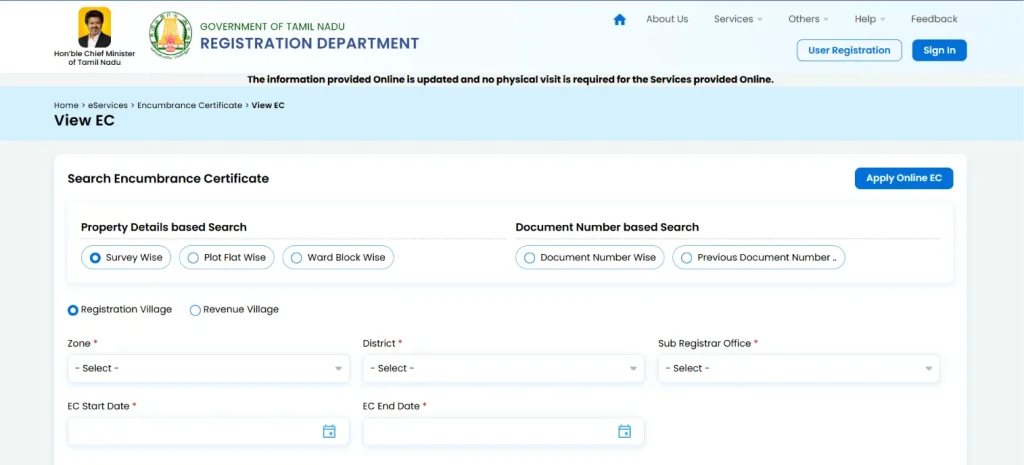
3. Select the appropriate property details and search period for registration records.
4. Submit the entered details to search for available land registration records.
5. Review registered documents, transaction details, registration dates, and recorded encumbrances.
How to Check Tamil Nadu Land Guideline Value Online?
The Tamil Nadu Registration Department provides an online Guideline Value Search through TNREGINET. Users can search the applicable value using details such as the district, Sub-Registrar Office, registration village, street name or survey number.
1. Visit the official TNREGINET portal and open the Guideline Value search service.
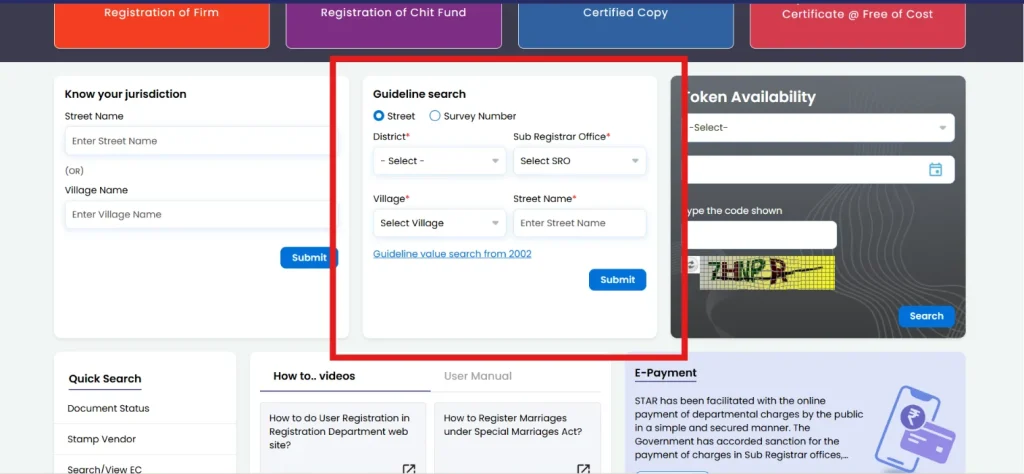
2. Select the appropriate district, sub-registrar office, village and street name and submit.
3. The portal will reflect the guideline value.
What are the Documents needed for Property Registration on TNREGINET?
You need a specific set of primary deeds, identity proofs, and land records to register a property through the TNREGINET portal in Tamil Nadu. Here is the checklist of documents required:
- Sale Deed
- Parent Deed
- Encumbrance Certificate (EC)
- Patta, Chitta, and Adangal
- Approved Building Plan or Layout
- Latest Property Tax Receipts
- Identity and Address Proofs
- PAN Card Details
- TDS Certificate
- Power of Attorney (POA)
- No Objection Certificate (NOC)
What to do If you Forgot Your Password on TNREGINET?
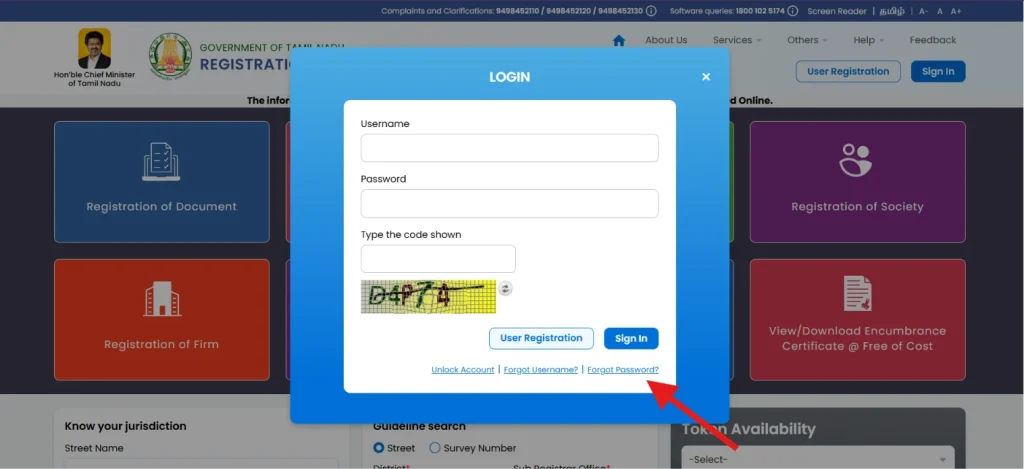
If you forget your TNREGINET password, use the recovery options available on the portal’s login page. You just need to follow these steps:
1. Click on the Sign up option on the TNREGINET login page and then select “Forgot Password.”
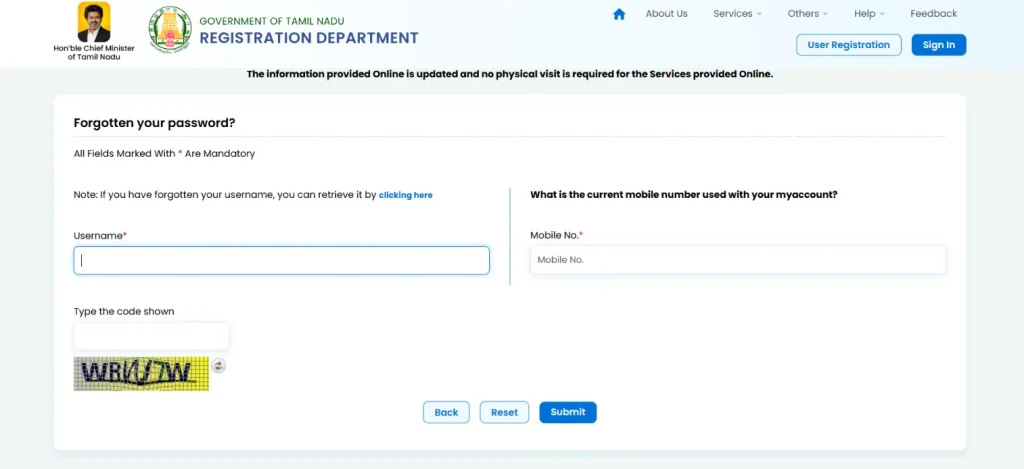
2. Enter the details requested to verify your registered account – username and mobile number. Enter the captcha and click “Submit.”
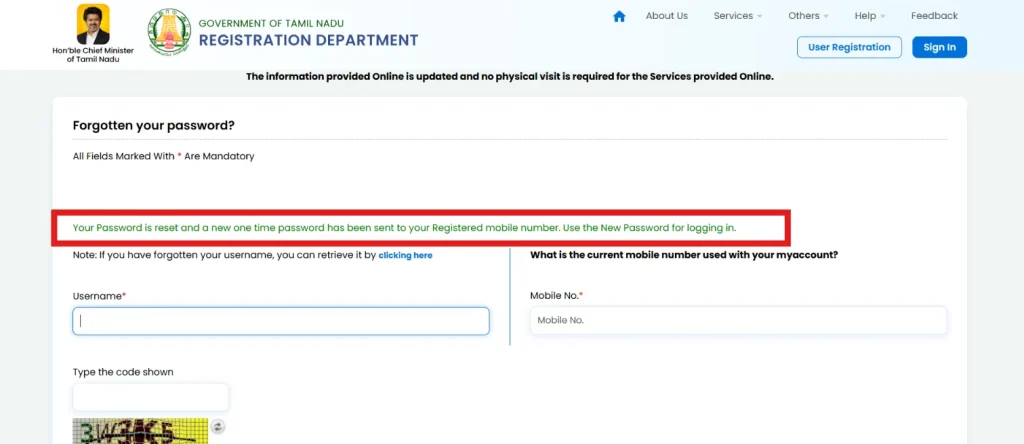
3. You will receive a one-time password on your registered mobile number. You can use this password to login into your account.
What are the Benefits of Using the TNREGINET Portal?
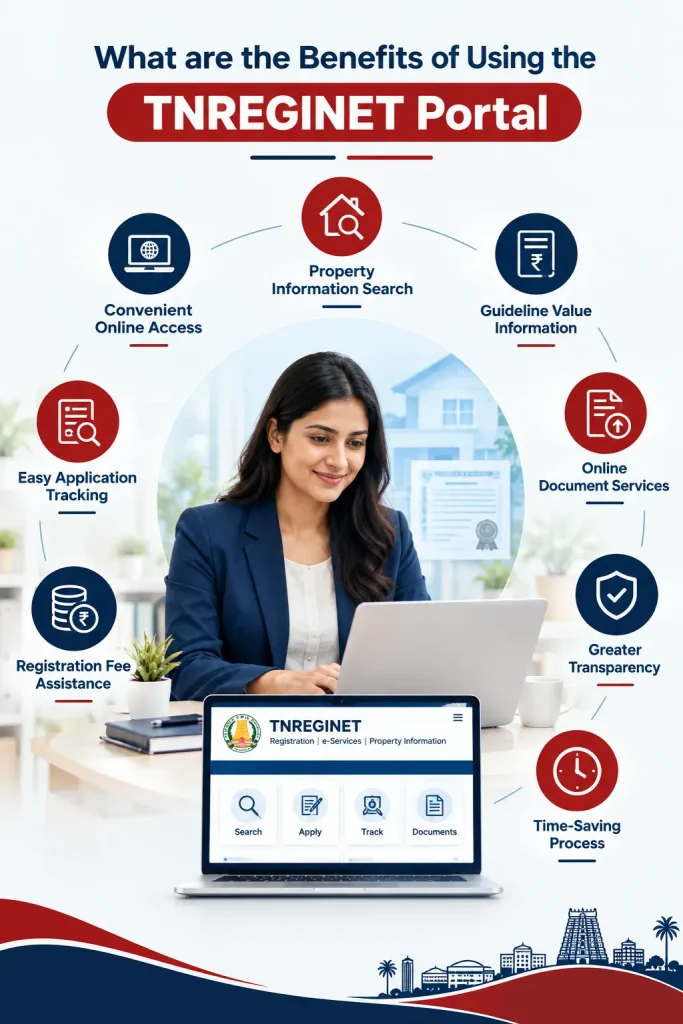
The TNREGINET portal has made several property and registration-related services more accessible through digital channels. Instead of depending entirely on physical visits, users can access information, submit applications and use different registration services online. Here are the key benefits it offers:
1. Convenient Online Access: Users can access property registration and related services online, reducing the need to visit government offices repeatedly for routine processes and information.
2. Property Information Search: The portal enables users to search property-related information, including registration records and Encumbrance Certificate details, helping them review available records conveniently.
3. Guideline Value Information: Users can check applicable property guideline values online, making it easier to estimate property values and understand registration-related costs before proceeding with a transaction.
4. Online Document Services: TNREGINET provides access to various document-related services, allowing users to initiate applications and obtain relevant registration documents through the online platform.
5. Greater Transparency: Digital access to registration information and applicable property details can improve transparency by allowing users to review relevant information before completing property-related transactions.
6. Time-Saving Process: Online services reduce dependence on repeated office visits and allow users to complete eligible registration-related activities from their homes or other convenient locations.
7. Registration Fee Assistance: Users can access information and online facilities that help them understand applicable registration charges and prepare for the expenses associated with property transactions.
8. Easy Application Tracking: Applicants can use the portal to monitor the progress of eligible applications and stay informed about the status of their registration-related requests.
What are the Common Issues on TNREGINET and How to Resolve Them?
| Issue | What Happens | How to Resolve It? |
| Unable to Log In | Incorrect username, password, or CAPTCHA prevents access to the account. | Use the Forgot Username or Forgot Password option and complete the recovery process. |
| Website Not Loading | The portal may load slowly, or certain services may remain temporarily unavailable. | Refresh the page, clear browser cache, try another browser, or access the portal later. |
| Captcha Error | An incorrect or unclear captcha can prevent login or service requests. | Refresh the captcha and carefully enter the newly displayed characters. |
| Payment Not Updated | Payment may be completed but the transaction status may not immediately appear. | Keep the transaction details and contact the TNREGINET technical helpdesk if the status remains unchanged. |
| Application Status Not Updated | Submitted applications may continue showing pending or incomplete status. | Check the application status again later and contact the concerned Registration Department office if required. |
| EC Search Error | Property details may not return records or the search may produce an error. | Recheck the district, SRO, village, survey number and other entered property details. |
| Technical Error | A technical issue may interrupt access to online registration services. | Contact the TNREGINET software support helpline at 1800 102 5174 for assistance. |
| Property Record Discrepancy | Online property information may differ from available documents or local records. | Verify the details with the concerned Sub-Registrar’s Office and provide supporting documents if necessary. |
Frequently Asked Questions
1. What are the key features of the TNREGINET Portal?
TNREGINET offers several online property and registration services, including document registration, Encumbrance Certificate search, guideline value search, building value calculation, application tracking and registration-related information, reducing the need for repeated visits to government offices.
2. What if you make a mistake during online registration on TNREGINET Portal?
If you enter incorrect information during online registration, review and correct the details wherever editing is permitted before final submission. For errors after submission, contact the concerned Sub-Registrar’s Office for guidance on correction or further action.
3. How long does online property registration take on TNREGINET?
The time required depends on the type of document, verification requirements, appointment availability and Sub-Registrar’s Office procedures.
4. What are the different methods of payment on TNREGINET?
TNREGINET supports net banking, UPI, debit/credit cards, and offline challan payments through authorised bank branches.
5. Why is it important to have an Encumbrance Certificate?
An Encumbrance Certificate (EC) provides information about registered transactions or encumbrances recorded against a property for a specified period. It can help buyers review the property’s registration history before proceeding with a purchase or other transaction.
6. What happens if you enter the wrong survey number while searching for an EC?
Entering an incorrect survey number can result in incorrect, incomplete or no property records being displayed. Recheck the survey and subdivision numbers against your property documents and repeat the search using the correct details.
7. Can you download a copy of your registered documents from TNREGINET?
You can search and download an Encumbrance Certificate (EC) or certified copies of registered documents directly through the official TNREGINET Portal.
8. How can you contact TNREGINET customer support?
For technical assistance, users can contact the TNREGINET helpdesk at 1800-102-5174.
You may also like


What Does Project Logistics Alliance Membership Offer?
Project Logistics Alliance membership offers an Indian project cargo business a