
GSTIN Explained: Meaning, Format, Registration and How to Check
- by kapil
- Updated September 26, 2026
- 24 mins read
With the growing number of businesses, online sellers, startups and service providers in India, keeping business and tax records accurate has become vital. As GST compliance has become closely connected with everyday business activities, the GSTIN (Goods and Services Tax Identification Number )has become an important reference point for businesses during invoicing, tax filing, verification and other transactions.
Knowing how GSTIN works for businesses, its registration, format, status and verification can help businesses maintain accurate records and avoid common compliance mistakes and penalties.
What is GSTIN?
GSTIN stands for Goods and Services Tax Identification Number. It is a unique 15-digit identification number assigned to every taxpayer registered under the Goods and Services Tax (GST) system in India. It is issued by the Goods and Services Tax Network (GSTN) on behalf of the government after successful GST registration.
It is used to identify a registered business or taxpayer for GST-related transactions, including issuing tax invoices, filing GST returns, claiming input tax credit and paying GST. A business may have separate GSTINs for different states or Union Territories where it is registered.
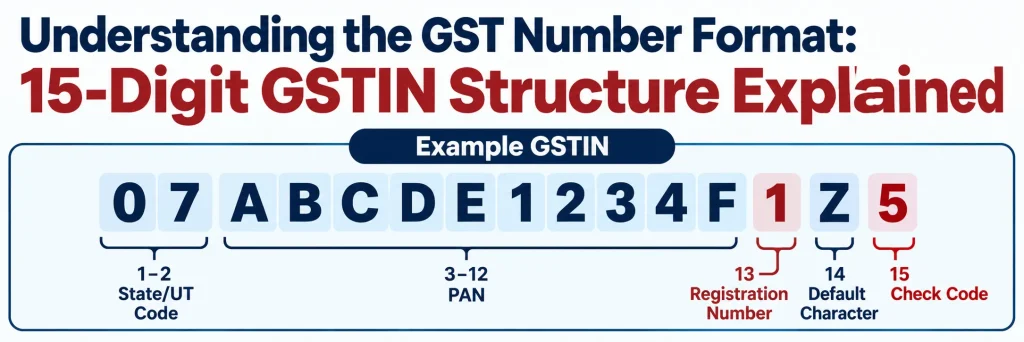
Understanding the GST Number Format: 15-Digit GSTIN Structure Explained
A Goods and Services Tax Identification Number is a unique 15-digit alphanumeric number assigned to every registered taxpayer under the GST regime in India. It follows a standardised format that contains information about the taxpayer’s state or Union Territory, PAN, registration number, default character and checksum digit. Understanding this structure can help businesses verify whether a GSTIN has been entered correctly and identify basic registration details from the number itself.
The 15-character goods and service tax identification number is structured as follows:
11AAAAA1111A1Z1
| Position | Details | Explanation |
| 1-2 | State/UT Code | The first two digits represent the state or Union Territory where the taxpayer is registered. |
| 3-12 | PAN | The next 10 characters correspond to the taxpayer’s PAN. |
| 13 | Entity/Registration Number | This digit indicates the number of registrations held by the same PAN within that state or Union Territory. |
| 14 | Default Character | The fourteenth character is generally “Z” as prescribed in the GSTIN format. |
| 15 | Check Code | The final character is a Check code used for validating the GSTIN. It can either be a number or a letter. |
Example of a GSTIN Structure
Consider a hypothetical GSTIN:
07ABCDE1234F1Z5
Its structure can be understood as:
- 07 – State/UT code
- ABCDE1234F – PAN
- 1 – Registration number
- Z – Default character
- 5 – Checksum digit
Thus, the 15 characters of a GSTIN are not randomly assigned. Each part follows a prescribed structure and serves a specific identification or validation purpose.
Who Needs a GSTIN Number in India? Eligibility and Turnover Threshold
A goods and services tax identification number is required for businesses and individuals who are liable to register under the Goods and Services Tax (GST) law. The requirement depends on factors such as annual turnover, the nature of supplies, and certain specific business activities. Key categories include:
| Category | Applicable Turnover/Condition |
| Service Providers for General Category States | When the turnover exceeds ₹20 lakh in a financial year |
| Service Provider in Special Category States (Group A: Arunachal Pradesh, Meghalaya, Sikkim, Uttarakhand, Puducherry) | When the turnover exceeds ₹10 lakh in a financial year |
| Service Provider in Special Category States (Group B: Manipur, Mizoram, Nagaland, Tripura) | When the turnover exceeds ₹10 lakh in a financial year |
| Suppliers of Goods in General States | When the turnover exceeds ₹40 lakh in a financial year, subject to applicable conditions |
| Supplier of Goods in Special category states (Group A: Arunachal Pradesh, Meghalaya, Sikkim, Uttarakhand, Puducherry) | When the turnover exceeds ₹20 lakh in a financial year, subject to applicable conditions |
| Supplier of Goods in Special category states (Group B: Manipur, Mizoram, Nagaland, Tripura) | When the turnover exceeds ₹10 lakh in a financial year, subject to applicable conditions |
| Inter-State Suppliers, E-commerce Businesses, Casual Taxable Persons, | GST registration may be required regardless of turnover |
What are the Different GSTIN Status? How to Check It?
A goods and services tax identification number can have different statuses depending on whether the registration is currently valid, temporarily suspended, cancelled or otherwise inactive.
| GSTIN Status | Meaning |
| Active | The GST registration is valid and currently active. |
| Suspended | The GST registration has been temporarily suspended, generally while a cancellation or other proceeding is under process. |
| Canceled | The GST registration has been cancelled and is no longer active. |
| Inactive | The GSTIN is not currently active on the GST Portal. In certain cases, a cancelled registration may show as inactive |
| Expired | The registration has expired where the GST registration is subject to a specified period of validity, such as certain temporary registrations. |
How to Check GSTIN Status Online?
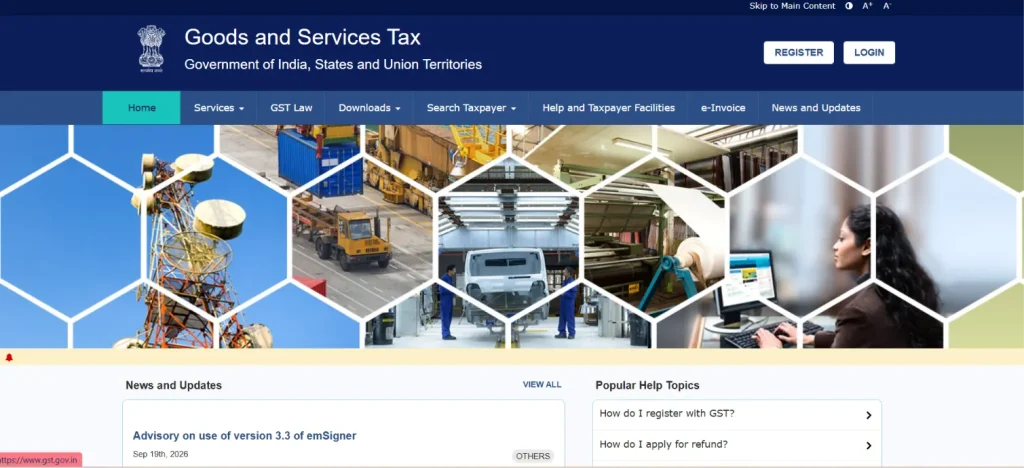
You can verify a goods and service tax identification number directly through the GST Portal without logging in. Follow these steps:
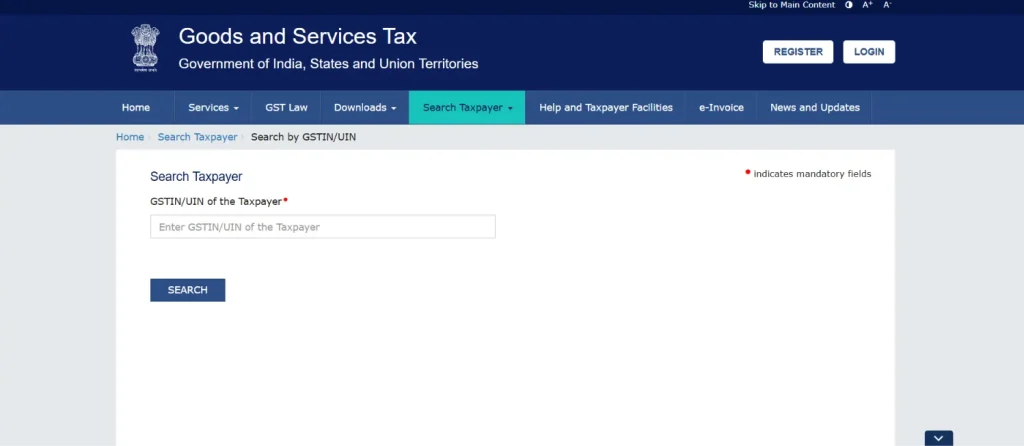
- Open the official GST Portal. Click Search Taxpayer on the GST Portal homepage.
- Choose the option to search using the GSTIN/UIN.
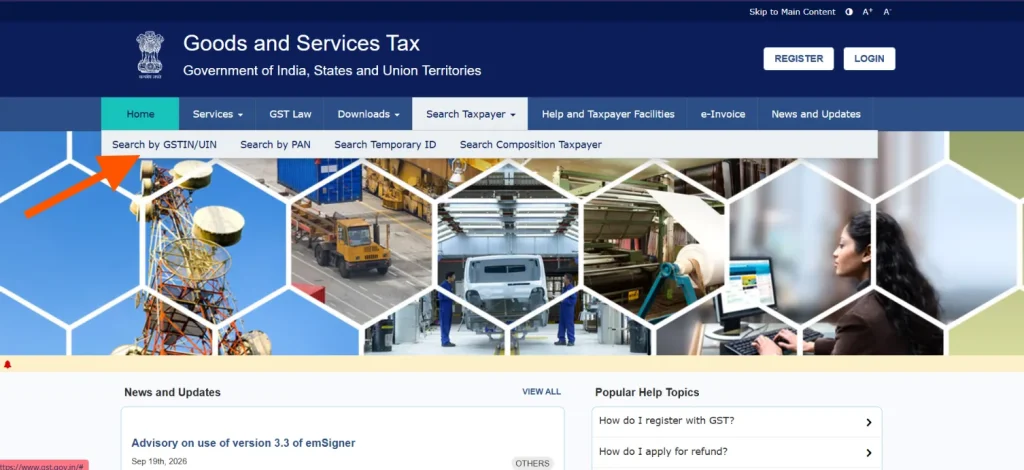
- Enter the 15-digit GSTIN you want to verify.
- Type the characters shown in the CAPTCHA box and click on “Search”
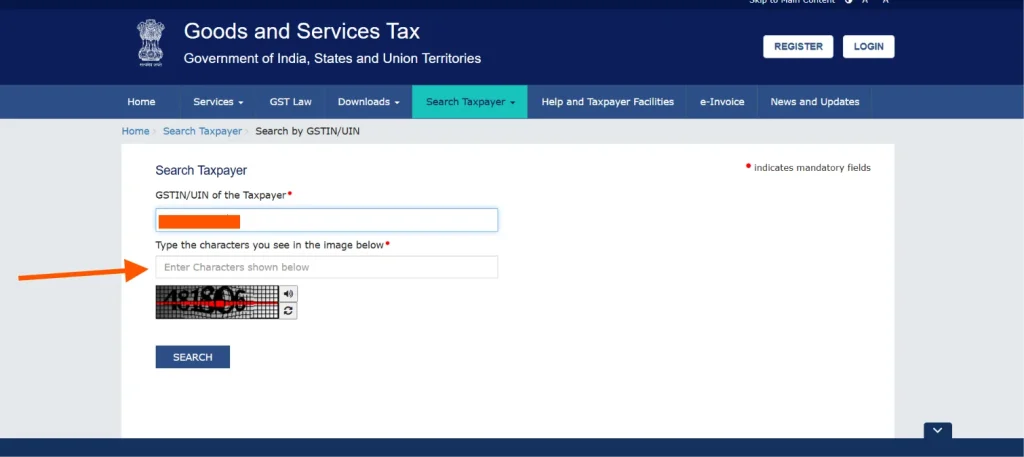
- The taxpayer’s GSTIN status will be displayed along with other registration details.
- You can also check the legal name, trade name, registration date, business constitution, principal place of business and, where applicable, cancellation date and return-filing details.
What are the Benefits of Obtaining a Goods and Service Tax Identification Number?
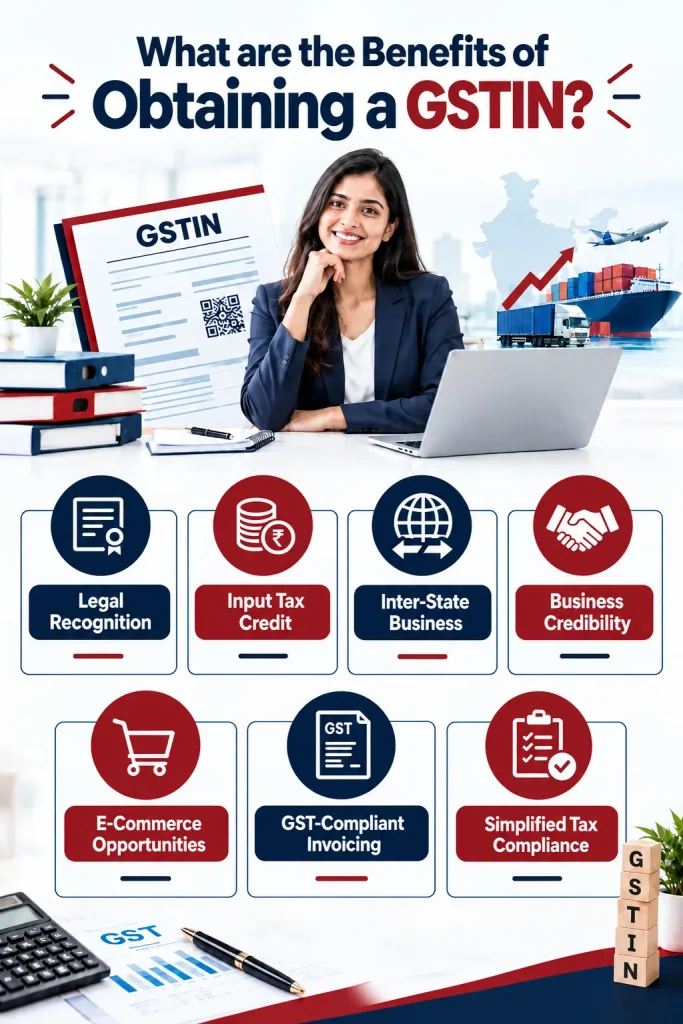
Obtaining a goods and service tax identification number provides businesses with a recognised GST registration and enables them to comply with applicable tax requirements. It can also support business transactions, tax credit claims and wider market opportunities.
1. Legal Recognition: A goods and service tax identification number identifies a business as a registered taxpayer under the GST framework and provides formal recognition for conducting taxable business activities.
2. Input Tax Credit: Registered businesses can claim eligible input tax credit on purchases and expenses, helping reduce the overall GST liability on taxable supplies.
3. Inter-State Business: GST registration enables eligible businesses to undertake inter-State taxable transactions while complying with applicable GST registration and tax requirements.
4. Business Credibility: Displaying a valid GST number on invoices and business documents can help establish greater transparency and credibility with customers, suppliers and business partners.
5. E-Commerce Opportunities: A GST number can help businesses meet applicable GST requirements when selling through e-commerce platforms or undertaking transactions covered by specific GST provisions.
6. GST-Compliant Invoicing: Registered taxpayers can issue GST tax invoices containing prescribed details, making transactions more transparent and supporting proper accounting and tax reporting.
7. Access to Business Opportunities: GST registration may be required by certain customers, organisations or businesses before entering into transactions, particularly where GST-compliant invoicing and documentation are expected.
8. Simplified Tax Compliance: A GST number provides access to the GST Portal for filing returns, paying applicable taxes and completing other GST-related compliance requirements online.
What is the Difference Between Regular GSTIN and Composition GSTIN?
A Regular GSTIN and a Composition GSTIN both identify businesses registered under GST, but the applicable tax scheme, annual return, compliance requirements and input tax credit rules differ. Here are the key differences between the two:
| Basis | Regular GSTIN | Composition GSTIN |
| Tax Scheme | Business operates under the regular GST scheme and pays tax at the applicable rate on taxable supplies. | Business opts for the composition scheme and pays tax at the prescribed composition rate. |
| Turnover Limit | No composition-specific turnover ceiling applies; registration is governed by applicable GST provisions. | Subject to the prescribed turnover limit for composition taxpayers. |
| Input Tax Credit (ITC) | Eligible businesses can generally claim input tax credit on qualifying purchases, subject to GST rules. | Composition taxpayers cannot claim input tax credit on their purchases. |
| Tax Collection | Eligible registered taxpayers can collect GST from customers and issue tax invoices. | Composition taxpayers generally cannot collect GST separately from customers. |
| Tax Invoice | Can issue a GST tax invoice showing applicable GST separately. | Issues a Bill of Supply instead of a regular GST tax invoice. |
| Inter-State Supplies | Generally permitted, subject to applicable GST provisions. | Generally restricted from making inter-State outward supplies of goods, subject to applicable provisions and exceptions. |
What is the Difference Between GSTIN and UIN?
GSTIN and UIN are both identification numbers used under the GST framework, but they serve different categories of entities and purposes. It is generally issued to registered taxpayers, while UIN is assigned to specified entities such as embassies, consulates and certain international organisations. Here is the key difference between the two:
| Basis | GSTIN | UIN |
| Full Form | Goods and Services Tax Identification Number | Unique Identity Number |
| Issued To | Registered taxpayer under GST | Specified entities such as UN specialised agencies, notified multilateral financial institutions, foreign embassies and consulates |
| Purpose | Used for GST registration, tax compliance and identification of registered taxpayers | Primarily enables eligible entities to claim a refund of GST paid on inward supplies |
| Taxpayer Status | Identifies a registered person under GST | UIN holders are given a special status and do not fall within the definition of a “registered person” |
| Application Form | GST registration is generally applied for through the prescribed GST registration process | UIN is applied for electronically in FORM GST REG-13 |
How to Apply for a GSTIN?
A goods and service tax identification number can be obtained by applying for GST registration through the official GST Portal. The registration process involves entering business and taxpayer details, completing verification, uploading required documents and submitting the application electronically.
Step-by-Step Process to Apply for goods and service tax identification number
- Go to the official GST Portal
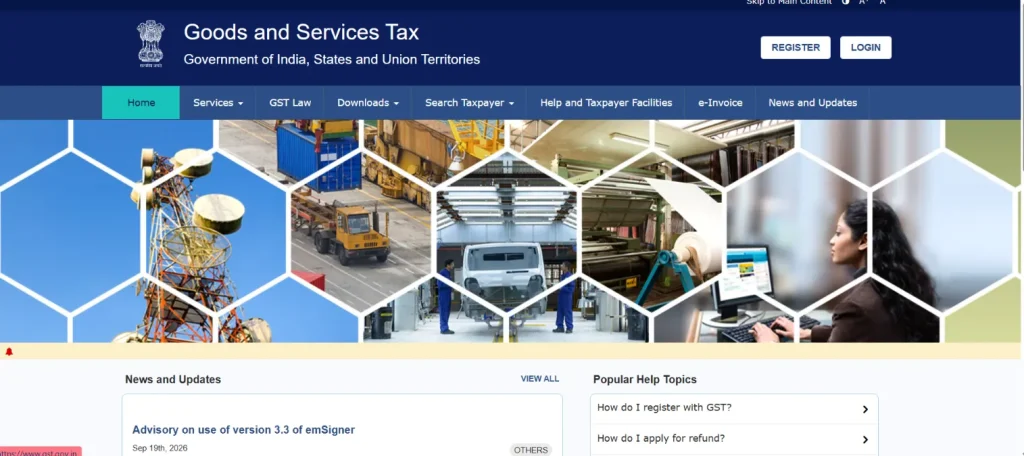
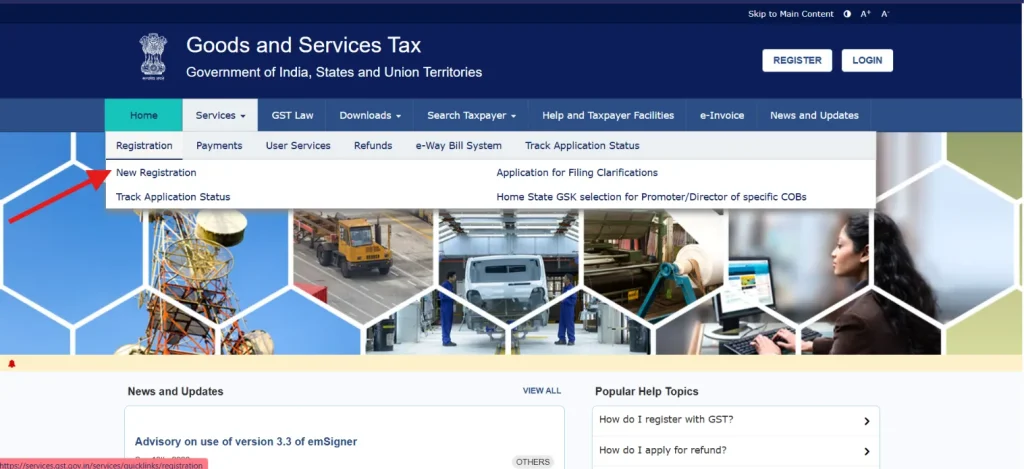
- Go to Services → Registration → New Registration or click Register Now.
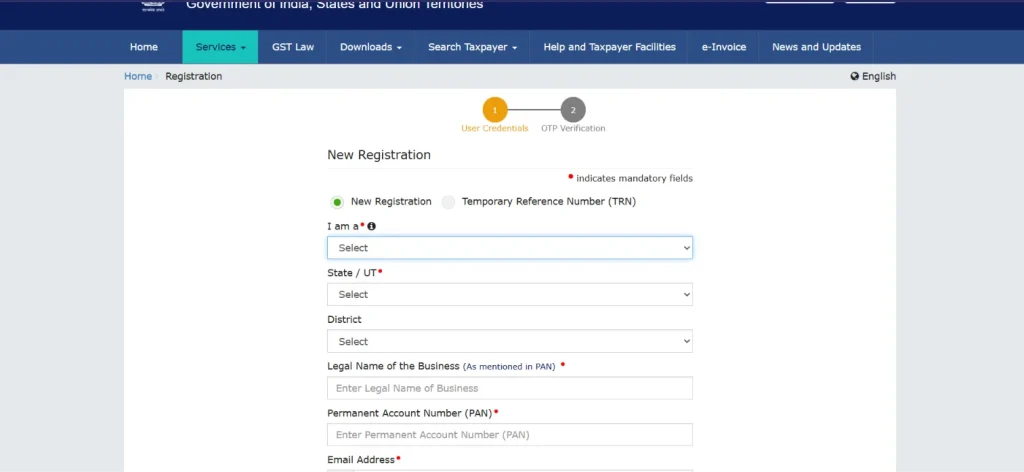
- Under the I am a option, select Taxpayer and choose the relevant State/UT and District, provide the legal name of the business as per PAN and enter the applicable PAN details.
- Enter the email address and Indian mobile number of the Primary Authorised Signatory.
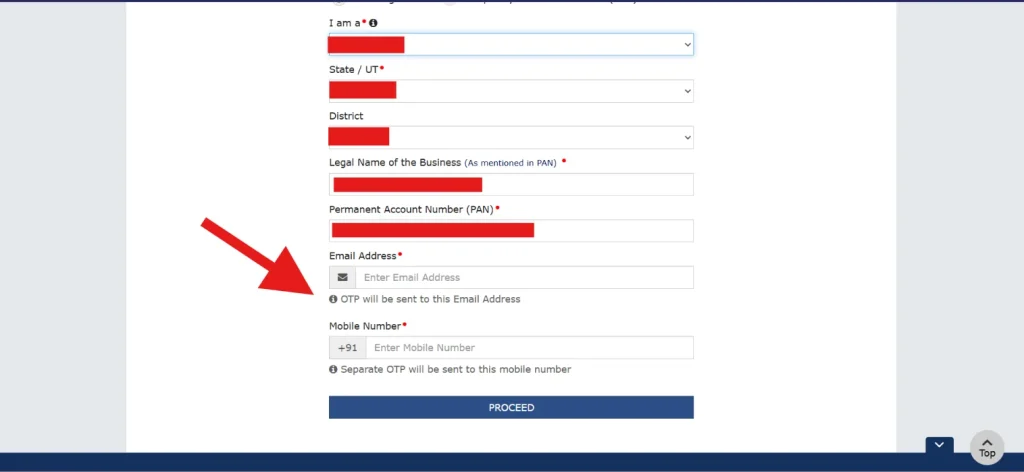
- Verify the mobile number and email address using the separate OTPs received from the GST Portal.
- After successful verification, a Temporary Reference Number (TRN) is generated. Save this TRN for completing the application.
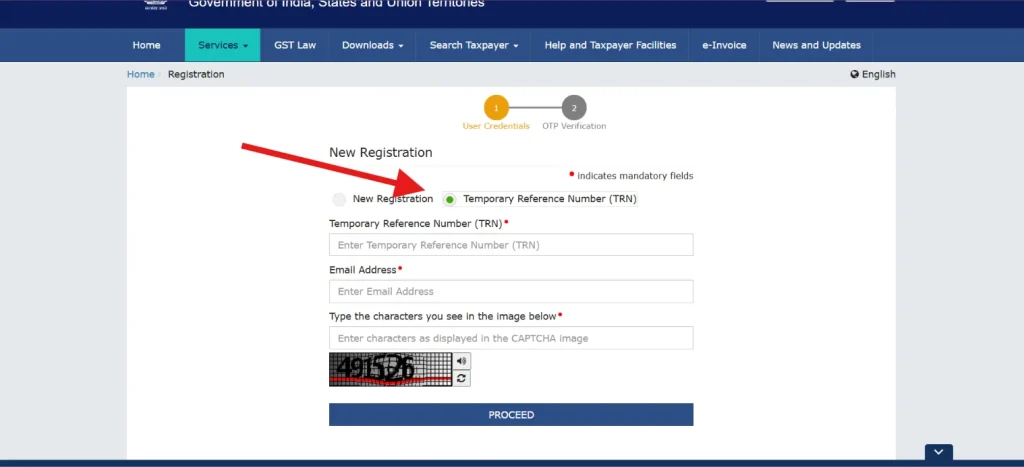
- Return to New Registration, select the TRN option, enter the TRN, email address and CAPTCHA, and complete OTP verification.
- Open the saved application and enter the required information across the relevant tabs, including Business Details, Promoters/Partners, Authorised Signatory, Principal Place of Business, Goods and Services, State-Specific Information and Aadhaar Authentication.
- Upload the documents and photographs requested for the applicable sections of the registration application.
- Verify the entered information and submit the application electronically using the applicable DSC, E-Signature or EVC. DSC is mandatory for companies and LLPs.
- After successful submission, an Application Reference Number (ARN) is generated and sent to the registered email address and mobile number. You can track your application status through this ARN.
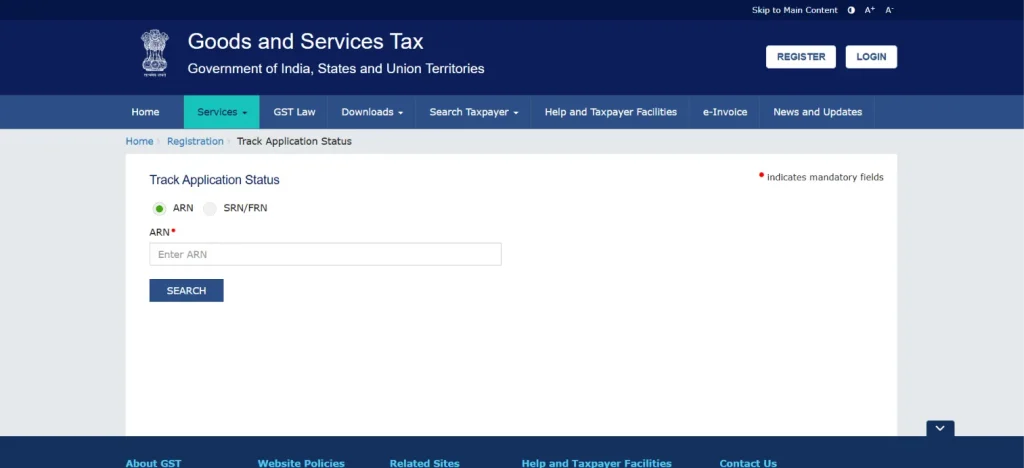
- Once the registration is approved, the goods and service tax identification number and registration credentials are provided to the taxpayer.
What Documents are Required to Obtain a GSTIN?
Here is a checklist of the documents required to obtain a goods and services tax identification number or GST Number:
- Partnership Deed
- Trust Deed
- Certificate of Incorporation
- Proof of Business Constitution
- Certificate of Establishment
- Registration Certificate
- Stakeholder Photograph
- Authorised Signatory Photograph
- Authorisation Letter
- Board Resolution and Acceptance
- Property Tax Receipt
- Municipal Khata Copy
- Electricity Bill/Rent or Lease Agreement
- Consent Letter
- Government-Issued Document/Certificate
- Additional Place Property Tax Receipt/Additional Place Municipal Khata
- Additional Place Electricity Bill/Additional Place Rent Agreement
- Supporting Clarification Documents
Can You Hold Multiple GSTINs under one PAN?
Yes, a person or business can hold multiple goods and services tax identification numbers under the same PAN, particularly when it has business operations in more than one State or Union Territory. Under GST, registration is generally state-specific, so a separate GST number is required for each State or Union Territory where registration is applicable.
A business may also obtain separate registrations within the same State or Union Territory for different places of business, subject to the applicable conditions under GST law. Each goods and service tax identification number is linked to the same PAN but functions as a separate GST registration for compliance purposes.
Therefore, businesses operating across multiple locations should ensure that the appropriate GST registrations are obtained and that returns, tax payments and other compliance requirements are fulfilled separately for each applicable goods and service tax identification number.
How to Verify a GSTIN?
You can verify a goods and services tax identification number online through the GST Portal’s Search Taxpayer facility. The service allows you to check the authenticity, registration status and other basic details of a GST number without logging in.
Step-by-Step Process to Verify a GSTIN
1. Open the official GST Portal, click “Search Taxpayer” on the GST Portal homepage and select the option to search using GSTIN/UIN.
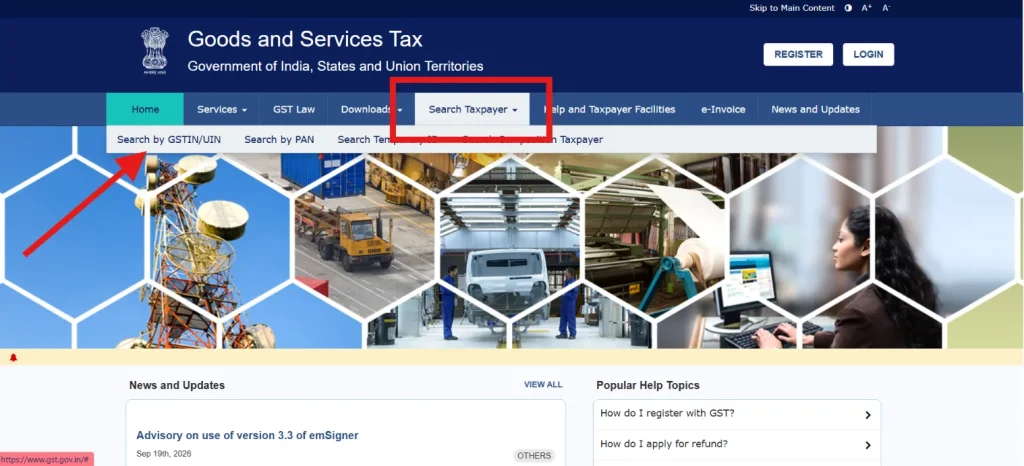 2. Enter the 15-digit GSTIN you want to verify, type the characters displayed in the CAPTCHA box and click the “SEARCH” button to submit the details.
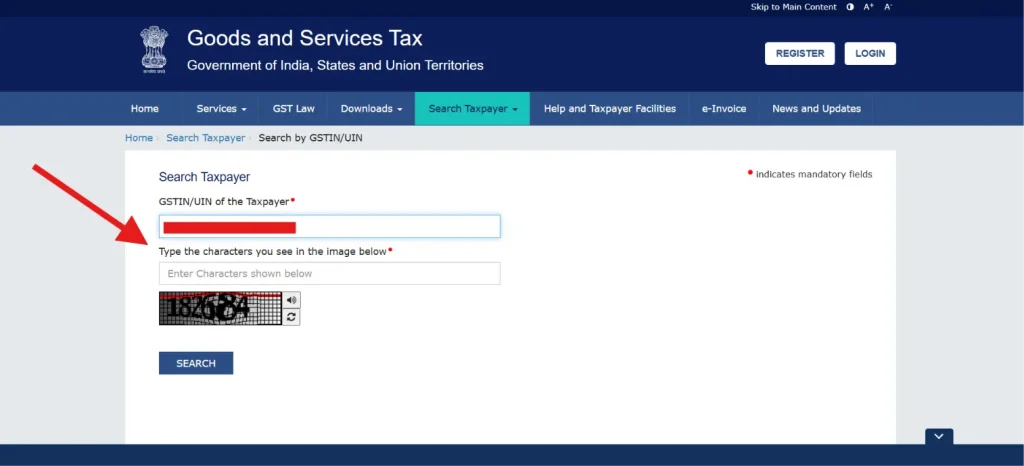
3. The portal will display details such as the legal name, trade name, registration date, business constitution and principal place of business.
Why Verifying a GST Number before every Transaction is Important?
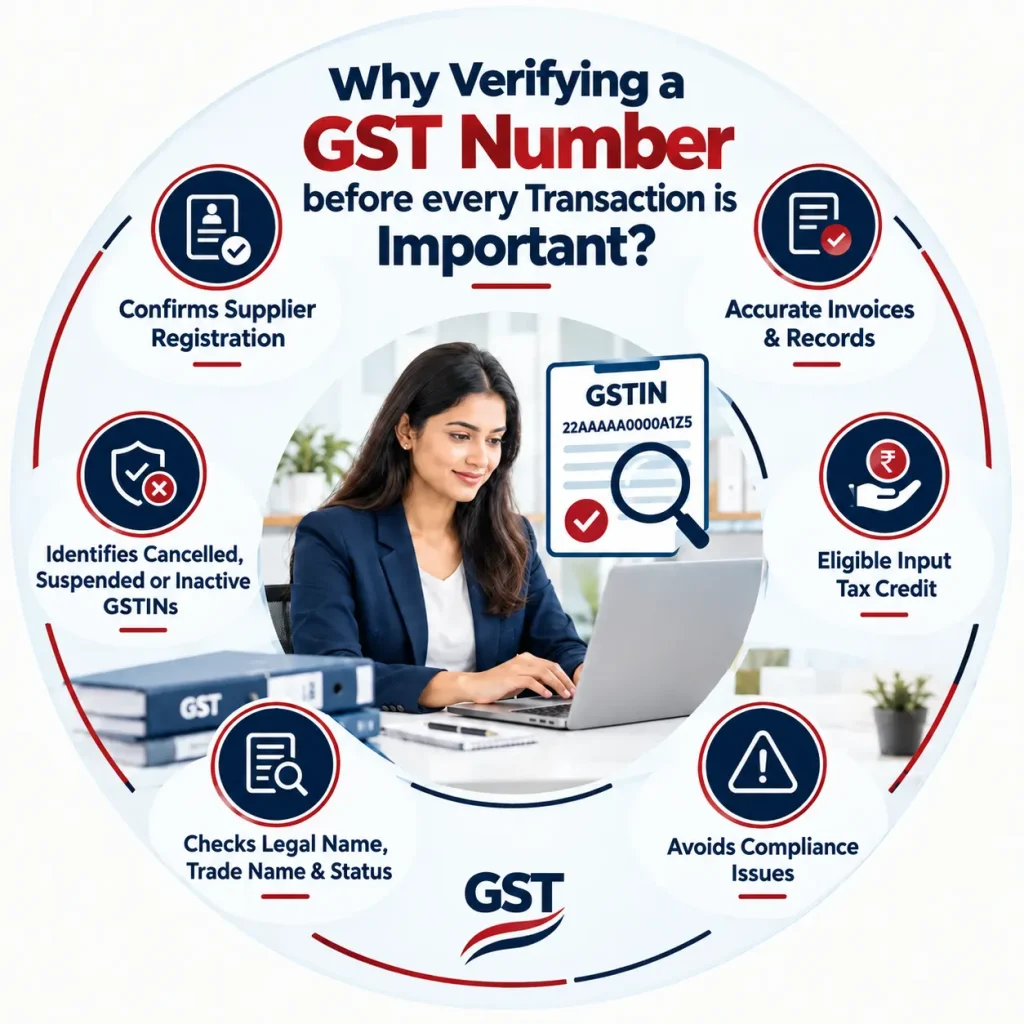
Verifying a GST number before a transaction helps businesses confirm the supplier’s registration details and maintain accurate GST records. It can also support proper invoicing and compliance.
- Verifying GST number confirms that the supplier is registered under GST and that the provided registration details are valid.
- Checking GST number helps ensure invoices contain accurate taxpayer information, reducing errors in accounting and GST records.
- Correct GST number details help businesses maintain proper documentation when claiming eligible input tax credit on purchases.
- Verifying registration details before transactions can help businesses avoid discrepancies that may create GST compliance difficulties later.
- GST number verification allows businesses to cross-check the legal name, trade name and registration status before completing transactions.
- Checking the GST Portal can identify GSTINs that are cancelled, suspended or otherwise not currently active.
How to Amend/Update Your GSTIN Details?
Registered taxpayers can update their GST registration details using the following steps:
- Go to the official GST Portal and log in using your valid username and password.
- After logging in, go to Services → Registration, and choose either:
- Amendment of Registration Core Fields, or
- Amendment of Registration Non-Core Fields
Select the option according to the type of detail you want to update.
- The amendment application will display different tabs. Select the tab containing the details you want to change and edit the required information.
- Provide the new or corrected information in the applicable fields. For core amendments, make sure the required supporting details or documents are provided where applicable.
- After making the required changes, click Save & Continue and go to the Verification tab, select the verification checkbox, choose the name of the authorised signatory and enter the place.
- Authenticate the application using DSC or EVC, as applicable, and submit it on the GST Portal.
- After successful submission, an acknowledgement is generated. The Application Reference Number (ARN) is sent to the registered email address and mobile number.
For core amendments, the application is subject to approval by the tax official. Non-core amendments are automatically approved after successful filing and do not require tax-officer processing.
How to Search for GSTIN using PAN?
To search for GSTIN or GST number using PAN, you need to follow these steps:
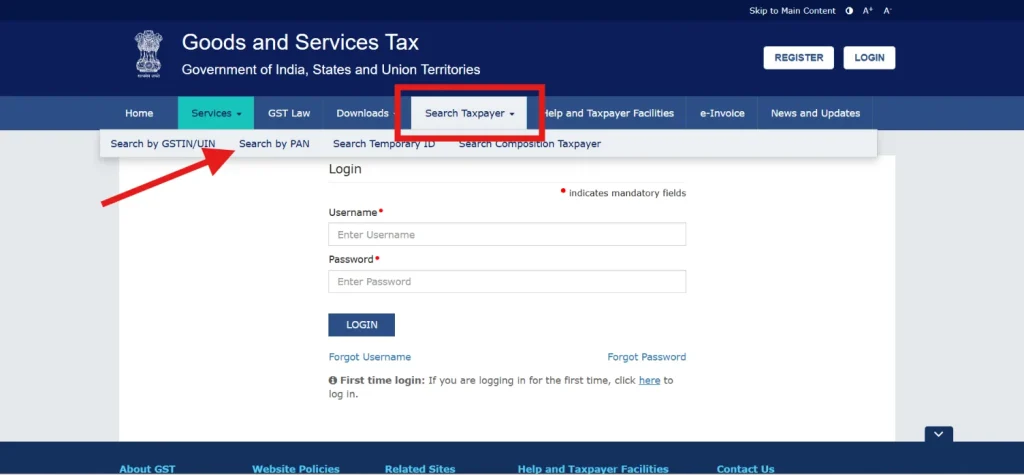
- Visit the GST Portal. On the GST Portal homepage, select “Search Taxpayer” and choose the “Search by PAN” option to find GST registrations associated with a particular PAN.
- Enter the Permanent Account Number (PAN) for which you want to search for GST registrations. Enter the CAPTCHA and click “Search”
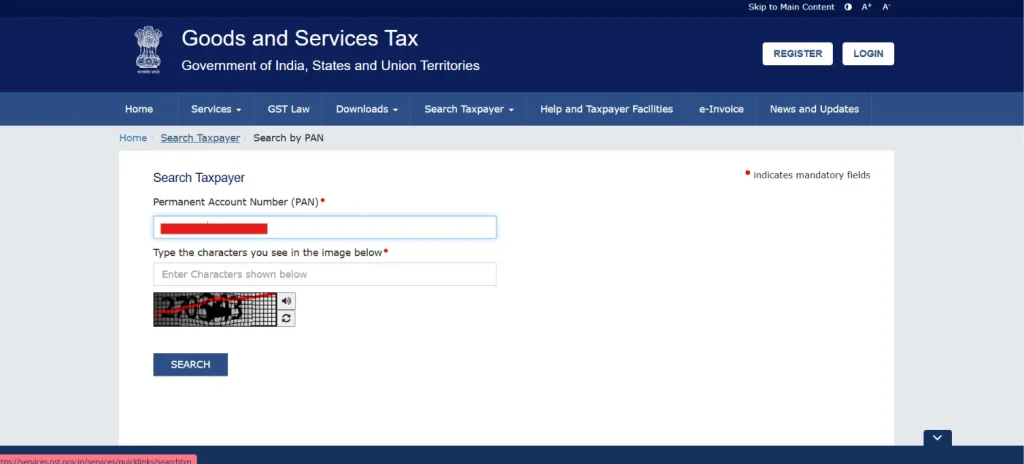
- The portal displays the GST registrations available against the entered PAN. You can check the GSTINs associated with that PAN.
- If there is no GST registration available against the entered PAN, the portal displays “No records found.”
What is a Temporary GSTIN?
A temporary ID in GST is a provisional identification number given to unregistered people or entities so they can use specific portal features without a permanent GST Registration.
Who Uses a Temporary ID?
- Individuals or businesses that do not have or need a permanent GST registration.
- Small sellers, home businesses, and non-resident taxpayers.
- Tax officers who issue a temporary ID (suo motu) when an eligible person fails to register.
What Functions can you do with a Temporary GSTIN?
With a temporary ID on the GST Portal, you can:
- File an application for a refund.
- Apply for an advance ruling.
- Apply to supply goods through e-commerce operators.
- Make specific one-off tax payments.
How to Generate a Temporary GSTIN ID?
To generate a temporary user GSTIN ID on the GST portal as an unregistered person (for refunds or advance rulings), follow these steps:
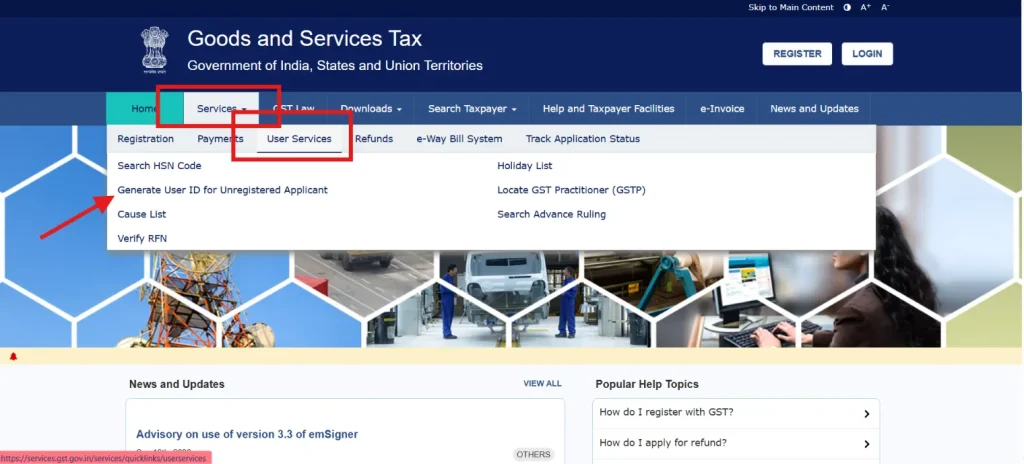
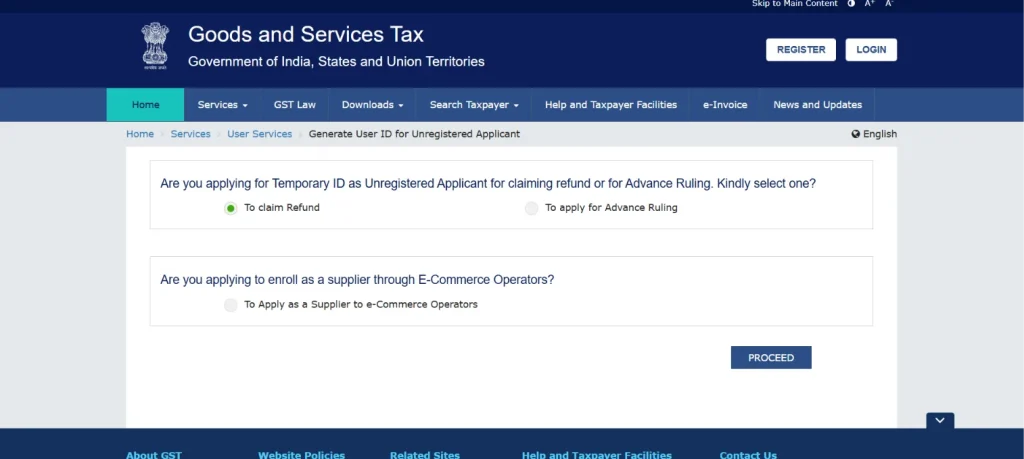
- Go to the Official GST Portal. Click Services > User Services > Generate User ID for Unregistered Applicant.
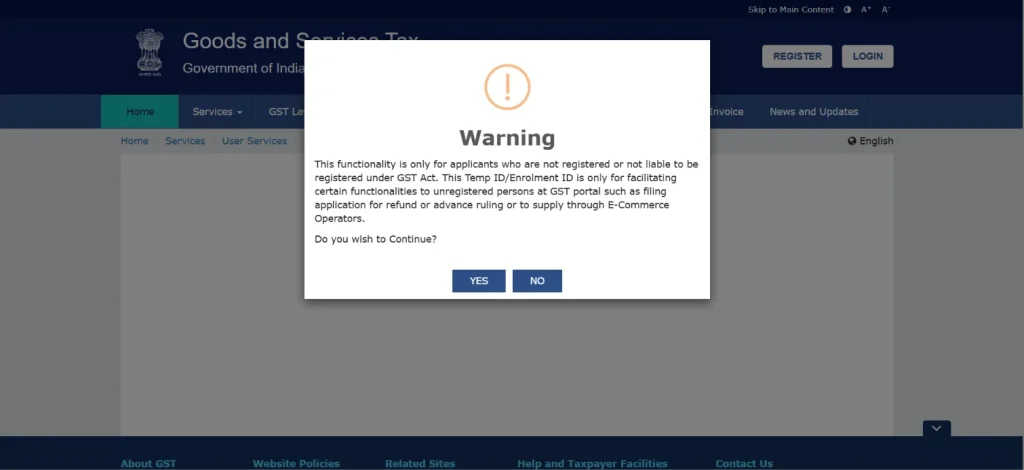
- Read the warning message and click Yes.
- Select your application category:
- Claiming a refund
- Advance ruling
- Supply to e-commerce operator
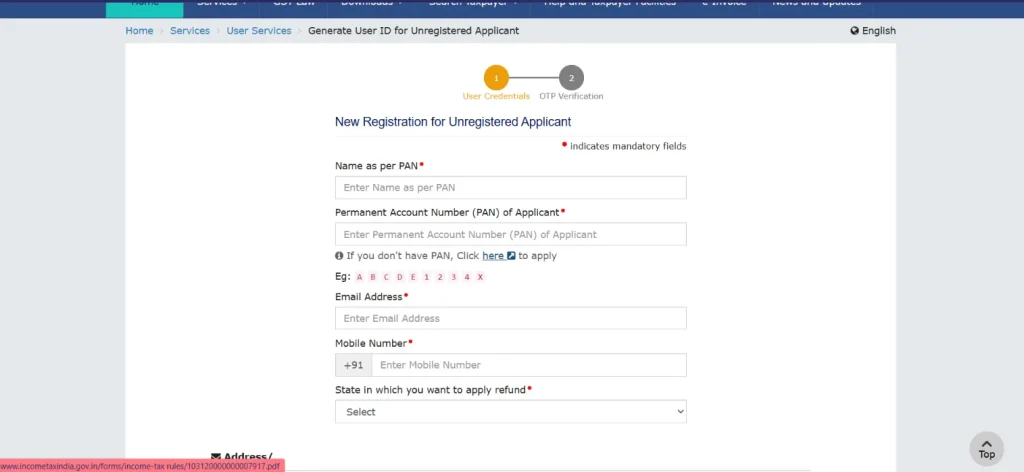
- Enter your basic details like PAN, email, and mobile number.
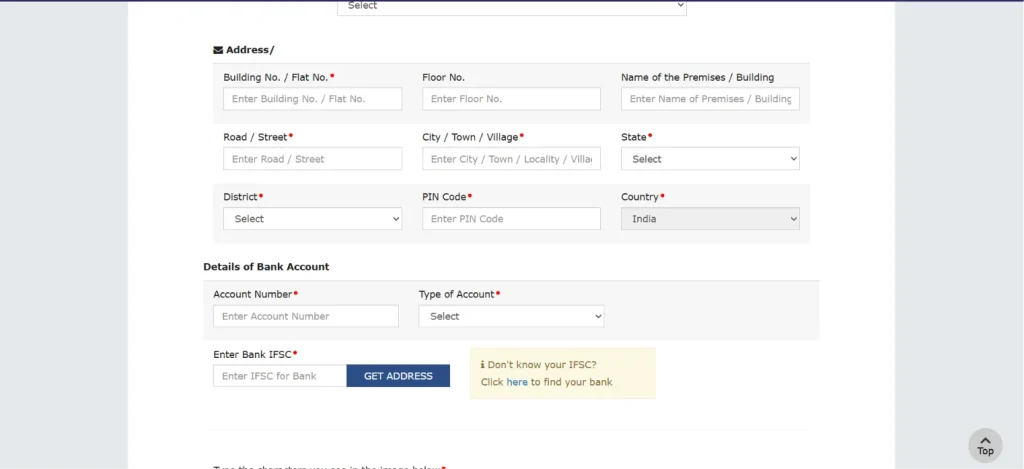
- Provide relevant address and bank details to proceed with verification.
- Complete the OTP verification sent to your mobile and email. Submit the form to receive your temporary user ID.
Is GSTIN and GSTN the same thing?
No, GSTIN and GSTN are not the same thing. Although both terms are related to India’s Goods and Services Tax system, they refer to different concepts. It is the unique identification number assigned to a registered taxpayer, while GSTN refers to the technology infrastructure and the organisation that supports the GST system. Understanding the difference helps taxpayers use the correct term when dealing with GST registration, compliance and verification.
| Basis | GSTIN | GSTN |
| Full Form | Goods and Services Tax Identification Number | Goods and Services Tax Network |
| Meaning | A unique 15-digit identification number assigned to a registered taxpayer | A technology and service infrastructure supporting the GST system |
| Purpose | Identifies a registered taxpayer under GST | Facilitates GST-related technology and services |
| Assigned to | Registered taxpayers | The GST system/network |
| Format | 15-digit alphanumeric number | No taxpayer identification number |
| Used For | Invoices, GST returns, payments and taxpayer verification | Processing and supporting GST registration, returns and related services |
What is the Cost for Obtaining a GSTIN?
Obtaining a goods and service tax identification number through the official GST Portal is free of cost. A taxpayer can apply for GST registration online without paying any fee to the government for submitting the application or receiving the goods and service tax identification number. When submitting the application, the taxpayer should review each detail carefully.
What is the Validity Period for GSTIN?
A GSTIN does not have a fixed validity period. Once issued, it generally remains valid as long as the taxpayer’s GST registration is active. It continues to be associated with the taxpayer until the registration is cancelled or surrendered in accordance with GST provisions. For businesses that continue to meet their GST obligations and maintain an active registration, the GST number remains valid without requiring periodic renewal.
Can your GSTIN Get Cancelled or Suspended?
Yes, a goods and service tax identification number can be suspended, revoked, or cancelled under certain circumstances. GST authorities may suspend a registration during the processing of a cancellation application or where discrepancies, non-compliance, or other grounds under GST law require action.
A GST registration may also be cancelled if the taxpayer does not conduct business from the registered place, fails to comply with applicable GST provisions, or obtains registration through fraud or misrepresentation.
A taxpayer can also voluntarily apply for cancellation when eligible. Once a goods and service tax identification number is cancelled, the taxpayer generally cannot use it for taxable business transactions unless the registration is restored or otherwise validly reactivated.
How Can You Reactivate a Cancelled GSTIN?
A cancelled GST number may be reactivated by applying for revocation of cancellation when the registration was cancelled by the tax officer on their own motion. The taxpayer must meet the applicable conditions and resolve the reason for cancellation before applying. Under Section 30 of the CGST Act, the application is generally made within 30 days of receiving the cancellation order, subject to applicable extensions.
How to Identify a Fake GSTIN?
A GSTIN can be checked for authenticity through the GST Portal. Simply checking whether a number follows the 15-digit goods and service tax identification number format is not sufficient. You should verify the number against the taxpayer details displayed on the GST Portal.
Steps to Check Whether a GSTIN is Genuine
- Visit the GST Portal and open the Search Taxpayer option.
- Select “Search by GSTIN/UIN” and enter the GSTIN provided by the business.
- Enter the CAPTCHA displayed on the screen.
- Click “Search” to retrieve the taxpayer’s details.
- Check the GSTIN status shown on the portal. An active registration should correspond with the business claiming to be registered.
- Compare the Legal Name and Trade Name displayed on the portal with the details provided by the business.
- Verify the Principal Place of Business and other available registration details.
- Check the registration date and cancellation details, if applicable.
If the goods and service tax identification number does not exist on the GST Portal or the displayed details do not match, do not rely on the goods and service tax identification number without further verification. The GST Portal specifically provides this facility to help verify FST number authenticity and avoid fraudulent GSTINs.
How to File a Complaint Against a forged or fake GST Number?
If you find that a business is using a forged, fake or fraudulently obtained goods and service tax identification number, you can report it to the GST authorities. The complaint should include accurate details and supporting evidence, such as invoices, GSTIN details, business information and relevant communications.
Steps to File a Complaint
- Verify the goods and service tax identification number using the Search Taxpayer facility on the GST Portal and note the taxpayer details displayed.
- Collect supporting evidence, such as the invoice containing the suspected fake goods and service tax identification number, business name, address, payment details, screenshots and other relevant documents.
- Report the suspected fraud to GST authorities. The Directorate General of GST Intelligence (DGGI) investigates GST evasion, including fake invoicing and fraudulent Input Tax Credit (ITC).
- Use the GST grievance mechanism for GST-related complaints or issues. The GST system provides an online grievance facility where users can submit complaints and track their status.
- If your PAN has been misused, you can use the GST Portal’s facility to report GST registrations obtained using your PAN without your knowledge or consent. Such complaints are forwarded to the relevant jurisdictional officer for further action.
- Keep the acknowledgement or complaint reference number after submission so that you can track the complaint and respond to any further requirements.
What are the Penalties for Operating Without a GSTIN?
A person who is liable to obtain GST registration but carries on taxable business without registering may face penalties under the GST law. The consequences can include payment of the applicable tax, interest and penalty. Under Section 122(1) of the CGST Act, failure to obtain registration when legally required can attract a penalty of ₹10,000 or an amount equivalent to the tax evaded, whichever is higher.
| Penalty | Rs. 10,000 or the tax evaded, whichever is higher, may apply for failure to obtain required registration. |
| Tax Liability | Authorities can assess the GST payable for the period during which the person remained unregistered despite being liable to register |
| Interest | Unpaid taxes accrue interest at 18% per annum under Section 50 of the CGST Act. |
| Confiscation | In certain circumstances, taxable goods supplied without applying for registration may be subject to confiscation and penalty under Section 130 of the CGST Act. |
What are the Common Mistakes you should Avoid while Applying for a GSTIN?

Applying for a goods and service tax identification number requires accurate business, PAN, address and supporting information. Errors or incomplete details can cause delays, clarification requests or rejection of the application. The common mistakes a taxpayer makes include:
- Entering Incorrect PAN Details: Always enter the correct PAN of the business or applicant. Any mismatch between PAN details and the GST application can delay registration or lead to rejection.
- Providing Wrong Business Details: Ensure the legal name, trade name, business constitution and nature of business are entered accurately and match the supporting documents submitted with the application.
- Using Incorrect Address: Enter the complete principal place of business address correctly. Make sure the address matches the submitted ownership, rent agreement, electricity bill or other supporting documents.
- Uploading Incorrect Documents: Upload clear, valid and relevant documents in the prescribed format. Check every document carefully to ensure it belongs to the applicant and contains consistent information.
- Providing Incorrect Contact Details: Enter an active mobile number and email address belonging to the applicant or authorised person, as these details may be required for OTP verification and GST communications.
- Ignoring Application Verification: Carefully review all information before submitting the application and complete the required verification process. Incorrect or incomplete information can result in clarification requests or processing delays.
- Failing to Update Required Information: Provide accurate details about additional business locations, authorised signatories, bank accounts and business activities wherever applicable to ensure the GST registration remains complete and accurate.
Frequently Asked Questions
1. Is GST and GSTIN the same thing?
No. GST is the indirect tax system, while GSTIN is the unique 15-digit identification number assigned to registered taxpayers.
2. Does every business require a GSTIN?
No. A goods and services tax identification number is required only when a business becomes liable for GST registration or voluntarily chooses to register.
3. What Happen If a Registered Business dosen’t Apply for a GSTIN?
A business liable for GST registration but operating without it may face tax liability, interest and penalties under applicable GST provisions.
4. How long does it take to get a goods and services tax identification number?
After successful verification and approval of the GST registration application, the goods and services tax identification number is issued electronically through the GST Portal.
5. Can a GSTIN be transferred from one business to another?
No. A goods and services tax identification number is linked to a specific PAN and state, so it cannot normally be transferred between different businesses.
6. What is the effect of a change in address or business constitution on GSTIN?
Changes in address or business constitution may require amendment of registration details or, in certain cases, obtaining a new goods and services tax identification number.
7. Is goods and services tax identification number mandatory for e-commerce sellers?
Goods and services tax identification number requirements for e-commerce sellers depend on applicable GST registration provisions, turnover, supply type, platform and relevant exemptions.
8. Which information can be amended in goods and services tax identification number after registration?
Registered taxpayers can amend eligible details such as business address, contact information, bank details, business activities and authorised signatory information.
9. How does GSTIN Help Claim Input Tax Credit?
GSTIN identifies the registered taxpayer and helps link eligible purchase invoices with GST records for claiming Input Tax Credit.
10. How does GSTIN work in e-Invoicing?
GSTIN identifies the supplier and recipient in an e-invoice, helping the GST system validate and record the transaction details.
You may also like


IP Reimbursement Schemes: Benefits, Eligibility & How to Apply
IP reimbursement schemes in India pay back part of the cost of filing a patent,


