
PWD registration allows a contractor to become enlisted with a State Public Works Department for specified categories, classes and jurisdictions. However, it is not a single licence valid throughout India. Each state sets its own eligibility rules, financial thresholds, work-experience requirements, fees and tendering limits.
CPWD enlistment is separate and applies to works governed by the Central Public Works Department. Registration on an e-procurement portal is also different because it only enables online bid submission. This guide explains these distinctions, shows how contractor classes are assessed, lists the documents and application steps, and explains what authorities check before accepting bids.
What is PWD Registration?
Public works department contractor registration records an individual or business in an approved contractor list. For construction firms, it is a form of government contractor registration or civil contractor registration. The enlistment order normally identifies the issuing authority, work category, contractor class, tendering limit or competence level, validity and important conditions.
The difference between PWD registration and tender eligibility is simple: the certificate is evidence of enlistment, not an award of work. The procurement authority may still examine similar-work experience, bid capacity, turnover, technical personnel, equipment, litigation, performance and debarment status for an individual tender.
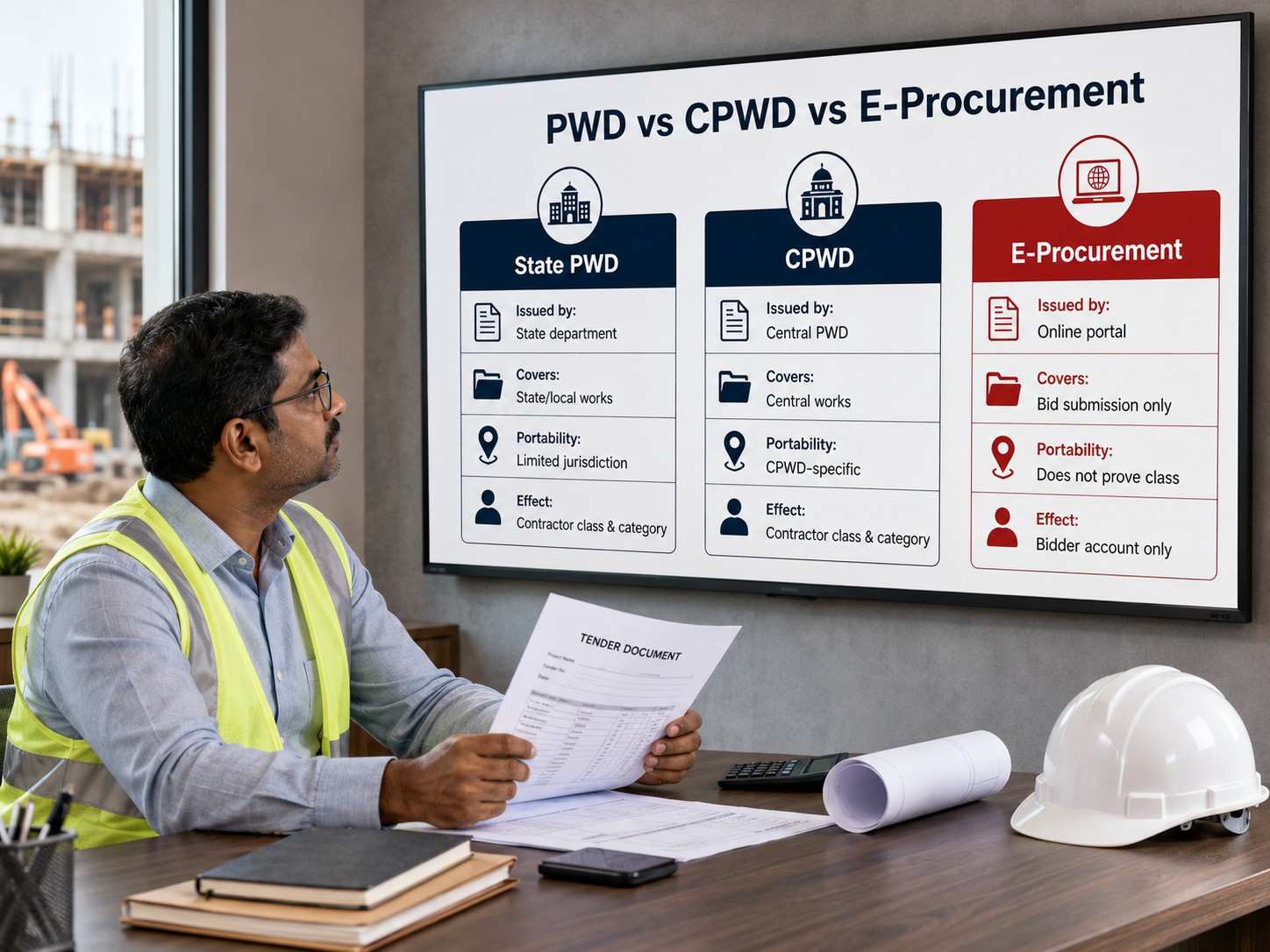
PWD vs CPWD Registration: What Is the Difference?
PWD and CPWD registrations are separate contractor-enlistment systems. A State PWD certificate does not automatically qualify a contractor for CPWD works, and CPWD enlistment does not override the conditions of a state tender.
|
Point |
State PWD Registration |
CPWD Enlistment |
E-Procurement Registration |
|
Issuing authority |
Public Works Department of the relevant state |
Central Public Works Department under the Ministry of Housing and Urban Affairs |
The government portal used for electronic bidding |
|
Primary use |
State government roads, buildings and other public works |
Works governed or executed through CPWD |
Creating a bidder account and submitting online bids |
|
Contractor classes |
Determined separately by each state |
Defined under the current CPWD enlistment rules |
No contractor class is granted |
|
Work categories |
May include civil, roads, buildings, electrical or specialised works |
Buildings & Roads and Horticulture |
Covers only the portal submission process |
|
Geographic effect |
Normally limited to the issuing department or jurisdiction |
Applicable to CPWD enlistment across India |
Limited to tenders published on that portal |
|
Tender eligibility |
Depends on the class, category, limit and individual NIT |
Depends on the CPWD class and individual NIT |
Registration alone does not establish technical eligibility |
|
Portability |
Another state or department may not accept it |
A State PWD tender may not automatically accept it |
It cannot replace PWD or CPWD enlistment |
CPWD Contractor Classes and Tendering Limits
The Rules for Enlistment of Contractors in CPWD, 2026 came into effect on 1 January 2026. CPWD uses nine classes for the Buildings & Roads category and five classes for Horticulture.
|
CPWD Class |
Buildings & Roads Tendering Limit |
Horticulture Tendering Limit |
|
Class I (Super) |
₹650 crore |
Not applicable |
|
Class I (AAA) |
₹260 crore |
Not applicable |
|
Class I (AA) |
₹130 crore |
Not applicable |
|
Class I (A) |
₹75 crore |
₹3 crore |
|
Class I |
₹50 crore |
₹2.30 crore |
|
Class II |
₹15 crore |
₹80 lakh |
|
Class III |
₹4 crore |
₹40 lakh |
|
Class IV |
₹1.30 crore |
₹20 lakh |
|
Class V |
₹40 lakh |
Not applicable |
These limits indicate the estimated cost up to which an enlisted contractor may bid in the relevant category. They do not create an automatic right to participate or receive a contract. The contractor must still satisfy the bidding-capacity formula, similar-work experience and every other condition stated in the NIT.
Tendering limits and enlistment conditions may be amended. Contractors should therefore check the latest official CPWD contractor-enlistment circulars before applying or bidding.
PWD Contractor Classes
Unlike CPWD, State PWDs do not follow one nationwide class structure. A state may use Roman numerals, letters, special classes or category-specific grades. The permitted tender value, required experience, financial capacity and registering authority can therefore differ even when two states use the same class name.
For example, “Class I” in one state should not be treated as equivalent to “Class I” in another. The contractor must read the current rules of the PWD that will issue the registration.
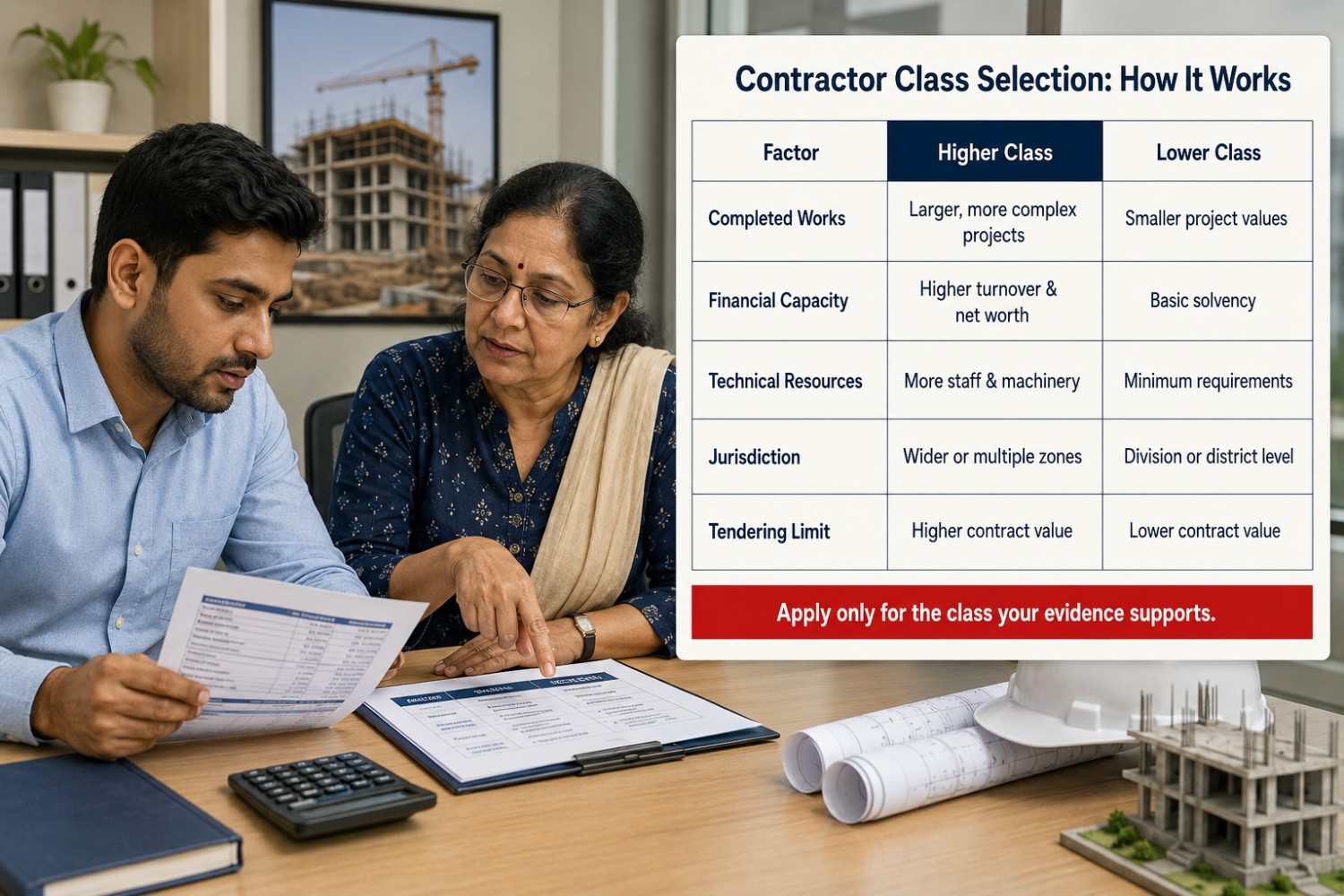
How to Select the Correct PWD Contractor Class
|
Requirement |
What the Contractor Must Verify |
|
Work category |
Whether registration is required for buildings, roads, bridges, electrical works or another specialised category |
|
Tendering limit |
The maximum estimated value of work permitted under the class |
|
Completed-work experience |
Required number, type and value of completed works and the applicable look-back period |
|
Financial capacity |
Minimum turnover, net worth, working capital or bank-solvency requirement |
|
Technical personnel |
Required engineers, supervisors and other qualified staff |
|
Plant and machinery |
Whether equipment must be owned, leased or supported by availability documents |
|
Registering authority |
Whether the application is handled by a division, circle, zone, Chief Engineer or state-level committee |
|
Territorial validity |
Whether the certificate applies to a division, region or the entire state |
|
Registration validity |
Certificate duration, renewal period and conditions for class upgradation |
A contractor should not select a class based only on annual turnover. The department may also require completed works of a particular value, owner-certified performance reports, prescribed technical staff and minimum machinery.
Suppose a contractor has sufficient turnover for a higher class but does not possess the required completed-work certificates. The application may still fail because financial capacity cannot replace technical experience. Contractors should apply for the highest class for which every prescribed condition can be supported with valid evidence.
Eligibility and Documents
Who can apply?
Depending on the state rules, an applicant may be an individual contractor, proprietorship, partnership, limited liability partnership or company. Before filing, ensure the applicant’s name and constitution match its PAN, bank records, tax registrations, work certificates and portal profile. If the entity is not yet formalised, review the requirements for a private limited company, limited liability partnership, sole proprietorship or registered partnership firm before choosing the applicant.
The eligibility criteria for PWD contractor registration commonly include:
-
legal capacity and an eligible constitution;
-
experience in completed works of the prescribed nature and value;
-
satisfactory performance and completion evidence;
-
required financial standing, turnover, net worth or solvency;
-
prescribed engineers, supervisors, licences, tools and machinery;
-
current tax and labour records where the rule or NIT requires them; and
-
no disqualifying debarment, conflict, false statement or adverse action.
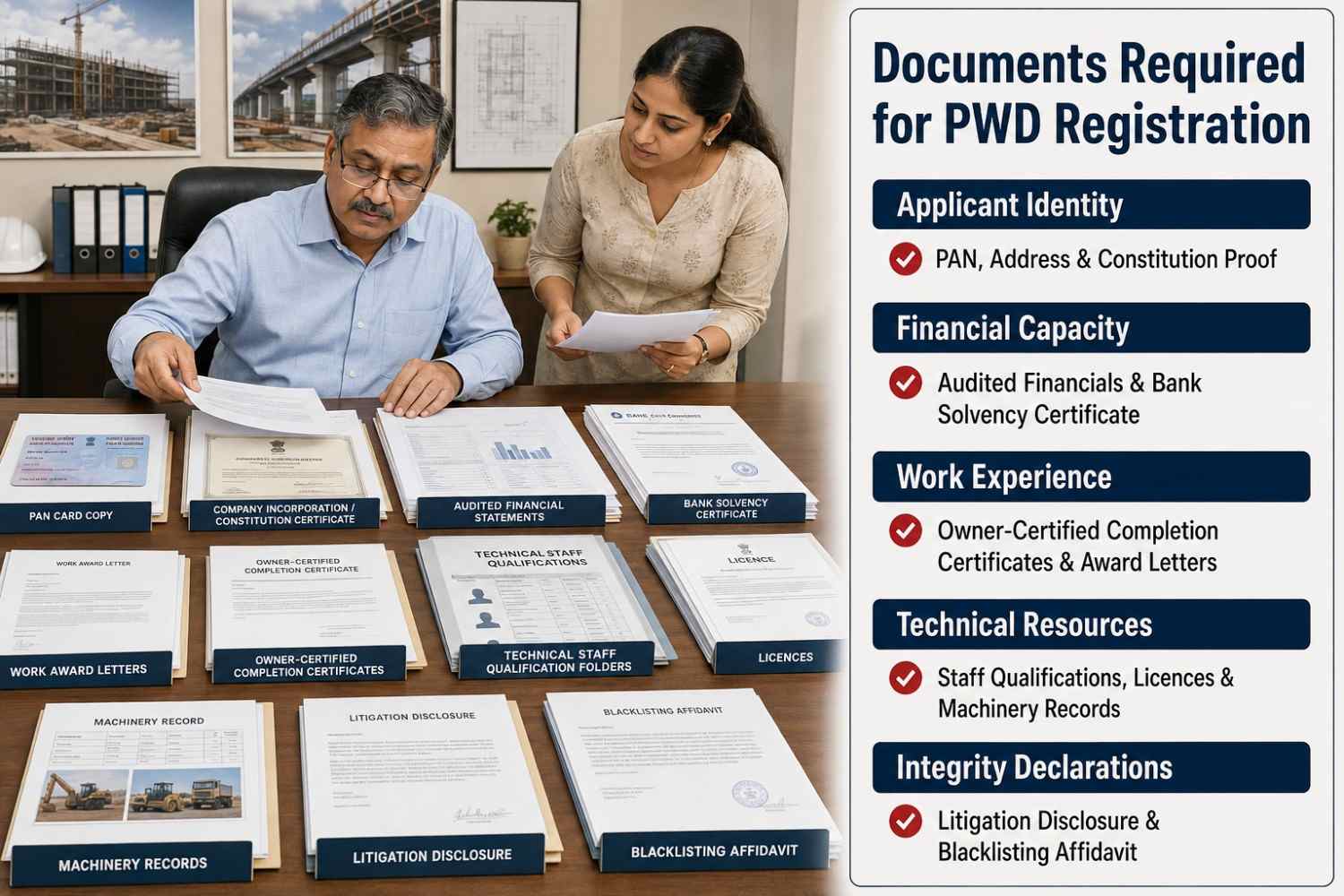
Documents Required for PWD Registration
|
Document group |
Records commonly requested |
Important check |
|
Applicant identity |
PAN, photograph, signature, address and authorised-signatory proof |
Names and addresses must match across records |
|
Business constitution |
Incorporation certificate, constitutional documents, partnership deed or proprietorship proof |
Include authorisation, board resolution or power of attorney when applicable |
|
Tax and MSME |
GST certificate, returns, ITRs and Udyam certificate where relevant |
GST registration details must match the applicant; Udyam Registration is not a substitute for enlistment |
|
Financial capacity |
Audited financial statements, CA certificates, net-worth statement or bank solvency certificate |
Use the period, format and issuing professional prescribed by the rule |
|
Work experience |
Award letters, agreements, final bills, work completion certificate and performance report |
The owner authority may need to certify value, dates, scope and performance |
|
Technical resources |
Staff qualifications, employment proof, licences, tools, plant and machinery details |
Ownership, lease or availability proof must follow the applicable rule |
|
Integrity declarations |
Litigation, relatives in the department, blacklisting declaration and affidavit |
Disclose accurately; silence can be treated as misrepresentation |
|
Filing records |
Application form, fee receipt, annexures and self-attested uploads |
Follow file format, size, signature and certification instructions |
Keep filed returns consistent because business income-tax filing records may support turnover and continuity checks. A structured project report preparation process can also help organise capability, resources and funding where a tender requires a detailed execution plan, although it cannot replace prescribed certificates.
PWD Registration Process
Before starting the application, prepare a one-page requirement sheet from the latest departmental rules. Record the issuing authority, work category, class, tendering limit, required completed works, financial thresholds, technical personnel, machinery, fees, security deposit and certificate validity.
This prevents the contractor from applying through the wrong portal or selecting a class that its documents cannot support. Once these details have been verified, follow the steps below.
Step 1: Identify the correct authority
Select the state, department, work wing and territorial office that issues the required enlistment. Do not assume that a municipal, irrigation, CPWD, MES or another department’s certificate is interchangeable.
Step 2: Download the current rules
Read the latest base rules with every amendment, circular and portal notice. Record the cut-off date for experience and financial documents.
Step 3: Choose the category and class
Map completed work, financial capacity, technical staff and machinery against the prescribed criteria. Confirm the class’s jurisdiction and tendering limit before paying a non-refundable fee.
Step 4: Reconcile the applicant’s records
Match the legal name, constitution, PAN, GSTIN, address, partners or directors and bank details. Correct material differences before submission.
Step 5: Build an indexed document file
Obtain owner-certified work records, CA certificates, bank documents, affidavits and technical evidence in the exact format required. A supplier and vendor assessment can help identify compliance gaps before a contractor presents its credentials to a department.
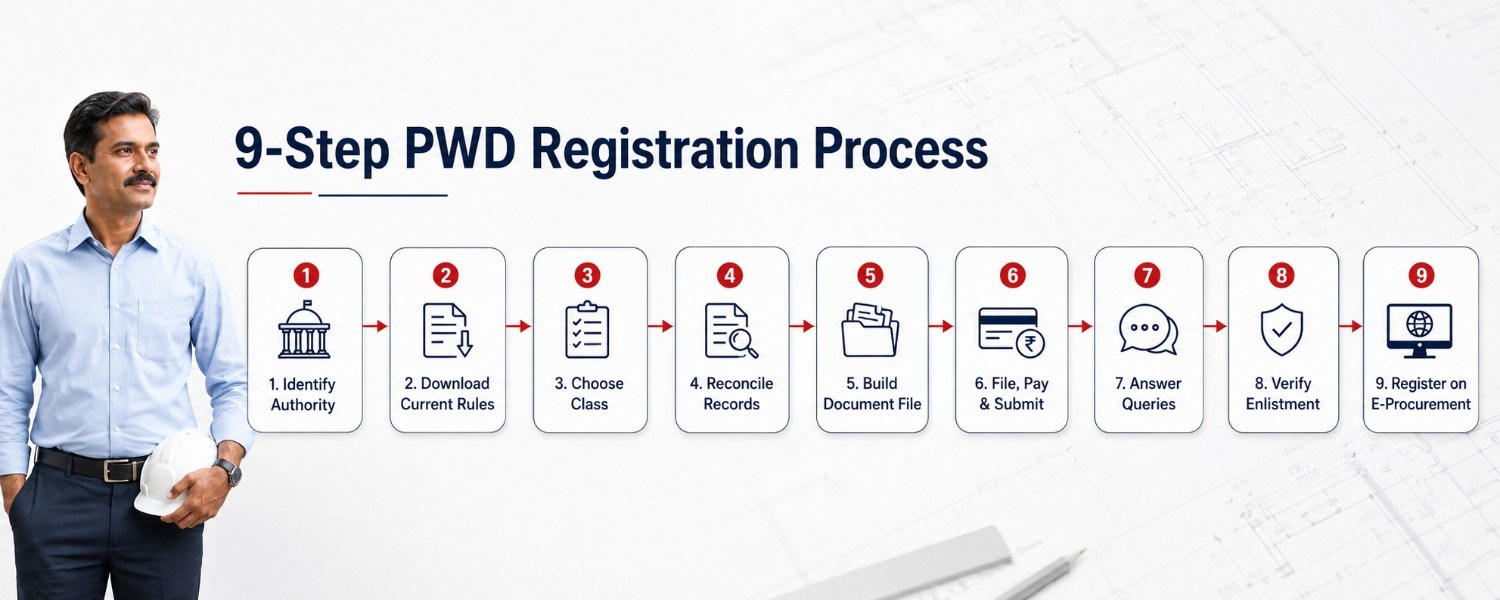
Step 6: File and pay through the stated channel
Create the portal profile, complete all fields, upload readable documents and pay only the current official amount through the specified method. Save the application number, receipt and final submitted copy.
Step 7: Answer scrutiny queries
Track the portal and registered email. Reply within the allowed period using documents that clarify the original application; do not alter experience, figures or declarations without a lawful basis.
Step 8: Verify the enlistment order
Check the name, class, category, jurisdiction, validity and conditions immediately. Report a clerical error through the prescribed correction route and preserve the digitally issued certificate.
Step 9: Prepare separately for bidding
After receiving the enlistment order, create or update the bidder account on the e-procurement portal specified in the tender. Map the authorised signatory’s DSC, verify the bidder profile and check the permitted file formats before uploading the technical bid, financial bid, BOQ and bid-security documents. Enlistment and portal registration are separate processes, and both must remain valid on the relevant tender dates.
PWD Registration Fees, Costs and Processing Time
There is no standard PWD registration fee applicable throughout India. The payable amount depends on the state, contractor class, work category, application type and registering authority.
|
Cost Component |
When It May Apply |
|
Application or enlistment fee |
At the time of fresh registration, renewal or class upgradation |
|
Security deposit |
When the departmental rules require an FDR, deposit or another prescribed security |
|
Bank-solvency certificate |
When financial capacity must be certified by a bank |
|
CA-certified records |
For turnover, net worth or other financial statements |
|
Affidavit and notarisation |
For declarations relating to blacklisting, litigation, constitution or technical staff |
|
Digital Signature Certificate |
For online filing or subsequent e-tender participation |
|
Tender fee and EMD |
At the bidding stage, not as part of basic contractor enlistment |
|
Performance security |
Normally after successful bidding and before or during contract execution |
Check whether the official fee is refundable before making payment. Application fees are often treated separately from security deposits, tender fees and EMD, so these amounts should not be combined as one “PWD registration cost.”
Processing time should be counted from the submission of a complete application, not from the creation of a portal account. Scrutiny may involve document verification, confirmation of completed works, performance reports from previous government clients, inspection of works or machinery, correction notices and approval by the competent authority. The registration becomes effective only when the final enlistment order is issued.
PWD Tender Eligibility
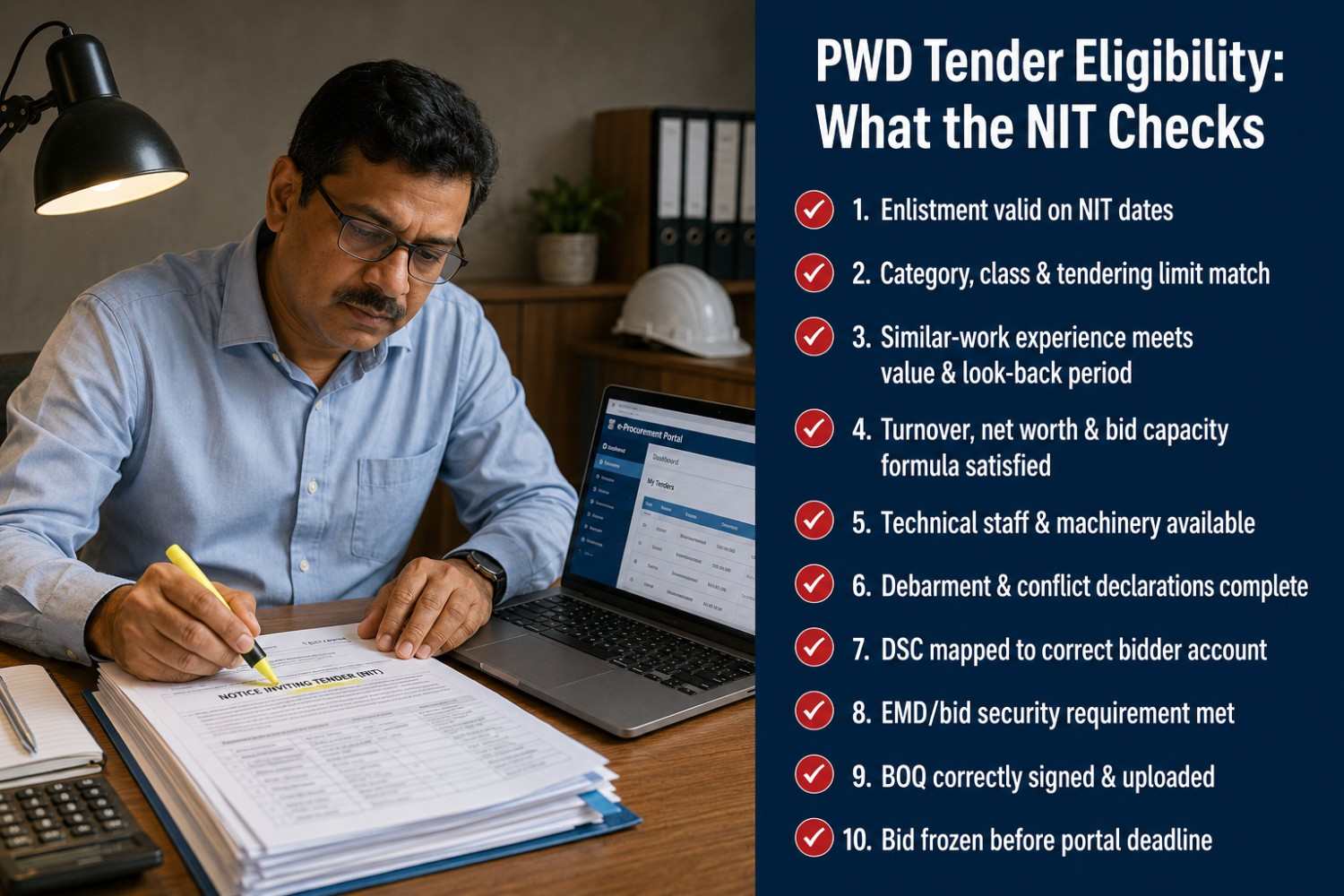
PWD tender eligibility is determined by the live NIT and its corrigenda. The Government of India’s Manual for Procurement of Works provides the broader central procurement framework, but the procuring entity must state and apply the conditions relevant to its work.
Before bidding, check:
-
The enlistment is valid on every date specified in the NIT;
-
The category, class, tendering limit and jurisdiction cover the work;
-
Similar-work experience satisfies the definition, value and look-back period;
-
Turnover, net worth, bid capacity and ongoing commitments meet the formula used;
-
Technical staff, machinery, licences and site requirements are available;
-
Declarations on debarment, litigation, relatives and conflicts are complete;
-
The digital signature certificate is mapped to the correct bidder account;
-
Tender fee, bid security or earnest money deposit requirements are met, or a valid exemption is documented;
-
Every form, annexure and unchanged BOQ is signed and uploaded correctly; and
-
The bid is frozen or finally submitted before the portal deadline and the acknowledgement is saved.
Udyam or NSIC contractor registration support does not create an automatic EMD exemption for every works tender. Claim only the benefit expressly permitted by the NIT and attach the exact current certificate it requests.
Renewal, Class Upgrade and Profile Changes
Check the official instruction on how to renew PWD contractor registration and track expiry well in advance. An enlistment renewal application may require recent works, performance, financial records, tax compliance, staff and fee evidence; it is not always automatic.
For a contractor class upgrade, demonstrate that the applicant now meets the higher thresholds. A change in name, partners, directors, constitution, address or category may require prior approval or a fresh application. Do not bid with an order that no longer matches the legal entity.
Common Reasons for Rejection or Delay
-
applying to the wrong authority, class or category;
-
using an expired rule, fee or form;
-
mismatch in the applicant’s name, PAN, GSTIN or constitution;
-
incomplete or uncertified work records;
-
financial certificates in the wrong format or period;
-
missing technical staff or machinery evidence;
-
undisclosed debarment, litigation or departmental relationship;
-
unreadable, unsigned or incorrectly attested uploads; and
-
late or incomplete response to a scrutiny notice.
Conclusion
PWD registration is not a common licence that can be used for every government construction tender in India. The issuing state department determines the contractor’s class, work category, tendering limit, jurisdiction and certificate validity. CPWD follows a separate central enlistment system with its own categories and classes.
Before applying, contractors should match their completed works, financial records, technical personnel and machinery with the current departmental rules. After registration, every tender must still be checked independently for similar-work experience, bid capacity, EMD, DSC, technical requirements and submission deadlines. Correct class selection and consistent supporting documents are therefore more important than simply obtaining a registration certificate.
FAQS
FAQs About PWD registration
-
Is PWD registration valid throughout India?
No general rule makes a state PWD certificate valid throughout India. Its reach depends on the issuing authority, class, category, jurisdiction and the tender’s recognition clause. Another state or department may demand its own enlistment or expressly accept an equivalent certificate.
- What is the difference between PWD and CPWD registration?
- Which PWD contractor class should I apply for?
- Can a new contractor apply for PWD registration?
- What documents are required for PWD registration?
- How much does PWD contractor registration cost?
- How long does contractor enlistment take?
- Is a registration certificate enough to win a PWD tender?
- Can an out-of-state contractor bid for a PWD tender?
- How do I renew or upgrade my PWD contractor licence?


